
在build.gradle文件android中指定build.gradle文件
在build.gradle文件android中指定build.gradle文件
提问于 2017-07-05 14:47:50
这是我的目录结构
src -main

    -java

    -jniLibs

            -armeabi

                     -lib1.so
-lib2.so需要了解在build文件中应该编写哪些代码,以便将这些文件包含在构建中。现在,我收到的错误是找不到.so文件.。
java.lang.UnsatisfiedLinkError: nativeLibraryDirectories=[/vendor/lib, /system/lib]]] couldn't find "libFPEComponent.so"我得在这里加上
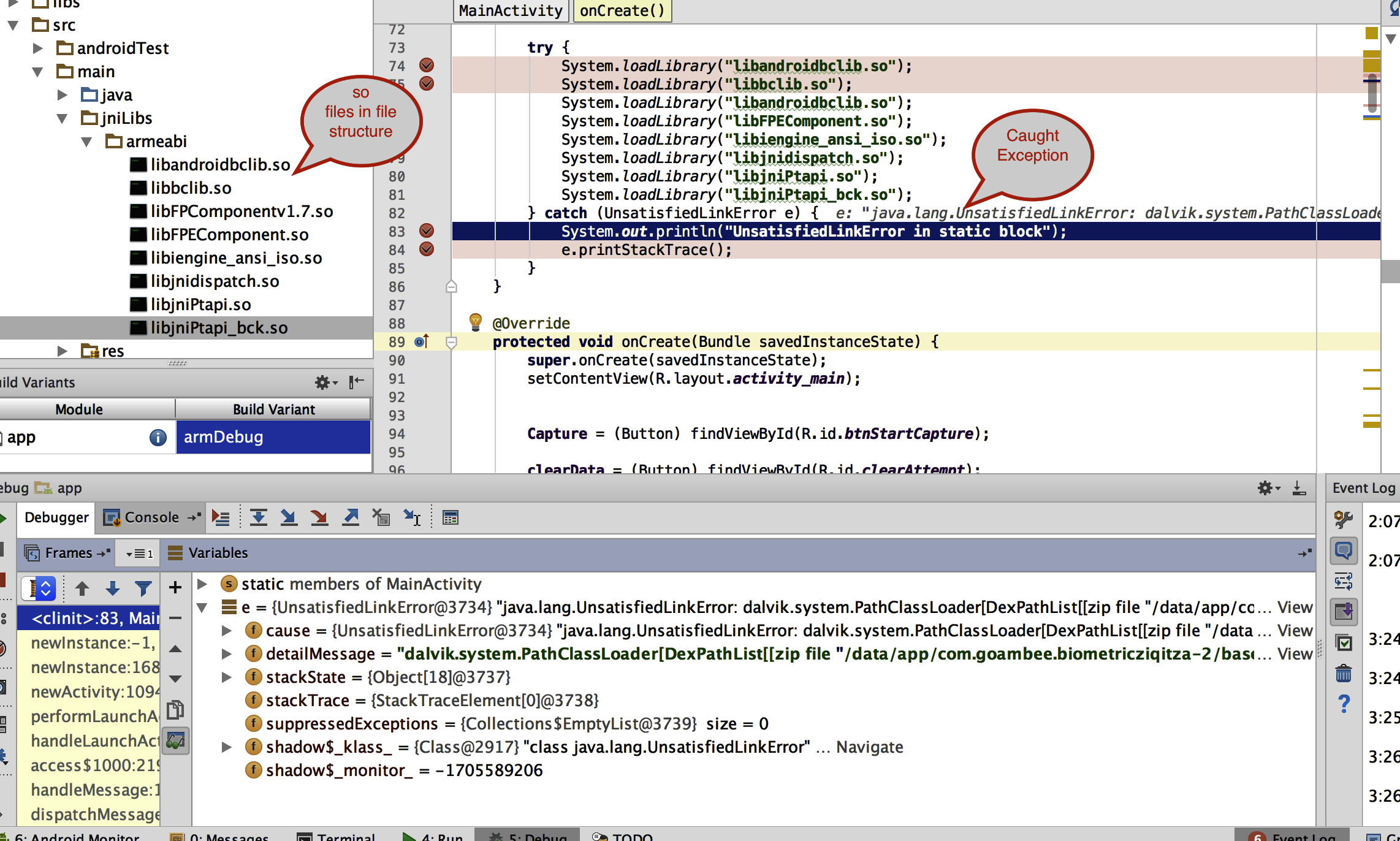
我的bUild.gradle文件
 apply plugin: 'com.android.application'

android {
    productFlavors {
        arm {
            ndk {
                abiFilters "armeabi-v7a", "armeabi"
            }
        }

    }

    sourceSets
            {
                main
                        {

                            jniLibs.srcDirs = ['src/main/jnilibs']

                        }

//Another code

            }

    compileSdkVersion 26
    buildToolsVersion '26.0.0'
    defaultConfig {
        applicationId "com.goambee.biometricziqitza"
        minSdkVersion 15
        targetSdkVersion 26
        versionCode 1
        versionName "1.0"
        testInstrumentationRunner "android.support.test.runner.AndroidJUnitRunner"
    }
    buildTypes {
        release {
            minifyEnabled false
            proguardFiles getDefaultProguardFile('proguard-android.txt'), 'proguard-rules.pro'
        }

    }
    splits {

        // Configures multiple APKs based on ABI.
        abi {

            // Enables building multiple APKs per ABI.
            enable true

            // By default all ABIs are included, so use reset() and include to specify that we only
            // want APKs for x86, armeabi-v7a, and mips.

            // Resets the list of ABIs that Gradle should create APKs for to none.
            reset()

            // Specifies a list of ABIs that Gradle should create APKs for.
            include "armeabi-v7a"

            // Specifies that we do not want to also generate a universal APK that includes all ABIs.
            universalApk false
        }
    }
}

dependencies {

    compile fileTree(include: ['*.jar'], dir: 'libs')
//    compile fileTree(dir: "$buildDir/native-libs", include: 'native-libs.jar')


    androidTestCompile('com.android.support.test.espresso:espresso-core:2.2.2', {
        exclude group: 'com.android.support', module: 'support-annotations'
    })
    compile 'com.android.support.constraint:constraint-layout:1.0.2'
    testCompile 'junit:junit:4.12'
    compile 'com.android.support:appcompat-v7:26.0.0-alpha1'
}

//task native-libstiveLibsToJar(type: Jar, description: 'create a jar archive of the native libs') {
//    destinationDir file("$buildDir/native-libs")
//    baseName 'native-libs'
//    from fileTree(dir: 'src/main/jnilibs', include: '**/*.so')
//    into 'lib/'
//}
//
//tasks.withType(JavaCompile)
//        {
//            compileTask -> compileTask.dependsOn(nativeLibsToJar)
//        }
这里包括了源代码集块,我也在没有这个块的情况下进行了测试。因此,仍然无法访问.so文件.
回答 1
Stack Overflow用户
发布于 2017-07-05 17:02:33
如果您想使用它,可以在您的类中这样调用它:
static {
    System.loadLibrary("libSONAME");
}在gradle中添加以下内容
jniLibs.srcDirs = ['libs']编辑:
在Android中添加.so库
- 在"src/main/“中创建文件夹"jniLibs”
- 将所有.so库放在"src/main/jniLibs“文件夹中
- 文件夹结构看起来, --app: -src:
- 不需要额外的代码,只需要同步项目并运行应用程序。
参考
https://github.com/commonsguy/sqlcipher-gradle/tree/master/src/main
不知道你到底有哪些文件,如果你只有.so的话?
查看下面的图像:
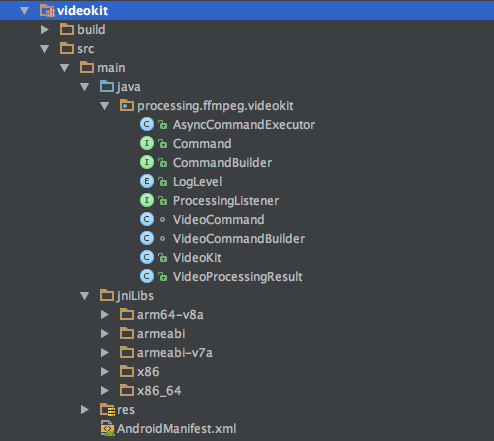
--这是我的项目中的一个‘项目/库’,这就是加载/添加.so文件的方式:
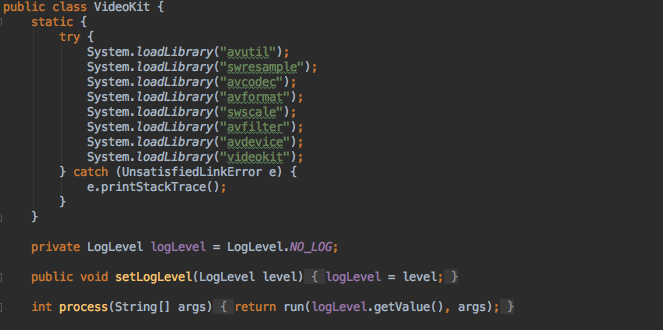
我编写这个项目的方式如下:
compile project(':videokit')页面原文内容由Stack Overflow提供。腾讯云小微IT领域专用引擎提供翻译支持
原文链接:
https://stackoverflow.com/questions/44929511
复制相关文章
相似问题
腾讯云开发者

Copyright © 2013 - 2026 Tencent Cloud. All Rights Reserved. 腾讯云 版权所有
深圳市腾讯计算机系统有限公司 ICP备案/许可证号:粤B2-20090059  粤公网安备44030502008569号
腾讯云计算(北京)有限责任公司 京ICP证150476号 | 京ICP备11018762号