
UILabel在嵌套UIStackViews中,有时在UITableViewCell中截断
我在一个表中设置了一个tableview单元格,该单元格包含以下视图层次结构
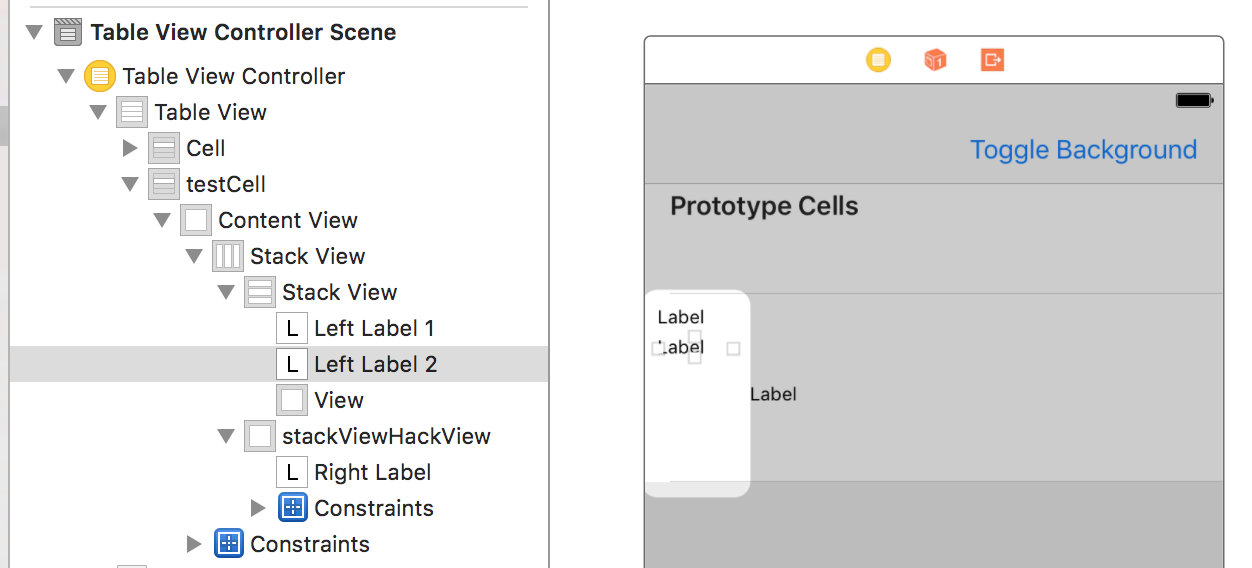
外部水平堆栈视图被固定在单元格的内容视图上,位于尾部、前导、底部和顶部边缘。
右标签被固定在其父stackViewHackView的尾随、前导、底部和顶部边缘上。
在我的控制器代码中,我将单元格设置为动态高度,以适应单元格的内容,这样它们就可以根据内容大小生长或缩小。
tableView.rowHeight = UITableViewAutomaticDimension
tableView.estimatedRowHeight = 30.0 关于自动布局设置。(粗体中的相关优先级)
- 外部水平堆栈视图
- 内容拥抱优先级== 250
- 内容抗压缩优先级== 750
- 内部垂直堆栈视图
- 内容拥抱优先级== 750
- 内容抗压缩优先级== 750
- 左标号1
- 内容拥抱优先级== 750
- 内容抗压缩优先级== 750
    - Left Label 2
        - Content Hugging Priority == 750
        - Content Compression Resistance Priority == **750**
    - View (Just to pad out the two left labels to the top of the stack view)
        - Content Hugging Priority == 250
        - Content Compression Resistance Priority == **h:750;** v:250
- stackViewHackView (hack to make multiline labels grow properly inside a stack view and cell)
    - Content Hugging Priority == 250
    - Content Compression Resistance Priority == **h:250;** v:750
        - lower horizontal resistance to allow this view to compress for the left stack view to fit
- Right Label
    - Content Hugging Priority == 250
    - Content Compression Resistance Priority == **h:250;** v:750
        - lower horizontal resistance to allow this view to compress for the left stack view to fit
我在一个简单的测试应用程序中用下面的代码填充这个单元格中的测试数据
override func tableView(_ tableView: UITableView, cellForRowAt indexPath: IndexPath) -> UITableViewCell
{
  let cell = tableView.dequeueReusableCell(withIdentifier: "testCell", for: indexPath) as! TestTableViewCell


  // Configure the cell...

  if indexPath.section == 0
  {
    cell.leftLabel1?.text = "Label1 aabbccdd"
    cell.leftLabel2?.text = "Label2 aabbccdd"
    cell.rightLabel?.text = "Cell \(indexPath.row) with a 'really really' long string that needs displaying clearly and causing the table cell to resize to fit the content. We're looking for about 3 or 4 lines of text to be displayed"
  }
  else if indexPath.section == 1
  {
    cell.leftLabel1?.text = "Label1 aabbccdd"
    cell.leftLabel2?.text = "Label2 aabbccdd"
    cell.rightLabel?.text = "Cell \(indexPath.row) with a 'really really really' long string that needs displaying clearly and causing the table cell to resize to fit the content. We're looking for about 3 or 4 lines of text to be displayed"
  }
  else
  {
    cell.leftLabel1?.text = "Label1 aabbccdd"
    cell.leftLabel2?.text = "Label2 aabbccdd"
    cell.rightLabel?.text = "Cell \(indexPath.row) with a 'really really really really really really really really' long string that needs displaying clearly and causing the table cell to resize to fit the content. We're looking for about 3 or 4 lines of text to be displayed"
  }

  return cell
}
这将导致在iPhone 7目标上的模拟器中进行以下呈现
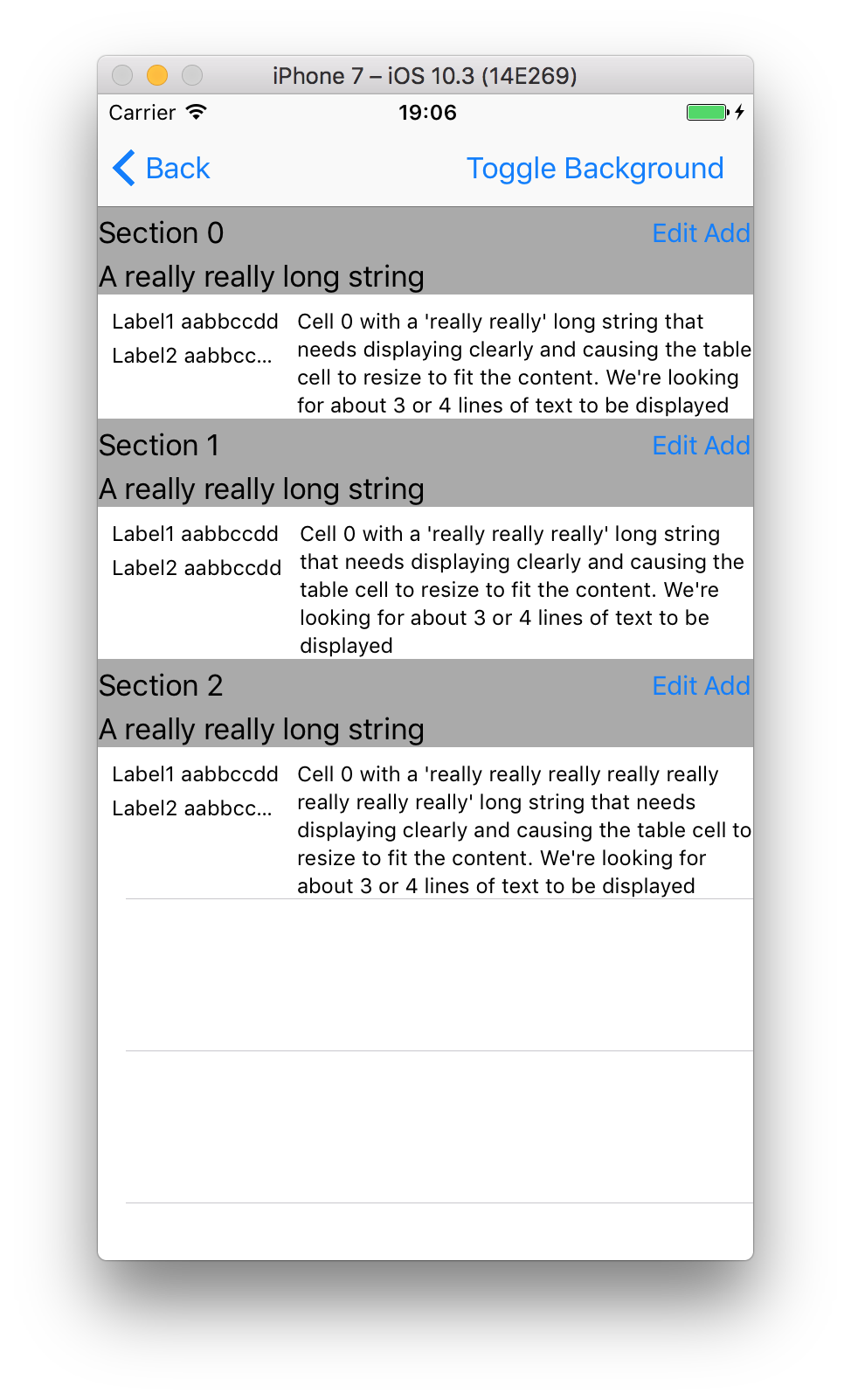
中间的表视图单元格是我一直想得到的那种输出。我不想左标签永远截断,他们的内容将永远是小到适合与右手边。然而,在右手边给定某些内容时,较长的标签2有时会被截断,就像您在顶部和底部的行中看到的那样。
我已经设置了内容压缩电阻,这样左边的所有元素都具有较高的抗压缩能力,右侧的元素设置为较低的电阻,因此它们应该压缩以为左侧元素腾出空间。
知道为什么会发生这种情况吗?或者我如何阻止它的发生,这样我的标签就能正常显示?
干杯!
回答 1
Stack Overflow用户
发布于 2017-07-09 23:02:27
(增加作为执行部分的答复)
这可能只是“我觉得是什么样子”但是..。我见过许多人使用包装在堆栈视图中的堆栈视图,而带有约束的简单视图可以完成这项工作。
看看我在这个项目中是如何做到的: github.com/DonMag/CellTest2 2
这真的很简单,你可以看看标签,看看我在改变优先级方面所做的事情是多么的少。我使用了您的示例字符串,并添加了更多的案例来测试变体。
https://stackoverflow.com/questions/44912976
复制相似问题
腾讯云开发者

Copyright © 2013 - 2026 Tencent Cloud. All Rights Reserved. 腾讯云 版权所有
深圳市腾讯计算机系统有限公司 ICP备案/许可证号:粤B2-20090059  粤公网安备44030502008569号
腾讯云计算(北京)有限责任公司 京ICP证150476号 | 京ICP备11018762号