
如何拥有动态DataTemplateSelector
我有一个可观察的集合,我显示在一个Xamarin表单ListView中。我已经定义了用于查看每个列表项的详细信息和摘要模板。我希望能够根据每个项中的布尔属性动态地在摘要和细节模板之间进行更改。
这是物品。
public class MyItem : INotifyPropertyChanged
{
    bool _switch = false;
    public bool Switch
    {
        get
        {
            return _switch;
        }
        set
        {
            if (_switch != value)
            {
                _switch = value;
                PropertyChanged?.Invoke(this, new PropertyChangedEventArgs("Switch"));
            }
        }

    }
    public int Addend1 { get; set; }
    public int Addend2 { get; set; }
    public int Result
    {
        get
        {
            return Addend1 + Addend2;
        }
    }
    public string Summary
    {
        get
        {
            return Addend1 + " + " + Addend2 + " = " + Result;
        }
    }
    public event PropertyChangedEventHandler PropertyChanged;
}
这是可观察到的收藏。请注意,每当开关值更改时,我都会删除该项并重新插入。这样做的原因是迫使ListView重新选择DataTemplate。
public class MyItems : ObservableCollection<MyItem>
{
    protected override void InsertItem(int index, MyItem item)
    {
        item.PropertyChanged += MyItems_PropertyChanged;
        base.InsertItem(index, item);
    }
    protected override void RemoveItem(int index)
    {
        this[index].PropertyChanged -= MyItems_PropertyChanged;
        base.RemoveItem(index);
    }
    private void MyItems_PropertyChanged(object sender, System.ComponentModel.PropertyChangedEventArgs e)
    {
        int index = IndexOf(sender as MyItem);
        if(index >= 0)
        {
            RemoveAt(index);
            Insert(index, sender as MyItem);
        }
    }
}
这是我的数据模板选择器。
public class MyItemTemplateSelector : DataTemplateSelector
{
    DataTemplate Detail { get; set; }
    DataTemplate Summary { get; set; }

    protected override DataTemplate OnSelectTemplate(object item, BindableObject container)
    {
        if(item is MyItem)
        {
            return (item as MyItem).Switch ? Detail : Summary;
        }
        return null;
    }
}
这是我的资源定义..。
        <DataTemplate x:Key="MyDetail">
            <ViewCell>
                <StackLayout Orientation="Horizontal">
                    <Switch IsToggled="{Binding Switch}"/>
                    <Entry Text="{Binding Addend1}"/>
                    <Entry Text="{Binding Addend2}"/>
                    <Label Text="{Binding Result}"/>
                </StackLayout>
            </ViewCell>
        </DataTemplate>
        <DataTemplate x:Key="MySummary">
            <ViewCell>
                <StackLayout Orientation="Horizontal">
                    <Switch IsToggled="{Binding Switch}"/>
                    <Label Text="{Binding Summary}" VerticalOptions="Center"/>
                </StackLayout>
            </ViewCell>
        </DataTemplate>
        <local:MyItemTemplateSelector x:Key="MySelector" Detail="{StaticResource MyDetail}" Summary="{StaticResource MySummary}"/>
这是我的集合初始化..。
        MyItems = new MyItems();
        MyItems.Add(new MyItem() { Switch = true, Addend1 = 1, Addend2 = 2 });
        MyItems.Add(new MyItem() { Switch = false, Addend1 = 1, Addend2 = 2 });
        MyItems.Add(new MyItem() { Switch = true, Addend1 = 2, Addend2 = 3 });
        MyItems.Add(new MyItem() { Switch = false, Addend1 = 2, Addend2 = 3 });
看上去就是这样..。
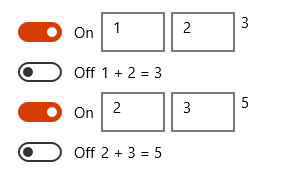
正确的。所以一切正常。如果切换,则项目的视图将从摘要更改为详细信息。问题是这不可能是正确的做法!它是一个完整的kluge删除一个列表项目,并将它放回相同的地方,以便重新选择数据模板。但我想不出另一种方法。在WPF中,我在item容器样式中使用了一个数据触发器来根据开关值设置内容模板,但是似乎没有办法在Xamarin中执行等效的操作。
回答 2
Stack Overflow用户
发布于 2017-07-05 21:00:10
这样做的方法不是通过切换模板,而是将内容视图定义为模板,并更改模板中控件的可见性。显然,除了删除和重新添加项目之外,没有办法让ListView重新评估项目模板。
这是我的内容视图。
<ContentView xmlns="http://xamarin.com/schemas/2014/forms"
         xmlns:x="http://schemas.microsoft.com/winfx/2009/xaml"
         xmlns:local="clr-namespace:XamarinFormsBench"
         x:Class="XamarinFormsBench.SummaryDetailView">
<ContentView.Content>
  <StackLayout x:Name="stackLayout" Orientation="Horizontal">
        <Switch x:Name="toggle" IsToggled="{Binding Switch}"/>
        <Entry x:Name="addend1" Text="{Binding Addend1}"/>
        <Entry x:Name="addend2" Text="{Binding Addend2}"/>
        <Label x:Name="result" Text="{Binding Result}"/>
        <Label x:Name="summary" Text="{Binding Summary}" VerticalOptions="Center"/>
    </StackLayout>
</ContentView.Content>
这是密码..。
namespace XamarinFormsBench
{
[XamlCompilation(XamlCompilationOptions.Compile)]
public partial class SummaryDetailView : ContentView
{
    public SummaryDetailView()
    {
        InitializeComponent();
        toggle.PropertyChanged += Toggle_PropertyChanged;
        UpdateVisibility();
    }

    private void Toggle_PropertyChanged(object sender, System.ComponentModel.PropertyChangedEventArgs e)
    {
        if(e.PropertyName == "IsToggled")
        {
            UpdateVisibility();
        }
    }

    private void UpdateVisibility()
    {
        bool isDetail = toggle.IsToggled;
        addend1.IsVisible = isDetail;
        addend2.IsVisible = isDetail;
        result.IsVisible = isDetail;
        summary.IsVisible = !isDetail;
        InvalidateLayout();  // this is key!
    }
}
}
现在主页包含了..。
    <ListView ItemsSource="{Binding MyItems}">
        <ListView.ItemTemplate>
            <DataTemplate>
                <ViewCell>
                    <local:SummaryDetailView/>
                </ViewCell>
            </DataTemplate>
        </ListView.ItemTemplate>
    </ListView>
使此工作正常的关键是在摘要和细节之间切换时使ContentView的布局失效。这迫使ListView再次布局单元格。否则,使不可见的控件消失,使控件可见的控件永远不会显示。如果ContentView是在ListView之外使用的,则不需要这样做。在我看来,这似乎是ListView中的一个bug。如果可以使ViewCell的布局失效,则可以让项模板切换到工作状态,但没有公共方法(只有受保护的方法)可以这样做。
Stack Overflow用户
发布于 2017-07-04 04:27:55
这在几年前对我来说是个棘手的问题。我来到了MarkupExtensions和转换器(IValueConverter)。在与XAML扩展领域进行了艰苦的斗争之后,我发现了一件显而易见的事情:不应该这样做。
对于组件的(M)任何属性(Ies)的动态更改,您应该使用样式。属性的反应(必须是DependencyProperty来处理组件)更改很容易通过Stryle.Triggers和设置程序来设置。
<Style x:Key="imbXmlTreeView_itemstyle" TargetType="TreeViewItem">
    <Setter Property="Margin" Value="-23,0,0,0" />
    <Setter Property="Padding" Value="1" />
    <Setter Property="Panel.Margin" Value="0"/>
    <Style.Triggers>
        <Trigger Property="IsSelected" Value="True">
            <Setter Property="Background" Value="{DynamicResource fade_lightGray}" />
            <Setter Property="Foreground"  Value="{DynamicResource fade_darkGray}" />
        </Trigger>
        <Trigger Property="IsSelected" Value="False">
            <Setter Property="Background" Value="{DynamicResource fade_lightGray}" />
            <Setter Property="Foreground" Value="{DynamicResource fade_darkGray}" />
        </Trigger>
    </Style.Triggers>
</Style>
考虑上面(刚刚从我的旧项目复制):DynamicResource可以是您的DataTemplate。
下面是您可能使用的更准确的示例:
<Style x:Key="executionFlowBorder" TargetType="ContentControl" >
        <Setter Property="Margin" Value="5" />
        <Setter Property="ContentTemplate" >
            <Setter.Value>
                <DataTemplate>
                    <StackPanel Orientation="Vertical">
                    <Border Style="{DynamicResource executionBorder}" DataContext="{Binding}">
                        <Grid>
                            <Grid.ColumnDefinitions>
                                <ColumnDefinition Width="20" />
                                <ColumnDefinition Width="1*"/>
                                <ColumnDefinition Width="20" />
                            </Grid.ColumnDefinitions>
                            <CheckBox IsChecked="{Binding Path=isExecuting}" Content="" Grid.Column="0" VerticalAlignment="Center"/>
                            <Label Content="{Binding Path=displayName, Mode=OneWay}" FontSize="10" Grid.Column="1" FontStretch="Expanded"  FontWeight="Black"/>
                            <Image Source="{Binding Path=iconSource, Mode=OneWay}" Width="16" Height="16" Grid.Column="2" HorizontalAlignment="Right" Margin="0,0,5,0"/>
                        </Grid>
                    </Border>
                    <Label Content="{Binding Path=displayComment, Mode=OneWay}" FontSize="9" HorizontalAlignment="Left"/>
                    </StackPanel>
                </DataTemplate>
            </Setter.Value>
        </Setter>
    </Style>
在这里,setter的值可以是DynamicResource,也可以是通过您的MarkupExtension传递的--就像我在这里所做的那样:
using System;
    using System.Windows;
    using System.Windows.Markup;

    #endregion

    /// <summary>
    /// Pristup glavnom registru resursa
    /// </summary>
    [MarkupExtensionReturnType(typeof (ResourceDictionary))]
    public class masterResourceExtension : MarkupExtension
    {
        public masterResourceExtension()
        {
        }

        public override object ProvideValue(IServiceProvider serviceProvider)
        {
            try
            {
                return imbXamlResourceManager.current.masterResourceDictionary;
            }
            catch
            {
                return null;
            }
        }
    }
您正在使用的MarkupExtensions示例如下:在XAML代码中:
<Image Grid.Row="1" Name="image_splash" Source="{imb:imbImageSource ImageName=splash}" Stretch="Fill" />后来添加了:只是不要忘记在XAML窗口/控件顶部添加名称空间/程序集引用(指向带有自定义MarkupExtension的代码)(在本例中,是来自同一个解决方案的单独库项目的imbCore.xaml ):
<Window x:Class="imbAPI.imbDialogs.imbSplash"
        xmlns:imb="clr-namespace:imbCore.xaml;assembly=imbCore"
        xmlns="http://schemas.microsoft.com/winfx/2006/xaml/presentation"
        xmlns:x="http://schemas.microsoft.com/winfx/2006/xaml"
        Title="{Binding Path=splashTitle}" Height="666" Width="896" ResizeMode="NoResize" WindowStyle="ToolWindow" Topmost="False" WindowStartupLocation="CenterScreen"
        xmlns:imbControls="clr-namespace:imbAPI.imbControls">
    <Grid>
还要记住,为了使它在XAML设计器中工作,您必须先编译它。
扩展的C#代码使用:
 using System;
    using System.Windows.Markup;
    using System.Windows.Media;
    using imbCore.resources;

    #endregion

    [MarkupExtensionReturnType(typeof (ImageSource))]
    public class imbImageSourceExtension : MarkupExtension
    {
        public imbImageSourceExtension()
        {
        }

        public imbImageSourceExtension(String imageName)
        {
            this.ImageName = imageName;
        }

        [ConstructorArgument("imageName")]
        public String ImageName { get; set; }

        public override object ProvideValue(IServiceProvider serviceProvider)
        {
            try
            {

                if (imbCoreApplicationSettings.doDisableIconWorks) return null;
                return imbIconWorks.getIconSource(ImageName);

            }
            catch
            {
                return null;
            }
        }
    }
希望我一开始就正确地回答了你的问题:)现在,我不得不说:)。祝好运!
后来又补充道:好的,我没注意到你的意思:)对不起。不过,如果你在我贴出的代码中找到有用的东西,我会留下回复。再见!
https://stackoverflow.com/questions/44895023
复制相似问题
腾讯云开发者

Copyright © 2013 - 2026 Tencent Cloud. All Rights Reserved. 腾讯云 版权所有
深圳市腾讯计算机系统有限公司 ICP备案/许可证号:粤B2-20090059  粤公网安备44030502008569号
腾讯云计算(北京)有限责任公司 京ICP证150476号 | 京ICP备11018762号