
无法编译gRPC java
无法编译gRPC java
提问于 2017-07-02 11:50:18
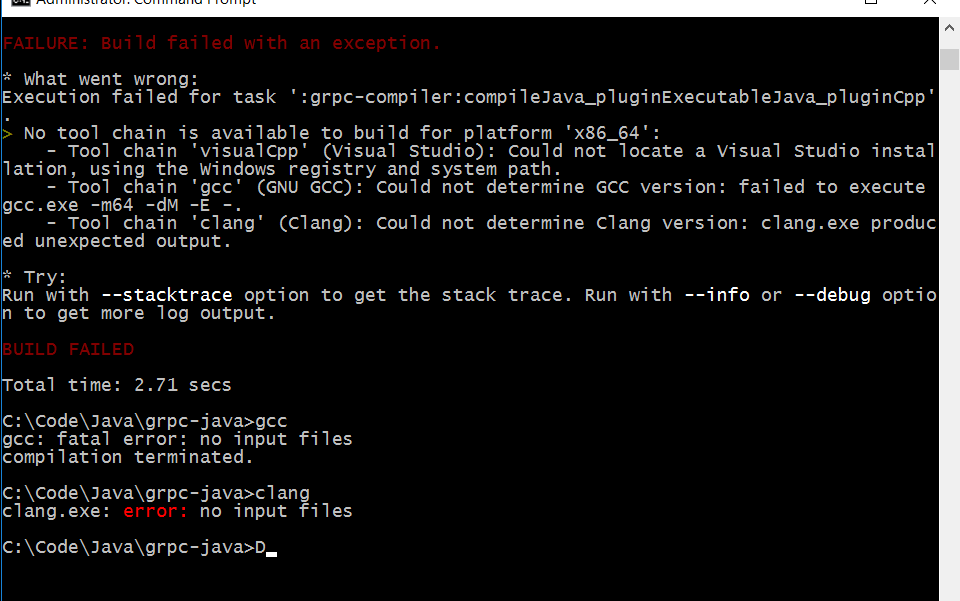
当我试图为java编译gRPC时,我得到了以下错误
我正在运行的命令是gradlew.bat installDist
Execution failed for task ':grpc-compiler:compileJava_pluginExecutableJava_pluginCpp'.
> No tool chain is available to build for platform 'x86_64':
    - Tool chain 'visualCpp' (Visual Studio): Could not locate a Visual Studio installation, using the Windows registry and system path.
    - Tool chain 'gcc' (GNU GCC): Could not find C compiler 'gcc' in system path.
    - Tool chain 'clang' (Clang): Could not find C compiler 'clang' in system path.

* Try:
Run with --stacktrace option to get the stack trace. Run with --info or --debug option to get more log output.
我已将文件夹(C:\Program (X86)\MicrosoftVisualStudio14.0)添加到路径中
更新
我已经安装了gcc和clang,但是我仍然得到了上面的错误。
回答 2
Stack Overflow用户
发布于 2017-12-21 16:49:04
我只是遇到了同样的问题,结果我跳过了一个步骤,更改为示例dir,它就能工作了。
$ # Clone the repository at the latest release to get the example code:
$ git clone -b v1.8.0 https://github.com/grpc/grpc-java
$ # Navigate to the Java examples:
$ cd grpc-java/examples

**Run a gRPC application**

1. Compile the server
$ ./gradlew installDist

2. Run the server
$ ./build/install/examples/bin/hello-world-server

3. In another terminal, compile and run the client
$ cd android/helloworld
$ ./gradlew installDebug

Congratulations! You’ve just run a client-server application with gRPC.
https://grpc.io/docs/quickstart/android.html#run-a-grpc-application
Stack Overflow用户
发布于 2019-10-04 07:13:30
就连我也面临着同样的问题。当您克隆代码时,代码库将是最新的主版。主代码有时会不稳定。但是在其中一个googlegroup中,上面提到的签出v1.7.0并尝试,它对我起了作用。git签出v1.7.0,
页面原文内容由Stack Overflow提供。腾讯云小微IT领域专用引擎提供翻译支持
原文链接:
https://stackoverflow.com/questions/44870493
复制相关文章
相似问题
腾讯云开发者

Copyright © 2013 - 2026 Tencent Cloud. All Rights Reserved. 腾讯云 版权所有
深圳市腾讯计算机系统有限公司 ICP备案/许可证号:粤B2-20090059  粤公网安备44030502008569号
腾讯云计算(北京)有限责任公司 京ICP证150476号 | 京ICP备11018762号