
添加DividerItemDecoration,recyclerView的两边
添加DividerItemDecoration,recyclerView的两边
提问于 2017-07-01 03:27:47
我正在为安卓系统的一个应用程序制作GUI,我是这方面的新手。
首先,我制作了一个水平的recyclerView,添加了一个自定义的可绘图的DividerItemDecoration,并设置了LinearSnapHelper,使其始终保持在中心。
它可以工作,但左侧位于屏幕的旁边,因为dividerItemDecorator只在元素之间放置行。
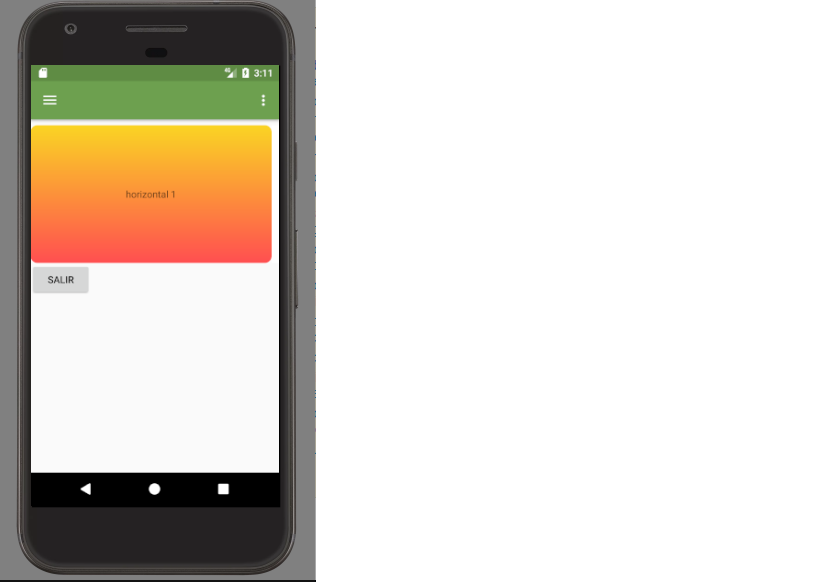
存在任何在recycler开头放置分隔符的方法,我曾经尝试过放置一些填充或页边距,但是当我在到达屏幕末尾之前滑动它时“裁剪”。
抱歉,请提前为英语道歉
我的代码是
MainActivity
@BindView(R.id.rvRecentNews)
RecyclerView rvRecentNews;
private ArrayList<String> horizontalList;
private HorizontalAdapter horizontalAdapter;

@Override
protected void onCreate(Bundle savedInstanceState) {
    super.onCreate(savedInstanceState);
    setContentView(R.layout.main_activity);
    ButterKnife.bind(this);

horizontalList=new ArrayList<>();
    horizontalList.add("horizontal 1");
    horizontalList.add("horizontal 2");
    horizontalList.add("horizontal 3");
    horizontalList.add("horizontal 4");
    horizontalList.add("horizontal 5");
    horizontalList.add("horizontal 6");
    horizontalList.add("horizontal 7");
    horizontalList.add("horizontal 8");
    horizontalList.add("horizontal 9");
    horizontalList.add("horizontal 10");

    horizontalAdapter=new HorizontalAdapter(horizontalList);

    LinearLayoutManager horizontalLayoutManagaer
            = new LinearLayoutManager(MainActivity.this, LinearLayoutManager.HORIZONTAL, false);
    rvRecentNews.setLayoutManager(horizontalLayoutManagaer);

    DividerItemDecoration dividerItemDecoration = new DividerItemDecoration(rvRecentNews.getContext(),
            horizontalLayoutManagaer.getOrientation());
    dividerItemDecoration.setDrawable(getApplicationContext().getResources().getDrawable(R.drawable.line_divider));

    rvRecentNews.addItemDecoration(dividerItemDecoration);

    SnapHelper helper = new LinearSnapHelper();
    helper.attachToRecyclerView(rvRecentNews);

    rvRecentNews.setAdapter(horizontalAdapter);


<LinearLayout xmlns:android="http://schemas.android.com/apk/res/android"
xmlns:app="http://schemas.android.com/apk/res-auto"
xmlns:tools="http://schemas.android.com/tools"
android:layout_width="match_parent"
android:layout_height="match_parent"
app:layout_behavior="@string/appbar_scrolling_view_behavior"
android:orientation="vertical"
tools:context="com.sgd.pawfriends.MainActivity"
tools:showIn="@layout/app_bar_main">

<ScrollView
    android:layout_width="match_parent"
    android:layout_height="wrap_content">

    <LinearLayout
        android:layout_width="match_parent"
        android:layout_height="match_parent">

        <android.support.v7.widget.RecyclerView
            android:layout_marginTop="8dp"
            android:id="@+id/rvRecentNews"
            android:layout_width="match_parent"
            android:layout_height="200dp"

            app:layout_behavior="@string/appbar_scrolling_view_behavior" />

    </LinearLayout>

</ScrollView>

<Button
    android:layout_width="wrap_content"
    android:layout_height="wrap_content"
    android:text="salir"
    android:onClick="logout"
    />

</LinearLayout>
提前感谢
回答 2
Stack Overflow用户
发布于 2017-07-01 14:17:18
试试这个:
<android.support.v7.widget.RecyclerView
    android:layout_width="match_parent"
    android:layout_height="match_parent"
    android:clipToPadding="false"
android:paddingLeft="10dp"/>clipToPadding="false"的意思是,只有当滚动到达结束/开始点时才剪辑。
Stack Overflow用户
发布于 2017-07-01 21:22:09
在这个页面中,我发现了许多实现自定义ItemDecoration的选项。
我只会改变
DividerItemDecoration dividerItemDecoration = new DividerItemDecoration(rvRecentNews.getContext(),
            horizontalLayoutManagaer.getOrientation());

    dividerItemDecoration.setDrawable(ContextCompat.getDrawable(this,R.drawable.line_divider));

    rvRecentNews.addItemDecoration(dividerItemDecoration);
为此
rvRecentNews.addItemDecoration(new StartOffsetItemDecoration(ContextCompat.getDrawable(this,R.drawable.line_divider)));类StartOffsetItemDecoration
public class StartOffsetItemDecoration extends RecyclerView.ItemDecoration {

private int mOffsetPx;
private Drawable mOffsetDrawable;
private int mOrientation;


public StartOffsetItemDecoration(int offsetPx) {
    mOffsetPx = offsetPx;
}

public StartOffsetItemDecoration(Drawable offsetDrawable) {
    mOffsetDrawable = offsetDrawable;
}


@Override
public void getItemOffsets(Rect outRect, View view, RecyclerView parent, RecyclerView.State state) {
    super.getItemOffsets(outRect, view, parent, state);


    mOrientation = ((LinearLayoutManager) parent.getLayoutManager()).getOrientation();
    if (mOrientation == LinearLayoutManager.HORIZONTAL) {
        if (mOffsetPx > 0) {
            outRect.left = mOffsetPx;
            outRect.right = mOffsetPx;
        } else if (mOffsetDrawable != null) {
            outRect.left = mOffsetDrawable.getIntrinsicWidth();
            outRect.right = mOffsetDrawable.getIntrinsicWidth();
        }
    } else if (mOrientation == LinearLayoutManager.VERTICAL) {
        if (mOffsetPx > 0) {
            outRect.top = mOffsetPx;
        } else if (mOffsetDrawable != null) {
            outRect.top = mOffsetDrawable.getIntrinsicHeight();
        }
    }
}

@Override
public void onDraw(Canvas c, RecyclerView parent, RecyclerView.State state) {
    super.onDraw(c, parent, state);
    if (mOffsetDrawable == null) {
        return;
    }

    if (mOrientation == LinearLayoutManager.HORIZONTAL) {
        drawOffsetHorizontal(c, parent);
    } else if (mOrientation == LinearLayoutManager.VERTICAL) {
        drawOffsetVertical(c, parent);
    }
}


private void drawOffsetHorizontal(Canvas canvas, RecyclerView parent) {
    int parentTop = parent.getPaddingTop();
    int parentBottom = parent.getHeight() - parent.getPaddingBottom();
    int parentLeft = parent.getPaddingLeft();
    int offsetDrawableRight = parentLeft + mOffsetDrawable.getIntrinsicWidth();

    mOffsetDrawable.setBounds(parentLeft, parentTop, offsetDrawableRight, parentBottom);
    mOffsetDrawable.draw(canvas);
}

private void drawOffsetVertical(Canvas canvas, RecyclerView parent) {
    int parentLeft = parent.getPaddingLeft();
    int parentRight = parent.getWidth() - parent.getPaddingRight();
    int parentTop = parent.getPaddingTop();
    int offsetDrawableBottom = parentTop + mOffsetDrawable.getIntrinsicHeight();

    mOffsetDrawable.setBounds(parentLeft, parentTop, parentRight, offsetDrawableBottom);
    mOffsetDrawable.draw(canvas);
}
感谢这篇文章的作者和Shayan Pourvatan创建自定义类的想法
页面原文内容由Stack Overflow提供。腾讯云小微IT领域专用引擎提供翻译支持
原文链接:
https://stackoverflow.com/questions/44857069
复制相关文章
相似问题
腾讯云开发者

Copyright © 2013 - 2026 Tencent Cloud. All Rights Reserved. 腾讯云 版权所有
深圳市腾讯计算机系统有限公司 ICP备案/许可证号:粤B2-20090059  粤公网安备44030502008569号
腾讯云计算(北京)有限责任公司 京ICP证150476号 | 京ICP备11018762号