
Qt中的线程应用
Qt中的线程应用
提问于 2017-06-29 18:36:18
我正在学习使用Qt中的线程进行管理,所以如果我犯了一些小错误,请向我道歉。让我们回到话题。
简介:
我编写了用于测试线程工作方式的小应用程序。我有两个按钮的简单GUI界面。每个线程都可以启动和停止不同的线程。线程基于Worker类在此链接下。我正在用Qt Creator在Ubuntu16.04LTS x64下编译我的代码。
主要问题:
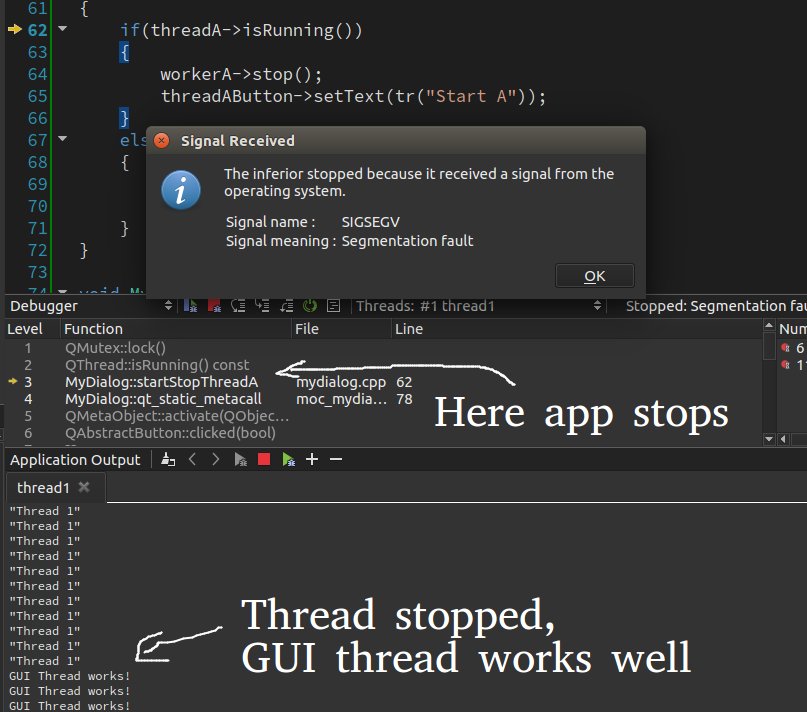
- 当我尝试启动线程时,它工作正常。然后我就停下来试着重新开始。在这种情况下,线程不会启动。我要用不恰当的方式关闭线吗?
- 这种管理线程的方式合适吗?做得好吗?我了解到在Qt中将QObject移动到线程比子类线程更好。(但这要看情况,我知道)。
我的代码:
工人h:
#ifndef WORKER_H
#define WORKER_H

#include <QObject>
#include <QMutex>

class Worker : public QObject
{
    Q_OBJECT
public:
    explicit Worker(QObject *parent = nullptr);

    void stop();
    void setMessage(const QString &message);

signals:
    void finished();

public slots:
    void process();

private:
    volatile bool stopped;
    QString messageStr;
    QMutex mutex;
};

#endif // WORKER_H
worker.cpp:
#include "worker.h"
#include <QDebug>

Worker::Worker(QObject *parent)
    : QObject(parent)
{
    stopped = false;
}

void Worker::process()
{
    forever
    {
        mutex.lock();
        if(stopped)
        {
            stopped = false;
            mutex.unlock();
            break;
        }
        mutex.unlock();
        qDebug() << messageStr;
    }
    emit finished();
}

void Worker::stop()
{
    mutex.lock();
    stopped = true;
    mutex.unlock();
}

void Worker::setMessage(const QString &message)
{
    messageStr = message;
}
mydialog.h:
#ifndef MYDIALOG_H
#define MYDIALOG_H

#include <QDialog>

class Worker;

class MyDialog : public QDialog
{
    Q_OBJECT
public:
    MyDialog(QWidget *parent = nullptr);

private slots:
    void startStopThreadA();
    void startStopThreadB();
    void showWorkingGUI();

private:
    Worker *workerA;
    Worker *workerB;
    QThread *threadA;
    QThread *threadB;
    QPushButton *threadAButton;
    QPushButton *threadBButton;
    QPushButton *quitButton;

};

#endif // MYDIALOG_H
mydilog.cpp:
#include "mydialog.h"
#include "worker.h"

#include <QCloseEvent>
#include <QHBoxLayout>
#include <QPushButton>
#include <QThread>
#include <QDebug>
#include <QTimer>

MyDialog::MyDialog(QWidget *parent)
    : QDialog(parent)
{
    //Here bla bla for gui
    threadAButton = new QPushButton(tr("Start A"));
    threadBButton = new QPushButton(tr("Start B"));
    quitButton = new QPushButton(tr("Quit"));

    connect(threadAButton, SIGNAL(clicked()), this, SLOT(startStopThreadA()));
    connect(threadBButton, SIGNAL(clicked()), this, SLOT(startStopThreadB()));

    QHBoxLayout *layout = new QHBoxLayout;
    layout->addWidget(threadAButton);
    layout->addWidget(threadBButton);
    layout->addWidget(quitButton);

    setLayout(layout);

    //Create worker's instances
    workerA = new Worker;
    workerB = new Worker;

    workerA->setMessage("Thread 1");
    workerB->setMessage("Thread 2");

    //Create threads instances
    threadA = new QThread;
    threadB = new QThread;

    //Move worker to thread
    workerA->moveToThread(threadA);
    workerB->moveToThread(threadB);

    connect(threadA, SIGNAL(started()), workerA, SLOT(process()));
    connect(workerA, SIGNAL(finished()), threadA, SLOT(quit()));
    connect(workerA, SIGNAL(finished()), workerA, SLOT(deleteLater()));
    connect(threadA, SIGNAL(finished()), threadA, SLOT(deleteLater()));

    connect(threadB, SIGNAL(started()), workerB, SLOT(process()));
    connect(workerB, SIGNAL(finished()), threadB, SLOT(quit()));
    connect(workerB, SIGNAL(finished()), workerB, SLOT(deleteLater()));
    connect(threadB, SIGNAL(finished()), threadB, SLOT(deleteLater()));

    QTimer *timer = new QTimer(this);
    connect(timer, SIGNAL(timeout()), this, SLOT(showWorkingGUI()));
    timer->start(1000);

}

void MyDialog::startStopThreadA()
{
    if(threadA->isRunning())
    {
        workerA->stop();
        threadAButton->setText(tr("Start A"));
    }
    else
    {
        threadA->start();
        threadAButton->setText(tr("Stop A"));
    }
}

void MyDialog::startStopThreadB()
{
    if(threadB->isRunning())
    {
        workerB->stop();
        threadBButton->setText(tr("Start B"));
    }
    else
    {
        threadB->start();
        threadBButton->setText(tr("Stop B"));
    }
}

void MyDialog::showWorkingGUI()
{
    qDebug() << "GUI Thread works!";
}
和main.cpp:
#include <QApplication>
#include "mydialog.h"

int main(int argc, char *argv[])
{
    QApplication a(argc, argv);
    MyDialog dialog;
    dialog.show();
    return a.exec();
}
请帮忙。如果我犯了一些错误,不要嘲笑我。我在线程方面真的很新:)
编辑:--我忘了附上图片:
回答 1
Stack Overflow用户
发布于 2017-07-02 18:56:06
创建新的对象内按钮方法,而不是MyDialog ctor解决了我的问题。例如:
void MainWindow::startStopThreadA()
{
    //First method - start/stop thread
    if(threadA && threadA->isRunning())
    {
        workerA->stop();
        threadA = nullptr;
        ui->threadAButton->setText("Start A");
    }
    else
    {
        threadA = new QThread;
        workerA = new WorkerObject;
        workerA->setMessage("Thread A running");
        workerA->moveToThread(threadA);

        connect(threadA, SIGNAL(started()), workerA, SLOT(process()), Qt::QueuedConnection);
        connect(workerA, SIGNAL(finished()), threadA, SLOT(quit()));
        connect(workerA, SIGNAL(finished()), workerA, SLOT(deleteLater()));
        connect(threadA, SIGNAL(finished()), threadA, SLOT(deleteLater()));

        threadA->start();
        ui->threadAButton->setText("Stop A");
    }
}页面原文内容由Stack Overflow提供。腾讯云小微IT领域专用引擎提供翻译支持
原文链接:
https://stackoverflow.com/questions/44832625
复制相关文章
相似问题
腾讯云开发者

Copyright © 2013 - 2026 Tencent Cloud. All Rights Reserved. 腾讯云 版权所有
深圳市腾讯计算机系统有限公司 ICP备案/许可证号:粤B2-20090059  粤公网安备44030502008569号
腾讯云计算(北京)有限责任公司 京ICP证150476号 | 京ICP备11018762号