
停止ngAfterContentInit执行两次
我有点不明白为什么在这个场景中ngAfterContentInit要执行两次。我已经创建了一个精简版本的应用程序来重现这个bug。简而言之,我使用一个*contentItem来标记组件,然后由standard-layout组件获取这些组件进行呈现。一旦我遵循这个模式,demo的ngAfterContentInit就会被执行两次。
我将演示应用程序放在github上,它将复制错误:https://github.com/jVaaS/stackoverflow/tree/master/ngaftercontentinit
否则,这里有一些重要的部分:
马车-飞镖:
@Component(
    selector: "buggy-app",
    template: """
        <standard-layout>
            <demo *contentItem></demo>
        </standard-layout>
    """,
    directives: const [
        ContentItemDirective,
        StandardLayout,
        Demo
    ]
)
class BuggyApp implements AfterContentInit {

    @override
    ngAfterContentInit() {
        print(">>> ngAfterContentInit: BuggyApp");
    }
}
标准布局。省道:
////////////////////////////////////////////////////////////////////////////////
///
/// Standard Layout Component
/// <standard-layout></standard-layout>
///
@Component(
    selector: "standard-layout",
    template: """
        <div *ngFor="let item of contentItems ?? []">
            <template [ngTemplateOutlet]="item.template"></template>
        </div>
    """,
    directives: const [ROUTER_DIRECTIVES, ContentItem])
class StandardLayout implements AfterContentInit {

    @ContentChildren(ContentItemDirective)
    QueryList<ContentItemDirective> contentItems;

    @override
    ngAfterContentInit() {
        print(">>> ngAfterContentInit: StandardLayout");
    }

}

////////////////////////////////////////////////////////////////////////////////
///
/// Content Item Directive
/// *contentItem
///
@Directive(selector: '[contentItem]')
class ContentItemDirective implements AfterContentInit {
    final ViewContainerRef vcRef;
    final TemplateRef template;
    final ComponentResolver componentResolver;

    ContentItemDirective(this.vcRef, this.template, this.componentResolver);

    ComponentRef componentRef;

    @override
    ngAfterContentInit() async {
        final componentFactory =
        await componentResolver.resolveComponent(ContentItem);
        componentRef = vcRef.createComponent(componentFactory);
        (componentRef.instance as ContentItem)
            ..template = template;
    }
}

////////////////////////////////////////////////////////////////////////////////
///
/// Content Item Generator
///
@Component(
    selector: "content-item",
    host: const {
        '[class.content-item]': "true",
    },
    template: """
        <template [ngTemplateOutlet]="template"></template>
    """,
    directives: const [NgTemplateOutlet]
)
class ContentItem {
    TemplateRef template;
}
////////////////////////////////////////////////////////////////////////////////最后是demo.dart
@Component(
    selector: "demo",
    template: "Hello World Once, but demo prints twice!")
class Demo implements AfterContentInit {

    @override
    ngAfterContentInit() {
        print(">>> ngAfterContentInit: Demo");
    }

}main.dart中没有太多内容:
void main() {
    bootstrap(BuggyApp);
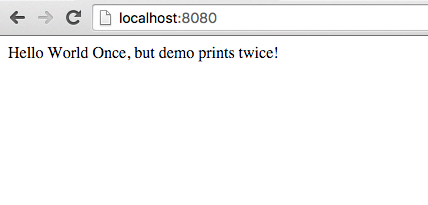
}当我运行这个程序时,Hello World按预期打印一次:
但当你看航站楼时:
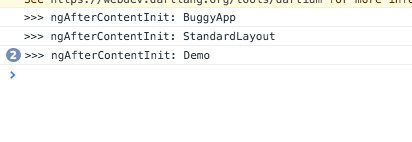
因此,demo组件只呈现一次,但是它的ngAfterContentInit被执行了两次,如果假设它只执行一次,就会造成破坏。
我尝试过添加一个恶意的解决方案,但似乎组件实际上被重新呈现了两次:
int counter = 0;

@override
ngAfterContentInit() {

    if (counter == 0) {
        print(">>> ngAfterContentInit: Demo");
        counter++;
    }

}
这是一个角度错误,还是有什么我可以做的,以防止这一点?
如果需要的话,pubspec.yaml:
name: bugdemo
version: 0.0.0
description: Bug Demo
environment:
  sdk: '>=1.13.0 <2.0.0'
dependencies:
  angular2: 3.1.0
  browser: ^0.10.0
  http: any
  js: ^0.6.0
  dart_to_js_script_rewriter: ^1.0.1
transformers:
- angular2:
    platform_directives:
    - package:angular2/common.dart#COMMON_DIRECTIVES
    platform_pipes:
    - package:angular2/common.dart#COMMON_PIPES
    entry_points: web/main.dart
- dart_to_js_script_rewriter
- $dart2js:
commandLineOptions: [--enable-experimental-mirrors]和index.html的良好措施:
<!DOCTYPE html>
<html>
<head>
    <title>Strange Bug</title>
</head>
<body>

    <buggy-app>
        Loading ...
    </buggy-app>

<script async src="main.dart" type="application/dart"></script>
<script async src="packages/browser/dart.js"></script>
</body>
</html>
更新
因此,有人建议,它可能只发生了两次在开发模式。我做了一个pub build并运行了index.html,它现在在普通Chrome中包含main.dart.js。

它仍在执行两次,用ngAfterViewInit尝试过,而且也执行了两次。
回答 2
Stack Overflow用户
发布于 2017-07-05 15:33:25
这看起来不像是窃听器。
下面是为demo.dart:https://gist.github.com/matanlurey/f311d90053e36cc09c6e28f28ab2d4cd生成的代码
void detectChangesInternal() {
  bool firstCheck = identical(this.cdState, ChangeDetectorState.NeverChecked);
  final _ctx = ctx;
  if (!import8.AppViewUtils.throwOnChanges) {
    dbg(0, 0, 0);
    if (firstCheck) {
      _Demo_0_2.ngAfterContentInit();
    }
  }
  _compView_0.detectChanges();
}我很怀疑,所以我把你的打印信息改成了hashCode
@override
ngAfterContentInit() {
  print(">>> ngAfterContentInit: Demo $hashCode");
}
然后我看到了以下情况:
ngAfterContentInit:演示516575718 ngAfterContentInit:演示57032191
这意味着两个不同的演示实例还活着,而不仅仅是一个发射了两次。然后,我将StackTrace.current添加到演示的构造函数中,以获得堆栈跟踪:
Demo() {
  print('Created $this:$hashCode');
  print(StackTrace.current);
}
并得到:
0 (package:bugdemo/buggy-app.template.dart:136:21) (软件包:bugdemo/demo.dart:11:20)1 ViewBuggyApp1.构建(package:angular2/src/core/linker/app_view.dart:180:12) 2 AppView.create (package:angular2/src/core/linker/app_view.dart:180:12)3 DebugAppView.create (package:angular2/src/debug/debug_app_view.dart:73:26) 4 TemplateRef.createEmbeddedView (package:angular2/src/core/linker/template_ref( (package:angular2/src/core/linker/view_container.dart:86:43) ) .dart:27:10) 5 ViewContainer.createEmbeddedView
这反过来又说您的组件是由BuggyApp的模板创建的:
<standard-layout>
  <demo *contentItem></demo>
</standard-layout>
再近一点。继续挖。
我注释掉了ContentItemDirective,并看到Demo现在只创建了一次。我想你完全没有预料到它是由于*contentItem而创建的,所以继续挖掘--并最终找到了答案。
StandardLayout组件创建模板:
<div *ngFor="let item of contentItems ?? []">
  <template [ngTemplateOutlet]="item.template"></template>
</div>但你的ContentItemDirective也是通过ComponentResolver实现的。我想你不是有意这么做的。因此,我想弄清楚您想做什么,并通过删除在其中一个位置创建组件来解决您的问题。
Stack Overflow用户
发布于 2017-06-29 19:18:58
可能与In Angular2, why are there 2 times check for content and view after setTimeout?有关
你处于开发模式吗?控制台告诉您什么时候应用程序引导。在显影模式下,角度击穿changeDetection两次,从而可以检测出副作用。
https://stackoverflow.com/questions/44832253
复制相似问题
腾讯云开发者

Copyright © 2013 - 2026 Tencent Cloud. All Rights Reserved. 腾讯云 版权所有
深圳市腾讯计算机系统有限公司 ICP备案/许可证号:粤B2-20090059  粤公网安备44030502008569号
腾讯云计算(北京)有限责任公司 京ICP证150476号 | 京ICP备11018762号