
Pandas和Excel中部分副本的条件格式
Pandas和Excel中部分副本的条件格式
提问于 2017-06-29 01:06:48
我有以下名为reviews.csv的csv数据
Movie,Reviewer,Sentence,Tag,Sentiment,Text,
Jaws,John,s1,Plot,Positive,The plot was great,
Jaws,Mary,s1,Plot,Positive,The plot was great,
Jaws,John,s2,Acting,Positive,The acting was OK,
Jaws,Mary,s2,Acting,Neutral,The acting was OK,
Jaws,John,s3,Scene,Positive,The visuals blew me away,
Jaws,Mary,s3,Effects,Positive,The visuals blew me away,
Vertigo,John,s1,Scene,Negative,The scenes were terrible,
Vertigo,Mary,s1,Acting,Negative,The scenes were terrible,
Vertigo,John,s2,Plot,Negative,The actors couldn’t make the story believable,
Vertigo,Mary,s2,Acting,Positive,The actors couldn’t make the story believable,
Vertigo,John,s3,Effects,Negative,The effects were awful,
Vertigo,Mary,s3,Effects,Negative,The effects were awful,
我的目标是将这个csv文件转换成带有条件格式的Excel电子表格。具体而言,我要适用以下规则:
- 如果“电影”、“句子”、“标签”和“情感”的值是相同的,那么整行应该是绿色的。
- 如果“电影”、“句子”和“标签”值相同,但“情感”值不同,则行应为蓝色。
- 如果“电影”和“句子”值相同,但“标记”值不同,则行应该是红色的。
因此,我想创建一个Excel电子表格(.xlsx),如下所示:
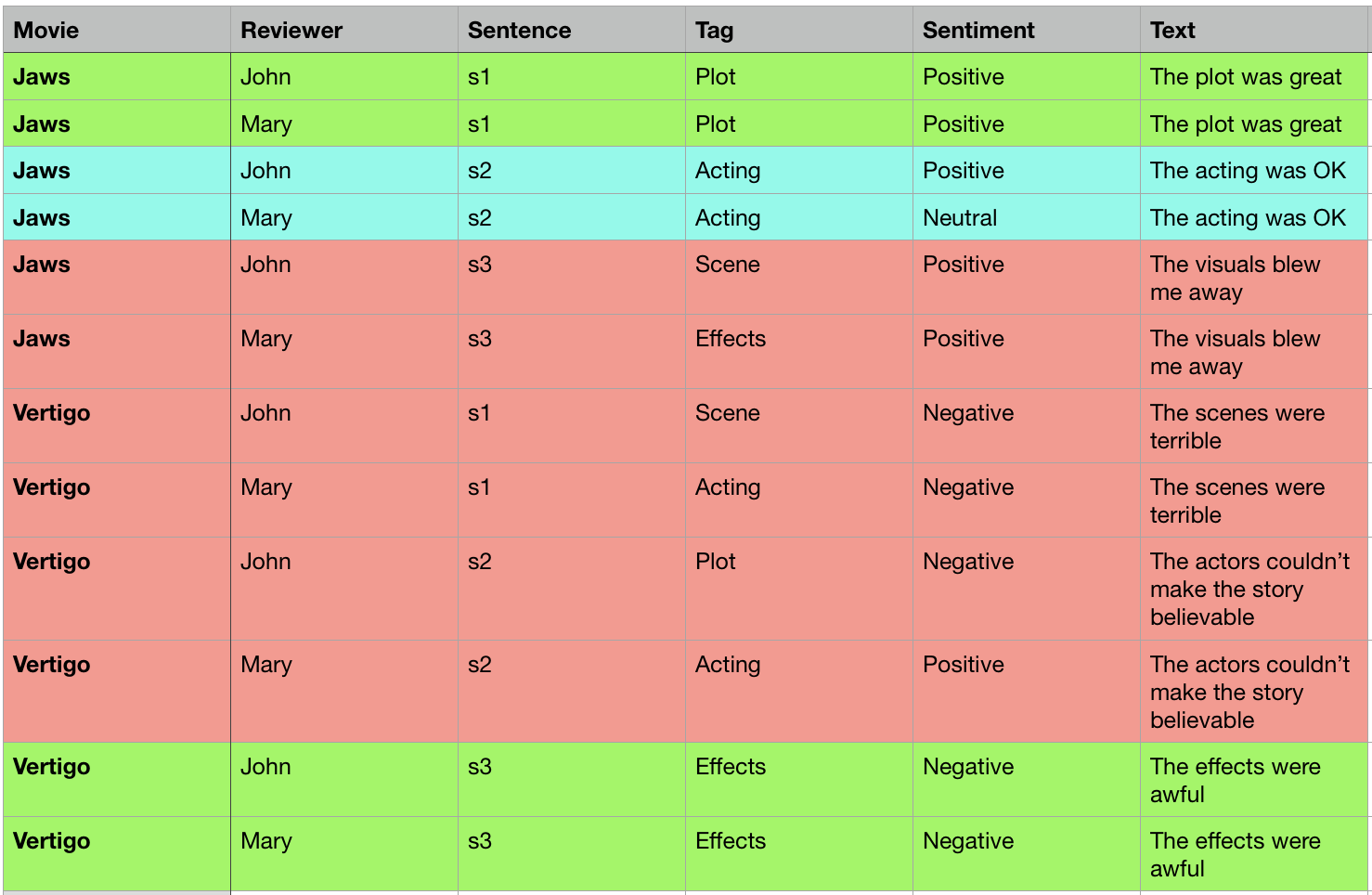
我一直在查看Pandas的样式文档,以及关于XlsxWriter的条件格式教程,但我似乎不能把它们都放在一起。到目前为止我的情况是这样的。我可以将csv读入Pandas,对其进行排序(虽然我不确定这是否必要),并将其写回Excel电子表格。如何进行条件格式设置,以及在代码中的位置?
def csv_to_xls(source_path, dest_path):
    """
    Convert a csv file to a formatted xlsx spreadsheet
    Input: path to hospital review csv file
    Output: formatted xlsx spreadsheet
    """
    #Read the source file and convert to Pandas dataframe
    df = pd.read_csv(source_path)

    #Sort by Filename, then by sentence number
    df.sort_values(['File', 'Sent'], ascending=[True, True], inplace = True)

    #Create the xlsx file that we'll be writing to
    orig = pd.ExcelWriter(dest_path, engine='xlsxwriter')

    #Convert the dataframe to Excel, create the sheet
    df.to_excel(orig, index=False, sheet_name='report')

    #Variables for the workbook and worksheet
    workbook = orig.book
    worksheet = orig.sheets['report']

    #Formatting for exact, partial, mismatch, gold
    exact = workbook.add_format({'bg_color':'#B7F985'}) #green
    partial = workbook.add_format({'bg_color':'#D3F6F4'}) #blue
    mismatch = workbook.add_format({'bg_color':'#F6D9D3'}) #red

    #Do the conditional formatting somehow

orig.save()回答 1
Stack Overflow用户
回答已采纳
发布于 2017-07-01 21:29:46
免责声明:我是图书馆的作者之一,我将建议
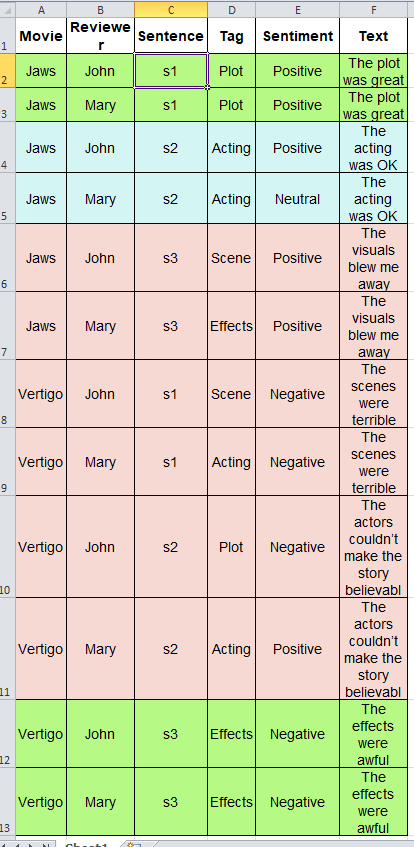
使用StyleFrame和DataFrame.duplicated可以很容易地实现这一点。
from styleframe import StyleFrame, Styler

sf = StyleFrame(df)

green = Styler(bg_color='#B7F985')
blue = Styler(bg_color='#D3F6F4')
red = Styler(bg_color='#F6D9D3')

sf.apply_style_by_indexes(sf[df.duplicated(subset=['Movie', 'Sentence'], keep=False)],
                          styler_obj=red)
sf.apply_style_by_indexes(sf[df.duplicated(subset=['Movie', 'Sentence', 'Tag'], keep=False)],
                          styler_obj=blue)
sf.apply_style_by_indexes(sf[df.duplicated(subset=['Movie', 'Sentence', 'Tag', 'Sentiment'],
                                           keep=False)],
                          styler_obj=green)

sf.to_excel('test.xlsx').save()
这将产生以下结果:
页面原文内容由Stack Overflow提供。腾讯云小微IT领域专用引擎提供翻译支持
原文链接:
https://stackoverflow.com/questions/44814798
复制相关文章
相似问题
腾讯云开发者

Copyright © 2013 - 2026 Tencent Cloud. All Rights Reserved. 腾讯云 版权所有
深圳市腾讯计算机系统有限公司 ICP备案/许可证号:粤B2-20090059  粤公网安备44030502008569号
腾讯云计算(北京)有限责任公司 京ICP证150476号 | 京ICP备11018762号