
加快VBA代码运行速度
加快VBA代码运行速度
提问于 2017-06-26 15:47:09
我有一个Excel工作簿,用户通过单击按钮导入文本文件。我的代码完全按照我的需要工作,但在填写H列(读日期)时,它的速度非常慢。以下是将文本文件导入Excel工作表时excel工作簿的样子:
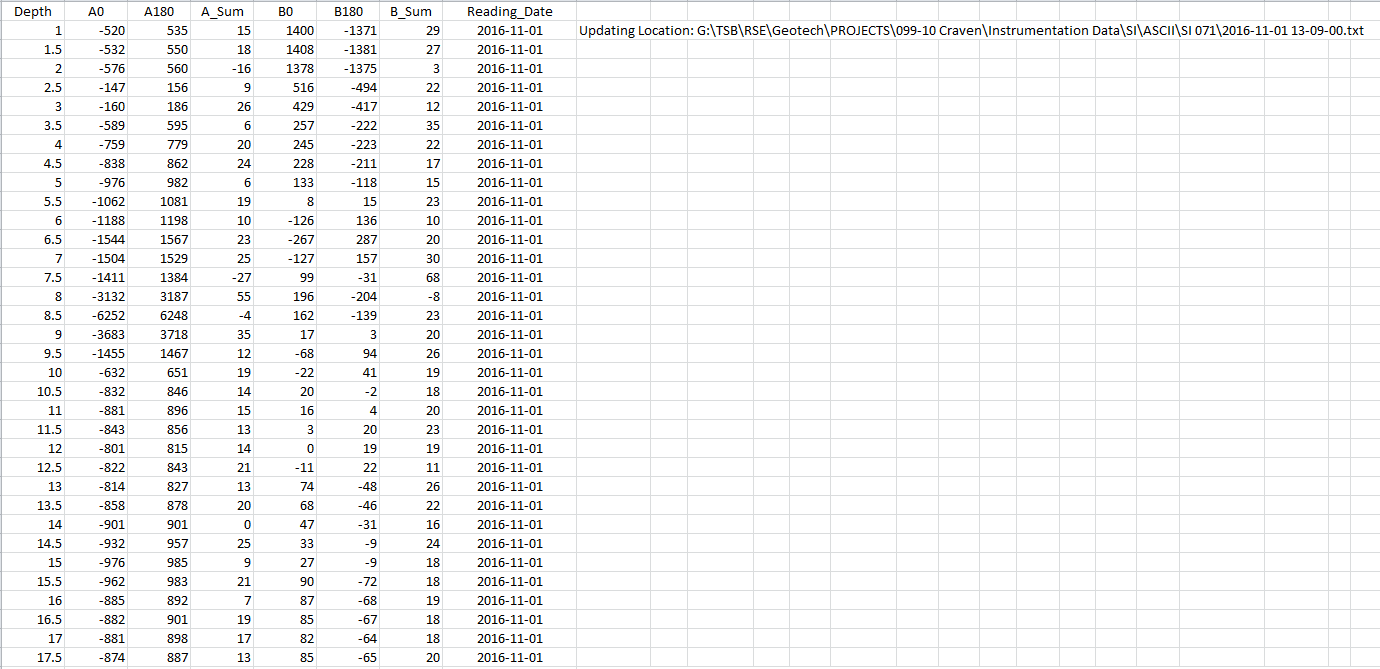
这是我的代码:
Sub Import_Textfiles()
Dim fName As String, LastRow As Integer

Worksheets("Data Importation Sheet").Activate

LastRow = Range("A" & Rows.Count).End(xlUp).Row + 1
    ' Finds the first blank row to import text file data to
fName = Application.GetOpenFilename("Text Files (*.txt), *.txt")

If fName = "False" Then Exit Sub

  With ActiveSheet.QueryTables.Add(Connection:="TEXT;" & fName, _
        Destination:=Range("A" & LastRow))
        .Name = "2001-02-27 14-48-00"
        .FieldNames = True
        .RowNumbers = False
        .FillAdjacentFormulas = False
        .PreserveFormatting = True
        .RefreshOnFileOpen = False
        .RefreshStyle = xlInsertDeleteCells
        .SavePassword = False
        .SaveData = True
        .AdjustColumnWidth = False
        .RefreshPeriod = 0
        .TextFilePromptOnRefresh = False
        .TextFilePlatform = 437
        .TextFileStartRow = 2
        .TextFileParseType = xlFixedWidth
        .TextFileTextQualifier = xlTextQualifierDoubleQuote
        .TextFileConsecutiveDelimiter = False
        .TextFileTabDelimiter = True
        .TextFileSemicolonDelimiter = False
        .TextFileCommaDelimiter = False
        .TextFileSpaceDelimiter = False
        .TextFileColumnDataTypes = Array(1, 1, 1, 1, 1, 1, 1)
        .TextFileFixedColumnWidths = Array(14, 14, 8, 16, 12, 14)
        .TextFileTrailingMinusNumbers = True
        .Refresh BackgroundQuery:=False
    End With
    ActiveWindow.SmallScroll Down:=0


    Dim strShortName As String


    'Adding Reading Date to Excel Sheet:
    Dim rowCount As Integer, currentRow As Integer
    Dim sourceCol As Integer, nextCol As Integer
    Dim currentRowValue As String
    Dim fileDate1 As String
    Dim fileDate2 As String

    sourceCol = 1 'columnA
    nextCol = 8 'column H
    rowCount = Cells(Rows.Count, sourceCol).End(xlUp).Row

    strShortName = fName
    fileDate1 = Mid(fName, InStrRev(fName, "\") + 1)
    fileDate2 = Left(fileDate1, 10)

    Cells(LastRow, 9) = ("Updating Location: " & strShortName)

    For currentRow = 1 To rowCount
        currentRowValue = Cells(currentRow, nextCol).Value
        If currentRowValue = "" Then
        Cells((currentRow), (nextCol)).Select
        Cells((currentRow), (nextCol)) = fileDate2
        End If
    Next

End Sub
如果有人对我如何加快阅读日期的输入有任何建议,我将非常感激!提前感谢!
回答 3
Stack Overflow用户
回答已采纳
发布于 2017-06-26 16:05:37
我注意到的一些事情
- 正如Chris在注释中提到的,您可以关闭屏幕更新,将计算设置为手动,并将它们重新打开,并在代码末尾将计算设置为自动。
例如
With Application
    .ScreenUpdating = False
    .Calculation = xlCalculationManual
End With

'
'~~> Rest of your code
'
With Application
    .ScreenUpdating = True
    .Calculation = xlCalculationAutomatic
End With- 避免使用
.Select。它降低了代码的速度。您不需要选择要写入它的单元格。
您的For循环可以编写为。
For currentRow = 1 To RowCount
    If Cells(currentRow, nextCol).Value = "" Then
        Cells(currentRow, nextCol).Value = fileDate2
    End If
Next
这本身将提高您的代码的速度,因为您不再选择单元格之前,写入它。
- 理想情况下,我会将范围复制到数组中,然后执行对数组所做的操作,然后将其写回单元格,但这就是我。
- 删除不必要的代码行。不需要
ActiveWindow.SmallScroll Down:=0。 - 使用对象并完全限定对象。
- 使用Excel行时,请使用
Long而不是Integer
Stack Overflow用户
发布于 2017-06-26 16:06:25
试试这个:
Application.ScreenUpdating = False
Application.Calculation = xlCalculationManual
Application.EnableEvents = False

YOUR CODE HERE

Application.Calculation = xlCalculationAutomatic
Application.ScreenUpdating = True
Application.EnableEvents = TrueStack Overflow用户
发布于 2017-06-26 16:10:53
最好的解决方案取决于一些事情,从我所提供的数据来看,这一点还不清楚。下面的更改将大大加快速度(选择单元格需要很长时间),但这并不是最优的。如果仍然要慢,请在进入下面的代码之前提供行数和行%(在H列中)。然后,要么搜索缺少的值,要么(在大多数情况下)将列H复制到数组中,并在更新值后将其复制回来。
旧代码:
For currentRow = 1 To rowCount
    currentRowValue = Cells(currentRow, nextCol).Value
    If currentRowValue = "" Then
    Cells((currentRow), (nextCol)).Select
    Cells((currentRow), (nextCol)) = fileDate2
    End If
Next
新代码:
For currentRow = 1 To rowCount
    if Cells(currentRow, nextCol).Value = "" then
        Cells(currentRow,nextCol).Value = fileDate2
    End If
Next页面原文内容由Stack Overflow提供。腾讯云小微IT领域专用引擎提供翻译支持
原文链接:
https://stackoverflow.com/questions/44763554
复制相关文章
相似问题
腾讯云开发者

Copyright © 2013 - 2026 Tencent Cloud. All Rights Reserved. 腾讯云 版权所有
深圳市腾讯计算机系统有限公司 ICP备案/许可证号:粤B2-20090059  粤公网安备44030502008569号
腾讯云计算(北京)有限责任公司 京ICP证150476号 | 京ICP备11018762号