
基于ASP.Net MVC和Web的应用内景实时度量
我们希望监控我们的应用程序之一与Azure应用程序的洞察。它是一个带有Web 2的ASP.Net 4 MVC应用程序。我在Azure中创建了一个新的application资源,并在项目中安装了以下NuGet包:
<package id="Microsoft.ApplicationInsights" version="2.3.0" targetFramework="net462" />
<package id="Microsoft.ApplicationInsights.Agent.Intercept" version="2.0.7" targetFramework="net462" />
<package id="Microsoft.ApplicationInsights.DependencyCollector" version="2.3.0" targetFramework="net462" />
<package id="Microsoft.ApplicationInsights.PerfCounterCollector" version="2.3.0" targetFramework="net462" />
<package id="Microsoft.ApplicationInsights.TraceListener" version="2.2.0" targetFramework="net462" />
<package id="Microsoft.ApplicationInsights.Web" version="2.3.0" targetFramework="net462" />
<package id="Microsoft.ApplicationInsights.WindowsServer" version="2.3.0" targetFramework="net462" />
<package id="Microsoft.ApplicationInsights.WindowsServer.TelemetryChannel" version="2.3.0" targetFramework="net462" />
ApplicationInsights.config看起来如下所示:
    <?xml version="1.0" encoding="utf-8"?>
<ApplicationInsights xmlns="http://schemas.microsoft.com/ApplicationInsights/2013/Settings">
<!-- This key is for Application Insights resource 'PlanningTool.Web' in resource group 'Default-ApplicationInsights-CentralUS' -->
<InstrumentationKey>Our key</InstrumentationKey>
<TelemetryModules>
    <Add Type="Microsoft.ApplicationInsights.DependencyCollector.DependencyTrackingTelemetryModule, Microsoft.AI.DependencyCollector" />
    <Add Type="Microsoft.ApplicationInsights.Extensibility.PerfCounterCollector.PerformanceCollectorModule, Microsoft.AI.PerfCounterCollector">
    <!--
    Use the following syntax here to collect additional performance counters:

    <Counters>
        <Add PerformanceCounter="\Process(??APP_WIN32_PROC??)\Handle Count" ReportAs="Process handle count" />
        ...
    </Counters>

    PerformanceCounter must be either \CategoryName(InstanceName)\CounterName or \CategoryName\CounterName

    NOTE: performance counters configuration will be lost upon NuGet upgrade.

    The following placeholders are supported as InstanceName:
        ??APP_WIN32_PROC?? - instance name of the application process  for Win32 counters.
        ??APP_W3SVC_PROC?? - instance name of the application IIS worker process for IIS/ASP.NET counters.
        ??APP_CLR_PROC?? - instance name of the application CLR process for .NET counters.
    -->
    </Add>
    <Add Type="Microsoft.ApplicationInsights.Extensibility.PerfCounterCollector.QuickPulse.QuickPulseTelemetryModule, Microsoft.AI.PerfCounterCollector" />
    <Add Type="Microsoft.ApplicationInsights.WindowsServer.DeveloperModeWithDebuggerAttachedTelemetryModule, Microsoft.AI.WindowsServer" />
    <Add Type="Microsoft.ApplicationInsights.WindowsServer.UnhandledExceptionTelemetryModule, Microsoft.AI.WindowsServer" />
    <Add Type="Microsoft.ApplicationInsights.WindowsServer.UnobservedExceptionTelemetryModule, Microsoft.AI.WindowsServer" />
    <Add Type="Microsoft.ApplicationInsights.Web.RequestTrackingTelemetryModule, Microsoft.AI.Web">
    <Handlers>
        <!--
        Add entries here to filter out additional handlers:

        NOTE: handler configuration will be lost upon NuGet upgrade.
        -->
        <Add>System.Web.Handlers.TransferRequestHandler</Add>
        <Add>Microsoft.VisualStudio.Web.PageInspector.Runtime.Tracing.RequestDataHttpHandler</Add>
        <Add>System.Web.StaticFileHandler</Add>
        <Add>System.Web.Handlers.AssemblyResourceLoader</Add>
        <Add>System.Web.Optimization.BundleHandler</Add>
        <Add>System.Web.Script.Services.ScriptHandlerFactory</Add>
        <Add>System.Web.Handlers.TraceHandler</Add>
        <Add>System.Web.Services.Discovery.DiscoveryRequestHandler</Add>
        <Add>System.Web.HttpDebugHandler</Add>
    </Handlers>
    </Add>
    <Add Type="Microsoft.ApplicationInsights.Web.ExceptionTrackingTelemetryModule, Microsoft.AI.Web" />
</TelemetryModules>
<TelemetryProcessors>
    <Add Type="Microsoft.ApplicationInsights.Extensibility.PerfCounterCollector.QuickPulse.QuickPulseTelemetryProcessor, Microsoft.AI.PerfCounterCollector" />
    <Add Type="Microsoft.ApplicationInsights.Extensibility.PerfCounterCollector.QuickPulse.QuickPulseTelemetryModule, Microsoft.AI.PerfCounterCollector"/>
    <Add Type="Microsoft.ApplicationInsights.WindowsServer.TelemetryChannel.AdaptiveSamplingTelemetryProcessor, Microsoft.AI.ServerTelemetryChannel">
    <MaxTelemetryItemsPerSecond>5</MaxTelemetryItemsPerSecond>
    </Add>
</TelemetryProcessors>
<TelemetryChannel Type="Microsoft.ApplicationInsights.WindowsServer.TelemetryChannel.ServerTelemetryChannel, Microsoft.AI.ServerTelemetryChannel" />
<!--
    Learn more about Application Insights configuration with ApplicationInsights.config here:
    http://go.microsoft.com/fwlink/?LinkID=513840

    Note: If not present, please add <InstrumentationKey>Your Key</InstrumentationKey> to the top of this file.
-->
<TelemetryInitializers>
    <Add Type="Microsoft.ApplicationInsights.WindowsServer.AzureRoleEnvironmentTelemetryInitializer, Microsoft.AI.WindowsServer" />
    <Add Type="Microsoft.ApplicationInsights.WindowsServer.DomainNameRoleInstanceTelemetryInitializer, Microsoft.AI.WindowsServer" />
    <Add Type="Microsoft.ApplicationInsights.WindowsServer.BuildInfoConfigComponentVersionTelemetryInitializer, Microsoft.AI.WindowsServer" />
    <Add Type="Microsoft.ApplicationInsights.Web.WebTestTelemetryInitializer, Microsoft.AI.Web" />
    <Add Type="Microsoft.ApplicationInsights.Web.SyntheticUserAgentTelemetryInitializer, Microsoft.AI.Web">
    <Filters>search|spider|crawl|Bot|Monitor|BrowserMob|BingPreview|PagePeeker|WebThumb|URL2PNG|ZooShot|GomezA|Google SketchUp|Read Later|KTXN|KHTE|Keynote|Pingdom|AlwaysOn|zao|borg|oegp|silk|Xenu|zeal|NING|htdig|lycos|slurp|teoma|voila|yahoo|Sogou|CiBra|Nutch|Java|JNLP|Daumoa|Genieo|ichiro|larbin|pompos|Scrapy|snappy|speedy|vortex|favicon|indexer|Riddler|scooter|scraper|scrubby|WhatWeb|WinHTTP|voyager|archiver|Icarus6j|mogimogi|Netvibes|altavista|charlotte|findlinks|Retreiver|TLSProber|WordPress|wsr-agent|http client|Python-urllib|AppEngine-Google|semanticdiscovery|facebookexternalhit|web/snippet|Google-HTTP-Java-Client</Filters>
    </Add>
    <Add Type="Microsoft.ApplicationInsights.Web.ClientIpHeaderTelemetryInitializer, Microsoft.AI.Web" />
    <Add Type="Microsoft.ApplicationInsights.Web.OperationNameTelemetryInitializer, Microsoft.AI.Web" />
    <Add Type="Microsoft.ApplicationInsights.Web.OperationCorrelationTelemetryInitializer, Microsoft.AI.Web" />
    <Add Type="Microsoft.ApplicationInsights.Web.UserTelemetryInitializer, Microsoft.AI.Web" />
    <Add Type="Microsoft.ApplicationInsights.Web.AuthenticatedUserIdTelemetryInitializer, Microsoft.AI.Web" />
    <Add Type="Microsoft.ApplicationInsights.Web.AccountIdTelemetryInitializer, Microsoft.AI.Web" />
    <Add Type="Microsoft.ApplicationInsights.Web.SessionTelemetryInitializer, Microsoft.AI.Web" />
</TelemetryInitializers>
</ApplicationInsights>
但是Application为exmample做的事情没有显示实时的度量标准或服务器请求。
我尝试过通过一个测试程序访问App,测试程序正在编写、所有的数据(Live量度、请求等)。正确显示:使用Microsoft.ApplicationInsights;使用系统;
namespace AppInsightsTest
{
    class Program
    {
        static void Main(string[] args)
        {
            Console.WriteLine("Application Insights Test");
            var e = new Exception("This is a App Insights test");
            var ai = new TelemetryClient();
            ai.TrackException(e);
            Console.WriteLine("Finished...");
            Console.ReadKey();
        }
    }
}
如何在MVC/Web项目中配置Api,使其正确工作。
提前谢谢。
使用Visual (2017)和Azure Portal: VS的截图更新:
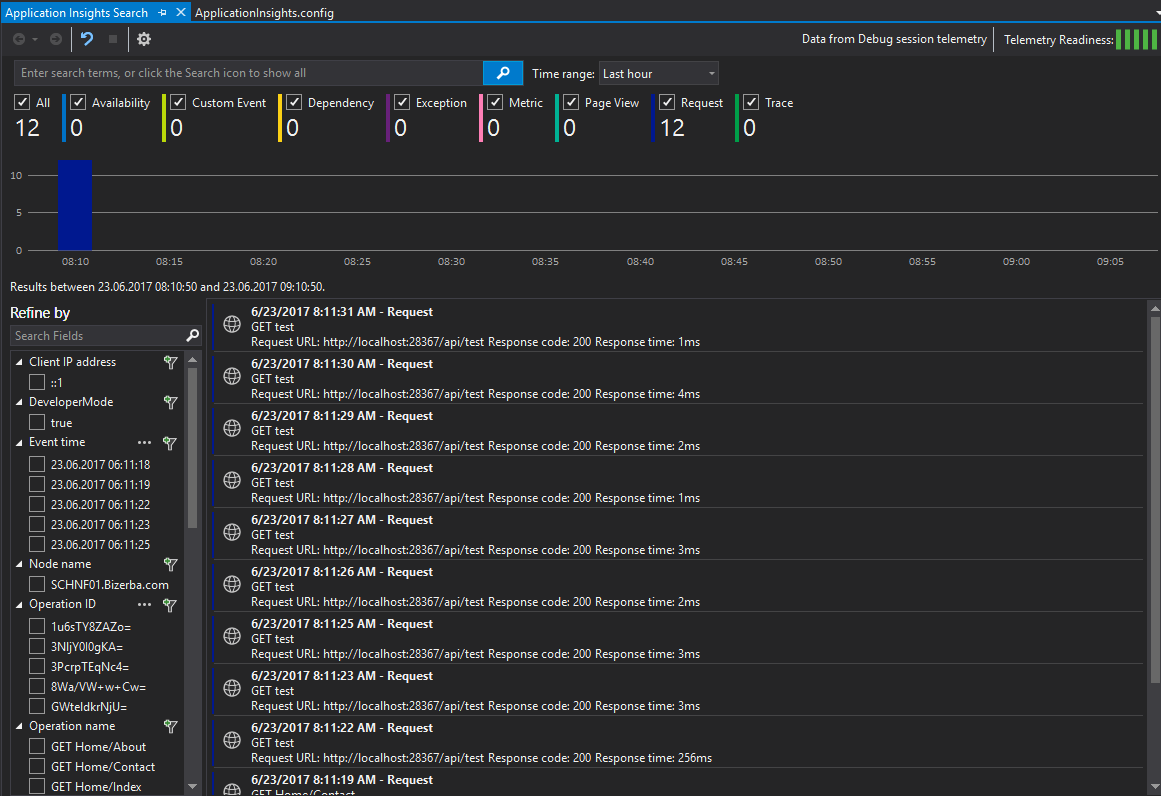
Azure门户网站(德文):
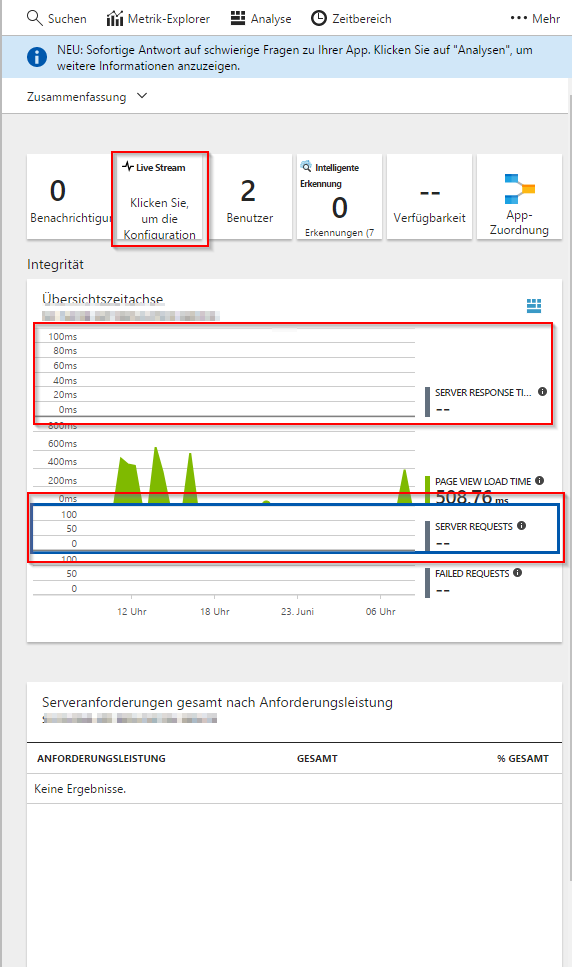
回答 3
Stack Overflow用户
发布于 2018-07-02 11:44:09
在忽略这个任务很长时间之后,我终于找到了答案。该服务托管在公司代理之后,为了使它能够发送数据到azure,您必须将代理添加到您的web.config中:
<configuration>
     <system.net enabled="true" useDefaultCredentials="true">
         <proxy proxyaddress="http://url.to.your.proxy" bypasslocal="true" />
     </system.net>
</configuration>
您必须采用与代理配置相关的设置。
Stack Overflow用户
发布于 2017-06-23 06:30:46
我将Application添加到我现有的MVC项目中,通过以下步骤,我可以获得实时度量流和服务器请求度量,请参考它。
- 右键单击“解决方案资源管理器”中的web应用程序项目,并选择“添加”>“应用程序内视遥测”.,然后将应用程序注册到Application并配置Application。(这将帮助我们安装与Application相关的软件包并配置项目。)
- 打开网页生成一些遥测
- 在Azure门户上,我可以看到在线服务器和Live度量流的数量。
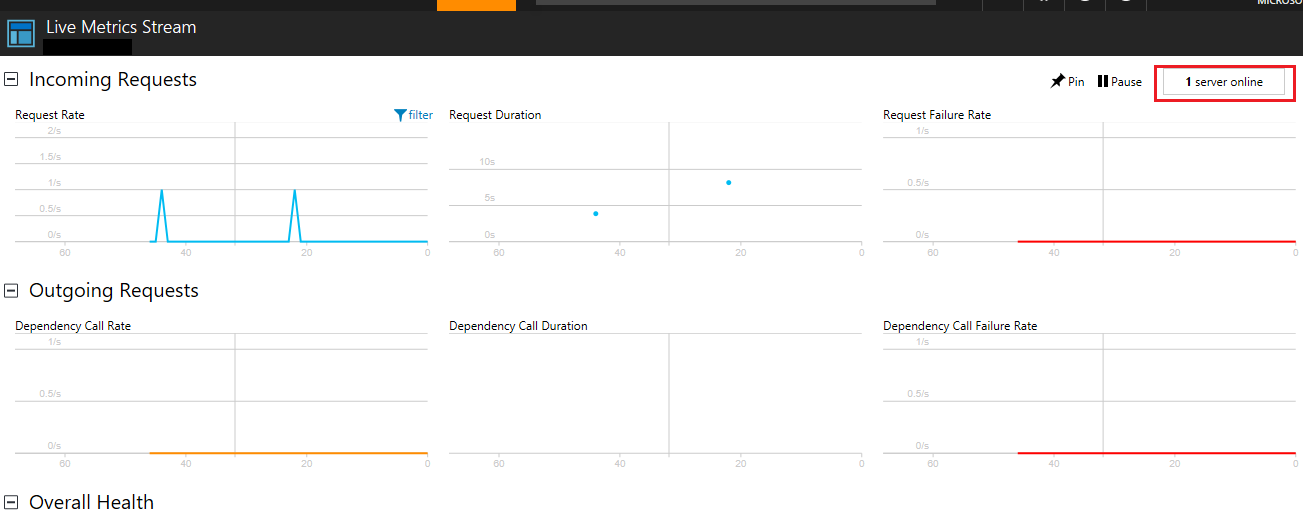
- 添加图表以显示服务器请求
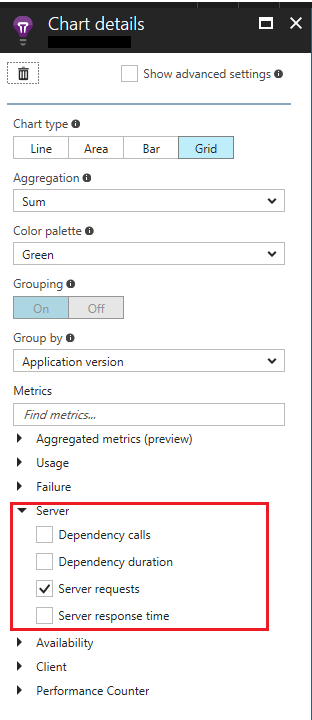
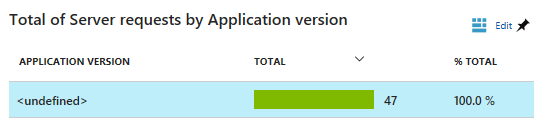
此外,您还可以参考这篇文章,它展示了如何配置您的ASP.NET web应用程序将遥测发送到Azure应用程序Insight服务。
Stack Overflow用户
发布于 2017-06-23 14:16:00
您的Azure应用程序洞察力资源没有链接到您的web应用程序。
在Azure门户中,找到您的应用程序洞察资源并导航到配置->属性。
在那里你会找到“仪器钥匙”。
将该密钥复制到您的applicationInsights.config部分:
<InstrumentationKey>Our key</InstrumentationKey>https://stackoverflow.com/questions/44701228
复制相似问题
腾讯云开发者

Copyright © 2013 - 2026 Tencent Cloud. All Rights Reserved. 腾讯云 版权所有
深圳市腾讯计算机系统有限公司 ICP备案/许可证号:粤B2-20090059  粤公网安备44030502008569号
腾讯云计算(北京)有限责任公司 京ICP证150476号 | 京ICP备11018762号