
使用npm angular2导入库
使用npm angular2导入库
提问于 2017-06-22 02:53:10
我无法使用npm设置这个图书馆。
命令完成:
npm install ng2-charts --save
npm install chart.js --save
index.html
我加了这一行
<script src="node_modules/chart.js/src/chart.js"></script>app.module
        import { ChartsModule } from 'ng2-charts/ng2-charts';

    @NgModule({
      imports: [
        BrowserModule,
        RouterModule.forRoot(router),
        HttpModule,
        ChartsModule,

      ],
systemjs.config.js
(function (global) {
  System.config({
    paths: {
      // paths serve as alias
      'npm:': 'node_modules/'
    },
    // map tells the System loader where to look for things
    map: {
      // our app is within the app folder
      'app': 'app',

      // angular bundles
      '@angular/core': 'npm:@angular/core/bundles/core.umd.js',
      '@angular/common': 'npm:@angular/common/bundles/common.umd.js',
      '@angular/compiler': 'npm:@angular/compiler/bundles/compiler.umd.js',
      '@angular/platform-browser': 'npm:@angular/platform-browser/bundles/platform-browser.umd.js',
      '@angular/platform-browser-dynamic': 'npm:@angular/platform-browser-dynamic/bundles/platform-browser-dynamic.umd.js',
      '@angular/http': 'npm:@angular/http/bundles/http.umd.js',
      '@angular/router': 'npm:@angular/router/bundles/router.umd.js',
      '@angular/forms': 'npm:@angular/forms/bundles/forms.umd.js',

      // other libraries
      'rxjs':                      'npm:rxjs',
      'angular-in-memory-web-api': 'npm:angular-in-memory-web-api/bundles/in-memory-web-api.umd.js',
      'chartJS':                   'npm:ng2-charts'
    },
    // packages tells the System loader how to load when no filename and/or no extension
    packages: {
      app: {
        defaultExtension: 'js',
        meta: {
          './*.js': {
            loader: 'systemjs-angular-loader.js'
          }
        }
      },
      chartJS:{
        defaultExtension: 'js'
      },
      rxjs: {
        defaultExtension: 'js'
      }
    }
  });
})(this);
我的控制台
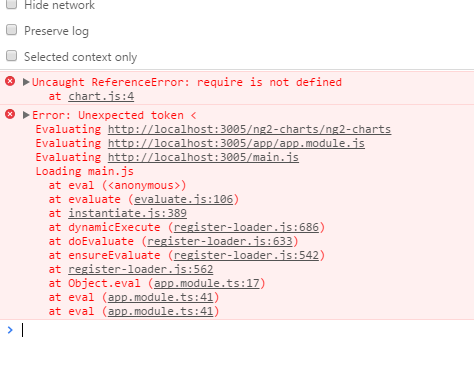
这个localhost:3005/ng2-charts/ng2-charts的内容实际上是一个index.html文件,它指的是我的index.html。
我几个小时都搞不懂它是怎么工作的。
回答 1
Stack Overflow用户
发布于 2017-06-22 02:57:32
你的system.js配置应该是
  map: {
    'chart.js': 'npm:chart.js/dist/Chart.bundle.min.js',
     'ng2-charts': 'npm:ng2-charts'
  }
在包裹里,
 'ng2-charts': {
   main: 'ng2-charts.js',
   defaultExtension: 'js'
}页面原文内容由Stack Overflow提供。腾讯云小微IT领域专用引擎提供翻译支持
原文链接:
https://stackoverflow.com/questions/44689352
复制相关文章
相似问题
腾讯云开发者

Copyright © 2013 - 2026 Tencent Cloud. All Rights Reserved. 腾讯云 版权所有
深圳市腾讯计算机系统有限公司 ICP备案/许可证号:粤B2-20090059  粤公网安备44030502008569号
腾讯云计算(北京)有限责任公司 京ICP证150476号 | 京ICP备11018762号