
用于使用gradle构建的kotlin版本(1.1.2-5)不同于绑定到IDE插件中的版本(1.1.2-4)
用于使用gradle构建的kotlin版本(1.1.2-5)不同于绑定到IDE插件中的版本(1.1.2-4)
提问于 2017-06-20 05:29:27
有人解决过这个问题吗?
用于使用gradle构建的kotlin版本(1.1.2-5)不同于绑定到IDE插件中的版本(1.1.2-4)
我用3.0金丝雀4号
回答 7
Stack Overflow用户
发布于 2018-01-09 13:52:12
Stack Overflow用户
发布于 2018-06-02 02:59:18
在我的例子中,我将Java转换为Kotlin,并且已经安装了更低版本的Kotlin。所以我更新了它。
Tools -> Kotlin -> Configure Kotlin Plugin Updates然后Check for updates now选择Stable
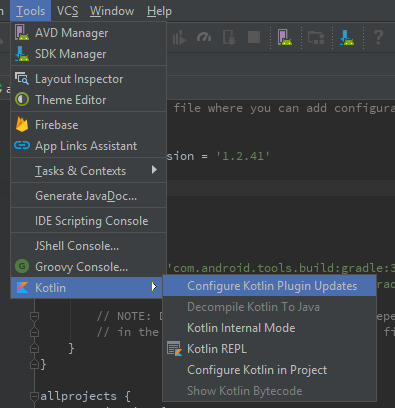
。
但是它没有自动更新build.gradle文件中的我的版本。因为它检测到了一个较新的版本,并且与旧版本不同。
因此,我手动将我的版本更新为最新的
ext.kotlin_version = '1.0.0'到ext.kotlin_version = '1.2.41'
buildscript {
    ext.kotlin_version = '1.2.41'

    repositories {
        google()
        jcenter()
    }

    dependencies {
        classpath 'com.android.tools.build:gradle:3.1.2'
        classpath "org.jetbrains.kotlin:kotlin-gradle-plugin:$kotlin_version"

        // NOTE: Do not place your application dependencies here; they belong
        // in the individual module build.gradle files
    }
}Stack Overflow用户
发布于 2017-06-20 11:58:35
有一个Android Studio 3.0发行金丝雀4阻止它加载更新版本的Kotlin插件。在新版AndroidStudio3.0发布之前,您可以忽略build.gradle中的Kotlin插件所显示的警告。
页面原文内容由Stack Overflow提供。腾讯云小微IT领域专用引擎提供翻译支持
原文链接:
https://stackoverflow.com/questions/44644524
复制相关文章
相似问题
腾讯云开发者

Copyright © 2013 - 2026 Tencent Cloud. All Rights Reserved. 腾讯云 版权所有
深圳市腾讯计算机系统有限公司 ICP备案/许可证号:粤B2-20090059  粤公网安备44030502008569号
腾讯云计算(北京)有限责任公司 京ICP证150476号 | 京ICP备11018762号