
HTML输入自动填充占位符
当用户写到文本框中时,显示用户建议的最佳方法是什么?我在JS数组中有所有可能的值。以数组["TYPO3", "Javascript"]为例。现在,如果用户输入这样一个字符串的起始字符,他应该得到如下建议:
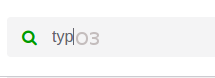
我很清楚占位符 html5标记,但是只有当文本框为空时才能工作。我也知道数据表元素或jQuery自动完成,但它们只允许特定的值。我还希望文本框中没有预定义的内容。
我的想法是在光标后面添加一个<span>标记,在输入keyup事件上更改其内容,并将span移到光标当前所在的位置。这也将使我有可能提出建议案文。
但对我来说,这似乎是一次糟糕的攻击,那么有没有一个更清洁的解决方案呢?
回答 2
Stack Overflow用户
发布于 2017-06-18 13:42:19
我不能告诉您什么是最好的方法,但是如果您信任Google的方法,那么它们的解决方案非常简单:
- 为实际输入设置一个常规文本框(
<input type='text' ...>)。 - 一个同级
<input>元素,它是disabled。
实际文本框应该位于禁用文本框的顶部。当用户开始键入并找到与自动完成匹配时,建议的文本应该成为其他value输入元素的disabled (建议的文本应该是银色的)。
下面是一个小例子:https://jsfiddle.net/e3L93o7g/
Stack Overflow用户
发布于 2019-06-26 02:14:03
这就是你想要的(我希望):
编辑:--不知怎么的--它在这里不能正常工作,所以我把公共小提琴作为备份:)。
const names = [
	'Predator_1', 'Semantic_RL', 'Thorn', 'Kill_09', 'One', 'Preclude'
];

const container = document.querySelector('#autocomplete-container');
const autocomplete = container.querySelector('#autocomplete');
const mainInput = container.querySelector('#main-input');

mainInput.addEventListener('keyup', onKeyUp, false);

let foundName = '';

function onKeyUp(e) {
	// e.preventDefault();
	console.log( mainInput.value, e );
  console.log( autocomplete.textContent );

  if (mainInput.value === '') {
  	autocomplete.textContent = '';
    return;
  }

  if  (keyChecker(e, 'Enter') || keyChecker(e, 'ArrowRight') ) {
  	console.log('keyChecker')
		mainInput.value = foundName;
    autocomplete.textContent = '';
  }

  let found=false;

  for (let word of names) {
  	if (word.indexOf(mainInput.value) === 0) {
    	foundName = word;
    	autocomplete.textContent = word;
      break;
    } else {
    	foundName = '';
      autocomplete.textContent = '';
    }
  }

}

function keyChecker(e, key) {
	const keys = {
  	'ArrowRight':37,
    'Enter':13,
    'ArrowLeft':39
  }

	if (e.keyCode === keys[key] || e.which === keys[key] || e.key === key) return true;

  return false;
}div#autocomplete-container, input#main-input {
font: 14px Tahoma, Verdana, Arial, sans-serif;
}
#autocomplete-container {
position: relative;
box-sizing: border-box;
width: 300px;
height: 32px;
line-height: 32px;
margin: 0 auto;
}
#autocomplete {
width: 300px;
position: absolute;
top: 0;
left: 0;
padding: 0 8px;
line-height: 32px;
box-sizing: border-box;
height: 32px;
color: #999;
cursor: text;
}
#autocomplete-container input[type=text] {
position: absolute;
top: 0;
left: 0;
width: 300px;
height: 32px;
line-height: 32px;
border: 1px solid #aaa;
border-radius: 4px;
outline: none;
padding: 0 8px;
box-sizing: border-box;
transition: 0.2s;
background-color: transparent;
cursor: text;
}
#autocomplete-container input[type=text]:focus {
border-color: dodgerBlue;
box-shadow: 0 0 8px 0 dodgerBlue;
}<div id="autocomplete-container">
<div id="autocomplete"></div>
<input
id="main-input"
type="text"
placeholder="Enter route..." />
</div>
https://stackoverflow.com/questions/44615327
复制相似问题
腾讯云开发者

Copyright © 2013 - 2026 Tencent Cloud. All Rights Reserved. 腾讯云 版权所有
深圳市腾讯计算机系统有限公司 ICP备案/许可证号:粤B2-20090059  粤公网安备44030502008569号
腾讯云计算(北京)有限责任公司 京ICP证150476号 | 京ICP备11018762号