
iOS,Swift:如何允许读者使用导航栏按钮项来调整WKWebView中的字体大小?
iOS,Swift:如何允许读者使用导航栏按钮项来调整WKWebView中的字体大小?
提问于 2017-06-17 20:38:58
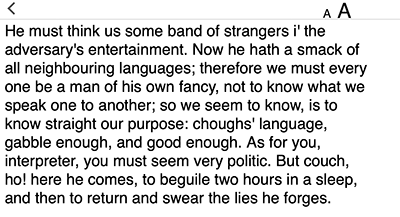
欢迎光临。我试图使用两个以编程方式创建的导航栏按钮项(上面图像中的“A”越小越大),允许读者在WKWebView中为iPhones和iPads应用程序中显示的文本大小增加或缩小。
在视图控制器中,我有以下导入语句:
导入UIKit
导入WebKit
在viewDidLoad中,我有以下两个导航栏按钮图标:
    let button1 = UIBarButtonItem(image: UIImage(named: "A_16x16"), style: .plain, target: self, action:#selector(decreaseFontSize))

    let button2 = UIBarButtonItem(image: UIImage(named: "A_28x28"), style: .plain, target: self, action:#selector(increaseFontSize))

    self.navigationItem.rightBarButtonItems = [button2, button1]
我还启动了以下功能:
    func decreaseFontSize(_ button:UIBarButtonItem!) {

    fontSize = (fontSize > 14) ? fontSize-6 : fontSize
    let fontSpecifier = "document.body.style.fontSize = '" + String(fontSize) + "px'"
    print("decrease font size button pressed")
    print(fontSpecifier)
    textWebView.evaluateJavaScript(fontSpecifier, completionHandler: nil)

}

func increaseFontSize(_ button:UIBarButtonItem!) {

    fontSize = (fontSize < 50) ? fontSize+6 : fontSize
    let fontSpecifier = "document.body.style.fontSize = '" + String(fontSize) + "px'"
    print("increase font size button pressed")
    print(fontSpecifier)
    //textWebView.evaluateJavaScript("document.body.style.fontSize = '40px'", completionHandler: nil)
    textWebView.evaluateJavaScript(fontSpecifier, completionHandler: nil)

}
HTML文本的CSS包括以下样式:
  body {
      color: black;
      background: white;
      font-size: 1.2em; /*20px; but use em */
      text-align: left;
      font-family: "MyCustomFont", sans-serif;
      margin-right: 8px;
      margin-left: 8px;
  }
这有点工作,但" MyCustomFont“(或没有引号的MyCustomFont)被忽略了。I非常希望显示自定义字体。
如有任何指导或建议的解决办法,将不胜感激。
回答 1
Stack Overflow用户
发布于 2017-06-20 22:07:00
由于Aditya对Using custom fonts in WKWebView的回答,我将其放在CSS文件的顶部,并显示了我的自定义字体:
    @font-face {
        font-family: 'MyCustomFont';
        src: local('MyCustomFont'),url('MyCustomFont.ttf') format('truetype');
    }
图标看起来像我的iPad一样调整字体大小--迷你4,但在我的iPhone 6中“工作”有点不一致。我还没有接受这个,我自己的答案,作为“接受的答案”,因为还有改进的余地。
页面原文内容由Stack Overflow提供。腾讯云小微IT领域专用引擎提供翻译支持
原文链接:
https://stackoverflow.com/questions/44609194
复制相关文章
相似问题
腾讯云开发者

Copyright © 2013 - 2026 Tencent Cloud. All Rights Reserved. 腾讯云 版权所有
深圳市腾讯计算机系统有限公司 ICP备案/许可证号:粤B2-20090059  粤公网安备44030502008569号
腾讯云计算(北京)有限责任公司 京ICP证150476号 | 京ICP备11018762号