
2013年展望中的tr,td宽度
2013年展望中的tr,td宽度
提问于 2017-06-14 17:51:25
我研究过的所有解决方案都无助于解决我的问题。我无法在Outlook电子邮件客户端中获得tr和td的宽度。以下是一个示例:
    <table width="600" style="box-sizing: border-box; max-width: 600px; margin: 0px auto; width: 600px; height: 150px; background-color: #ffffff; table-layout: fixed; padding: 20px; border-collapse: collapse; mso-table-lspace: 0; mso-table-rspace: 0;" border="0" cellpadding="0" cellspacing="0">
  <tbody width="600" style="box-sizing: border-box; width: 100%;">
    <!--Header Row-->
    <tr width="600" style="box-sizing: border-box; width: 100%;">
      <td width="600" style="box-sizing: border-box; display: inline-block; width: 100%; border-collapse: collapse; mso-table-lspace: 0; mso-table-rspace: 0;"><a href="http://example.org" style="box-sizing: border-box; font-family: 'Arial', sans-serif; text-decoration: none;"> <img src="http://example.img-us3.com/BarberJ/header-image-560.png" width="100%" height="auto" alt="header-image.png" title="header-image.png" style="box-sizing: border-box;"></a></td>
    </tr>
    <!--End Header Row--><!--Hero Image Row-->
    <tr style="box-sizing: border-box; width: 100%;">
      <td style="box-sizing: border-box; display: inline-block; width: 100%; border-collapse: collapse; mso-table-lspace: 0; mso-table-rspace: 0;"><img src="http://example.img-us3.com/BarberJ/hero-image-560.png" width="100%" height="auto" alt="hero-image.png" title="hero-image.png" style="box-sizing: border-box;"></td>
    </tr>
    <!--End Hero Image--><!--Main Heading/CTA-->
    <tr width="600" style="box-sizing: border-box; width: 100%;">
      <td width="75%" style="box-sizing: border-box; width: 75%; display: inline-block; padding: 0; border-collapse: collapse; mso-table-lspace: 0; mso-table-rspace: 0;">
        <h1 style="box-sizing: border-box; font-family: 'Arial', sans-serif; font-size: 26px; margin-bottom: 0px; font-weight: 800; color: #425563; margin-top: 4px;">Knitting New Knockers</h1>
        <p style="box-sizing: border-box; font-family: 'Arial', sans-serif; font-size: 12px; margin-top: 4px; font-weight: 100; color: #425563;">How a knitting Group is putting the 'ta-da' back in ta-tas.</p>
      </td>
      <td width="25%" style="box-sizing: border-box; display: inline-block; padding: 0; width: 25%; border-collapse: collapse; mso-table-lspace: 0; mso-table-rspace: 0;">
        <table border="0" cellspacing="0" cellpadding="0" style="box-sizing: border-box; border-collapse: collapse; mso-table-lspace: 0; mso-table-rspace: 0;">
          <tbody>
            <tr style="box-sizing: border-box;">
              <td bgcolor="#9F1C3B" style="box-sizing: border-box; display: inline-block; padding: 5px 15px; -webkit-border-radius: 30px; border-radius: 30px; color: #fff; border-collapse: collapse; mso-table-lspace: 0; mso-table-rspace: 0;" align="center"><a target="_blank" style="box-sizing: border-box; font-family: 'Arial', sans-serif; text-decoration: none; font-size: 16px; color: white;">Discover How</a>
              </td>
            </tr>
          </tbody>
        </table>
      </td>
    </tr>
</tbody>
</table>
我尝试在所有td和tr中增加固定宽度,我已经尝试删除任何百分比。在Outlook...where中没有什么是我的问题吗?
回答 2
Stack Overflow用户
回答已采纳
发布于 2017-06-14 19:52:48
在第三个<tr>行中,您添加了宽度为25%的第二个<td>。
获得更清晰输出的方法是将表划分为两个表,一个用于前两行图像,另一个用于表的其余两行。
<!DOCTYPE html PUBLIC "-//W3C//DTD XHTML 1.0 Strict//EN" "http://www.w3.org/TR/xhtml1/DTD/xhtml1-strict.dtd">
<html xmlns="http://www.w3.org/1999/xhtml">
<head>
  <meta http-equiv="X-UA-Compatible" content="IE=edge">
  <meta name="viewport" content="width=device-width, initial-scale=1.0">
  <meta http-equiv="Content-Type" content="text/html; charset=utf-8" />
</head>
<body>
  <table width="600" style="box-sizing: border-box; max-width: 600px; margin: 0px auto; width: 600px; height: 150px; background-color: #ffffff; table-layout: fixed; padding: 20px; border-collapse: collapse; mso-table-lspace: 0; mso-table-rspace: 0;" border="1" cellpadding="0" cellspacing="0">
    <tbody width="600" style="box-sizing: border-box; width: 100%;">
    <!--Header Row-->
    <tr width="600" style="box-sizing: border-box; width: 100%;">
      <td width="600" style="box-sizing: border-box; display: inline-block; width: 100%; border-collapse: collapse; mso-table-lspace: 0; mso-table-rspace: 0;"><a href="http://example.org" style="box-sizing: border-box; font-family: 'Arial', sans-serif; text-decoration: none;"> <img src="http://example.img-us3.com/BarberJ/header-image-560.png" width="100%" height="auto" alt="header-image.png" title="header-image.png" style="box-sizing: border-box;"></a></td>
   </tr>
   <!--End Header Row--><!--Hero Image Row-->
   <tr style="box-sizing: border-box; width: 100%;">
     <td style="box-sizing: border-box; display: inline-block; width: 100%; border-collapse: collapse; mso-table-lspace: 0; mso-table-rspace: 0;"><img src="http://example.img-us3.com/BarberJ/hero-image-560.png" width="100%" height="auto" alt="hero-image.png" title="hero-image.png" style="box-sizing: border-box;"></td>
   </tr>
  <!--End Hero Image--><!--Main Heading/CTA-->
</table>
<table width="600" style="box-sizing: border-box; max-width: 600px; margin: 0px auto; width: 600px; height: 150px; background-color: #ffffff; table-layout: fixed; padding: 20px; border-collapse: collapse; mso-table-lspace: 0; mso-table-rspace: 0;" border="1" cellpadding="0" cellspacing="0">
<tbody width="600" style="box-sizing: border-box; width: 100%;">
<tr width="600" style="box-sizing: border-box; width: 100%;">
  <td width="75%" style="box-sizing: border-box; width: 75%; display: inline-block; padding: 0; border-collapse: collapse; mso-table-lspace: 0; mso-table-rspace: 0;">
    <h1 style="box-sizing: border-box; font-family: 'Arial', sans-serif; font-size: 26px; margin-bottom: 0px; font-weight: 800; color: #425563; margin-top: 4px;">Knitting New Knockers</h1>
    <p style="box-sizing: border-box; font-family: 'Arial', sans-serif; font-size: 12px; margin-top: 4px; font-weight: 100; color: #425563;">How a knitting Group is putting the 'ta-da' back in ta-tas.</p>
  </td>
  <td width="25%" style="box-sizing: border-box; display: inline-block; padding: 0; width: 25%; border-collapse: collapse; mso-table-lspace: 0; mso-table-rspace: 0;">
    <table border="0" cellspacing="0" cellpadding="0" style="box-sizing: border-box; border-collapse: collapse; mso-table-lspace: 0; mso-table-rspace: 0;">
      <tbody>
        <tr style="box-sizing: border-box;">
          <td bgcolor="#9F1C3B" style="box-sizing: border-box; display: inline-block; padding: 5px 15px; -webkit-border-radius: 30px; border-radius: 30px; color: #fff; border-collapse: collapse; mso-table-lspace: 0; mso-table-rspace: 0;" align="center"><a target="_blank" style="box-sizing: border-box; font-family: 'Arial', sans-serif; text-decoration: none; font-size: 16px; color: white;">Discover How</a>
            </td>
          </tr>
        </tbody>
      </table>
    </td>
  </tr>
</tbody>
</table>
</body>
</html>
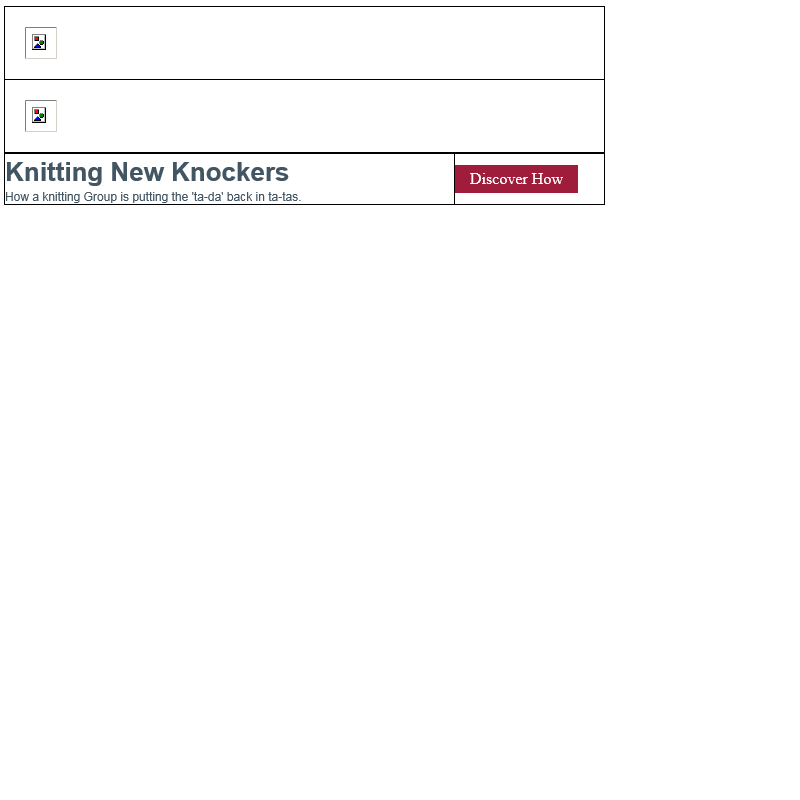
修复后的Outlook 2016表如下所示:
祝好运。
Stack Overflow用户
发布于 2017-06-14 19:40:28
可以说你错过了td的。更大的两个图片位于单个td上,最下面的一行位于两个td上,这就是为什么您的表不是aligning.Also的原因--尝试不使用框大小,旧的浏览器不读取它,而它的代码只占用文件大小。所有的电子邮件开发者都知道在电子邮件中,几千字节是多么重要。
<table width="600" style="box-sizing: border-box; max-width: 600px; margin: 0px auto; width: 600px; height: 150px; background-color: #ffffff; table-layout: fixed; padding: 20px; border-collapse: collapse; mso-table-lspace: 0; mso-table-rspace: 0;" border="0" cellpadding="0" cellspacing="0">
<tbody width="600" style="box-sizing: border-box; width: 100%;">
  <tr style="box-sizing: border-box; width: 100%;">
    <td style="box-sizing: border-box; display: inline-block; width: 100%; border-collapse: collapse; mso-table-lspace: 0; mso-table-rspace: 0;"><table width="600" style="box-sizing: border-box; max-width: 600px; margin: 0px auto; width: 600px; height: 150px; background-color: #ffffff; table-layout: fixed; padding: 20px; border-collapse: collapse; mso-table-lspace: 0; mso-table-rspace: 0;" border="0" cellpadding="0" cellspacing="0">
      <tbody width="600" style="box-sizing: border-box; width: 100%;">
        <!--Header Row-->
        <tr width="600" style="box-sizing: border-box; width: 100%;">
          <td width="600" style="box-sizing: border-box; display: inline-block; width: 100%; border-collapse: collapse; mso-table-lspace: 0; mso-table-rspace: 0;"><a href="http://example.org" style="box-sizing: border-box; font-family: 'Arial', sans-serif; text-decoration: none;"> <img src="http://example.img-us3.com/BarberJ/header-image-560.png" width="100%" height="auto" alt="header-image.png" title="header-image.png" style="box-sizing: border-box;"></a></td>
        </tr>
        <!--End Header Row-->
        <!--Hero Image Row-->
        <tr style="box-sizing: border-box; width: 100%;">
          <td style="box-sizing: border-box; display: inline-block; width: 100%; border-collapse: collapse; mso-table-lspace: 0; mso-table-rspace: 0;"><img src="http://example.img-us3.com/BarberJ/hero-image-560.png" width="100%" height="auto" alt="hero-image.png" title="hero-image.png" style="box-sizing: border-box;"></td>
        </tr>
        <!--End Hero Image-->
        <!--Main Heading/CTA-->
      </tbody>
    </table></td>
  </tr>
</tbody>
</table>
<table width="600" border="0" cellpadding="0" cellspacing="0" style="box-sizing: border-box; max-width: 600px; margin: 0px auto; width: 600px; height: 150px; background-color: #ffffff; table-layout: fixed; padding: 20px; border-collapse: collapse; mso-table-lspace: 0; mso-table-rspace: 0;">
  <tbody width="600" style="box-sizing: border-box; width: 100%;">
    <!--Header Row-->
    <!--End Header Row-->
    <!--Hero Image Row-->
    <!--End Hero Image-->
    <!--Main Heading/CTA-->
    <tr width="600" style="box-sizing: border-box; width: 100%;">
      <td width="75%" style="box-sizing: border-box; width: 75%; display: inline-block; padding: 0; border-collapse: collapse; mso-table-lspace: 0; mso-table-rspace: 0;"><h1 style="box-sizing: border-box; font-family: 'Arial', sans-serif; font-size: 26px; margin-bottom: 0px; font-weight: 800; color: #425563; margin-top: 4px;">Knitting New Knockers</h1>
        <p style="box-sizing: border-box; font-family: 'Arial', sans-serif; font-size: 12px; margin-top: 4px; font-weight: 100; color: #425563;">How a knitting Group is putting the 'ta-da' back in ta-tas.</p></td>
      <td width="25%" style="box-sizing: border-box; display: inline-block; padding: 0; width: 25%; border-collapse: collapse; mso-table-lspace: 0; mso-table-rspace: 0;"><table border="0" cellspacing="0" cellpadding="0" style="box-sizing: border-box; border-collapse: collapse; mso-table-lspace: 0; mso-table-rspace: 0;">
        <tbody>
          <tr style="box-sizing: border-box;">
            <td bgcolor="#9F1C3B" style="box-sizing: border-box; display: inline-block; padding: 5px 15px; -webkit-border-radius: 30px; border-radius: 30px; color: #fff; border-collapse: collapse; mso-table-lspace: 0; mso-table-rspace: 0;" align="center"><a target="_blank" style="box-sizing: border-box; font-family: 'Arial', sans-serif; text-decoration: none; font-size: 16px; color: white;">Discover How</a></td>
          </tr>
        </tbody>
      </table></td>
    </tr>
  </tbody>
</table>
希望这就是你想要的答案。
页面原文内容由Stack Overflow提供。腾讯云小微IT领域专用引擎提供翻译支持
原文链接:
https://stackoverflow.com/questions/44551505
复制相关文章
相似问题
腾讯云开发者

Copyright © 2013 - 2026 Tencent Cloud. All Rights Reserved. 腾讯云 版权所有
深圳市腾讯计算机系统有限公司 ICP备案/许可证号:粤B2-20090059  粤公网安备44030502008569号
腾讯云计算(北京)有限责任公司 京ICP证150476号 | 京ICP备11018762号