
如何在PowerPoint中使用openxml向单元格添加边框?
我试图通过PowerPoint通过OpenXml更改表的顶部边框,但它对我没有用。该单元格当前有左、右和底边框,但当我试图复制底部边框并将其添加到顶部边框时,PowerPoint不反映更改。
我需要改变什么,或者我做错了什么才能让它发挥作用?
我现在有下面的代码来复制底部边框并替换它。
   BottomBorderLineProperties btp = (BottomBorderLineProperties)celda.TableCellProperties.BottomBorderLineProperties.CloneNode(true);

   TopBorderLineProperties tbp = new TopBorderLineProperties()
   {
         Alignment = btp.Alignment,
         CapType = btp.CapType,
         CompoundLineType = btp.CompoundLineType,
         MCAttributes = btp.MCAttributes,
         Width = btp.Width
    };

   foreach(OpenXmlElement element in btp.ChildElements)
   {
       tbp.Append(element.CloneNode(true));
   }

   celda.TableCellProperties.TopBorderLineProperties = tbp;
谢谢!
PS:对不起我的英语
回答 1
Stack Overflow用户
发布于 2017-06-20 21:39:04
为了在PowerPoint表的中间设置单元格的顶部边框,您必须完成两个步骤:
步骤1:将单元格的底部边框直接设置在所讨论的单元格之上,
步骤2:设置单元格的顶部边框(您有该部分)
我通过使用OpenXML Productivity工具确定了这一点。我使用了一个简单的1幻灯片PowerPoint文件,名为Before.pptx,其表单元格具有左、下和右边框。
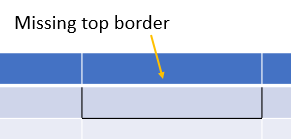
然后我添加了顶部边框(使用PowerPoint 2016)并将文件保存为After.pptx。然后,我使用Productivity工具对这两个文件进行了区分,并反向工程了使Before.pptx看起来像After.pptx所需的Before.pptx代码。您需要的重要代码显示在这里:
        //STEP 1 CODE STARTS HERE
        A.Table table1=graphicData1.GetFirstChild<A.Table>();

        A.TableRow tableRow1=table1.GetFirstChild<A.TableRow>();
        A.TableRow tableRow2=table1.Elements<A.TableRow>().ElementAt(1);

        A.TableCell tableCell1=tableRow1.Elements<A.TableCell>().ElementAt(2);

        A.TableCellProperties tableCellProperties1=tableCell1.GetFirstChild<A.TableCellProperties>();

        A.BottomBorderLineProperties bottomBorderLineProperties1 = new A.BottomBorderLineProperties(){ Width = 12700, CapType = A.LineCapValues.Flat, CompoundLineType = A.CompoundLineValues.Single, Alignment = A.PenAlignmentValues.Center };

        A.SolidFill solidFill1 = new A.SolidFill();
        A.SchemeColor schemeColor1 = new A.SchemeColor(){ Val = A.SchemeColorValues.Text1 };

        solidFill1.Append(schemeColor1);
        A.PresetDash presetDash1 = new A.PresetDash(){ Val = A.PresetLineDashValues.Solid };
        A.Round round1 = new A.Round();
        A.HeadEnd headEnd1 = new A.HeadEnd(){ Type = A.LineEndValues.None, Width = A.LineEndWidthValues.Medium, Length = A.LineEndLengthValues.Medium };
        A.TailEnd tailEnd1 = new A.TailEnd(){ Type = A.LineEndValues.None, Width = A.LineEndWidthValues.Medium, Length = A.LineEndLengthValues.Medium };

        bottomBorderLineProperties1.Append(solidFill1);
        bottomBorderLineProperties1.Append(presetDash1);
        bottomBorderLineProperties1.Append(round1);
        bottomBorderLineProperties1.Append(headEnd1);
        bottomBorderLineProperties1.Append(tailEnd1);
        tableCellProperties1.Append(bottomBorderLineProperties1);
        //STEP 1 CODE ENDS HERE


        //STEP 2 CODE STARTS HERE
        A.TableCell tableCell2=tableRow2.Elements<A.TableCell>().ElementAt(2);

        A.TableCellProperties tableCellProperties2=tableCell2.GetFirstChild<A.TableCellProperties>();

        A.BottomBorderLineProperties bottomBorderLineProperties2=tableCellProperties2.GetFirstChild<A.BottomBorderLineProperties>();

        A.TopBorderLineProperties topBorderLineProperties1 = new A.TopBorderLineProperties(){ Width = 12700, CapType = A.LineCapValues.Flat, CompoundLineType = A.CompoundLineValues.Single, Alignment = A.PenAlignmentValues.Center };

        A.SolidFill solidFill2 = new A.SolidFill();
        A.SchemeColor schemeColor2 = new A.SchemeColor(){ Val = A.SchemeColorValues.Text1 };

        solidFill2.Append(schemeColor2);
        A.PresetDash presetDash2 = new A.PresetDash(){ Val = A.PresetLineDashValues.Solid };
        A.Round round2 = new A.Round();
        A.HeadEnd headEnd2 = new A.HeadEnd(){ Type = A.LineEndValues.None, Width = A.LineEndWidthValues.Medium, Length = A.LineEndLengthValues.Medium };
        A.TailEnd tailEnd2 = new A.TailEnd(){ Type = A.LineEndValues.None, Width = A.LineEndWidthValues.Medium, Length = A.LineEndLengthValues.Medium };

        topBorderLineProperties1.Append(solidFill2);
        topBorderLineProperties1.Append(presetDash2);
        topBorderLineProperties1.Append(round2);
        topBorderLineProperties1.Append(headEnd2);
        topBorderLineProperties1.Append(tailEnd2);
tableCellProperties2.InsertBefore(topBorderLineProperties1,bottomBorderLineProperties2);我对我的Before.pptx文件运行了上面的代码,边框就完成了。
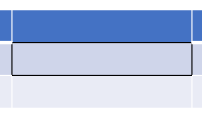
为了再次检查这两个步骤是否必要,我注释掉了步骤1的代码,并在一个新版本的Before.pptx文件中运行它,并且缺少了顶部边框。这证实了你看到的问题。因此,这两个步骤对于绘制一个边界是必要的。
https://stackoverflow.com/questions/44548311
复制相似问题
腾讯云开发者

Copyright © 2013 - 2026 Tencent Cloud. All Rights Reserved. 腾讯云 版权所有
深圳市腾讯计算机系统有限公司 ICP备案/许可证号:粤B2-20090059  粤公网安备44030502008569号
腾讯云计算(北京)有限责任公司 京ICP证150476号 | 京ICP备11018762号