
如何在框内强制使用checkboxGroupInput元素
如何在框内强制使用checkboxGroupInput元素
提问于 2017-06-13 14:37:33
我有一个反应性的checkboxGroupInput,将用户上传的输入文件中的列名作为值。输入文件有时可能有100多个列,所以我使用这答案将选项对齐为多个列。它大多数情况下运行良好,但有时列名非常大,因此标签不在框内:
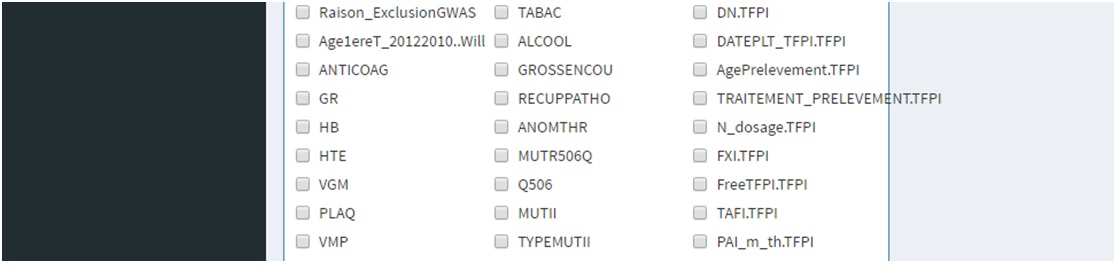
你知道我怎样才能克服这个问题吗?
我已经准备了一个使用mtcars数据集(以及row.names而不是colnames )的示例代码。
library(shiny)
library(shinydashboard)

sidebar <- dashboardSidebar(
  sidebarMenu(
    busyIndicator(text="Loading..."),
    tags$head(
      tags$style(
        HTML('
             .multicol {
             -webkit-column-count: 3; /* Chrome, Safari, Opera */
             -moz-column-count: 3;    /* Firefox */
             column-count: 3;
             -moz-column-fill: auto;
             -column-fill: auto;
             }
             ')
        )
        ),

    menuItem("Plot result", tabName = "scatterplot", icon = icon("area-chart"))
    )
)

body <- dashboardBody(
  tabItems(
    tabItem(tabName = "scatterplot",
              box(
                title="CHECKBOX",solidHeader = TRUE, status="primary",
                tags$div(align = 'left',
                         class = 'multicol', uiOutput("covarselect")),
                width=2
              )
            )
    )
)

ui=dashboardPage(
  dashboardHeader(title = "analysis"),
  sidebar,
  body
)

server <- function(input, output,session) {
  output$covarselect <- renderUI({
    mtcars <- datasets::mtcars
    row.names(mtcars) <- gsub(" ","",row.names(mtcars))
    checkboxGroupInput("carselect","Select any that apply",as.list(row.names(mtcars)),inline=F)
  })
}

shinyApp(ui = ui, server = server)
编辑
按照尼基尔·南贾帕的建议,我尝试在小提琴中复制这个问题,尽管我没有像在shinydashboard中那样成功地复制box。
回答 1
Stack Overflow用户
发布于 2022-06-29 20:45:20
添加overflow-y和height样式属性,其中分组复选框位于分区<div>中,这与您的设计类似。
UI:

fluidRow(
 box(
     width = 2,
     title = "Grouped Checkboxes",
     div(id = 'groupchk' style = 'height: 400px; overflow-y: scroll;',
         checkboxGroupInput("chkbxgrp", "Choose:", choices = many_choices)
    )
),此外,假设分组复选框在box旁边,fluidRow中有一个图。你想要匹配情节的相对高度。您将从分区groupchk中删除样式,我们可以使用shinyjs::runjs函数动态设置高度。
对某些反应性的、观察的或renderUI函数执行此操作:
首先获取要匹配的元素的高度,然后将其赋值并设置溢出-y。要使shinyjs工作,必须使用useShinyjs() shinyjs:。
SERVER:

runjs("var newHeight = $('#plot').height();
       $('#groupchk').height(newHeight);
$('#groupchk').css('overflow-y','scroll')")页面原文内容由Stack Overflow提供。腾讯云小微IT领域专用引擎提供翻译支持
原文链接:
https://stackoverflow.com/questions/44524589
复制相关文章
相似问题
腾讯云开发者

Copyright © 2013 - 2026 Tencent Cloud. All Rights Reserved. 腾讯云 版权所有
深圳市腾讯计算机系统有限公司 ICP备案/许可证号:粤B2-20090059  粤公网安备44030502008569号
腾讯云计算(北京)有限责任公司 京ICP证150476号 | 京ICP备11018762号