
通过Python子进程运行Sysinternals时的编码问题
我有一个Python3.6.0脚本,我在系统上运行autorunsc v13.71 (https://technet.microsoft.com/en-us/sysinternals/bb963902.aspx) (根据使用platform.machine()的系统bitness,x86或x86_64版本)。如果我直接从终端(CMD或Powershell)运行autorunsc,就会得到预期的输出,没有问题(输出中的snip):
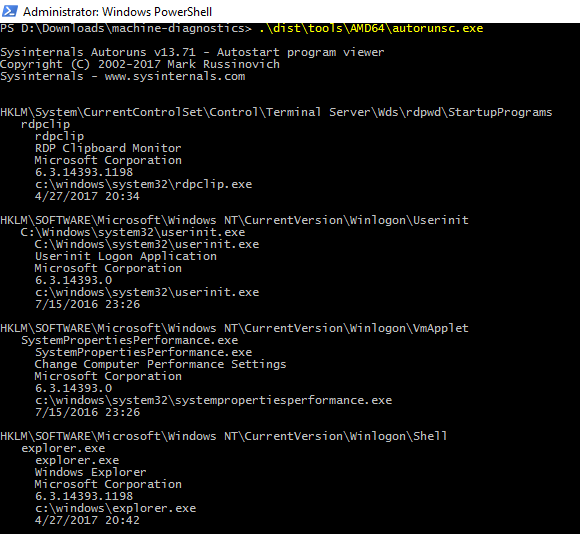
但是,如果我试图使用我的代码运行它,就会得到以下混乱的输出:

我使用窗口的默认记事本打开输出文本文件。人们应该能够使用记事本来阅读它,他们将无法下载像Notepad++、ST3等代码阅读器。
我的代码(删除了一些部分以保持简短和直接):
#!/usr/bin/env python
# -*- coding: utf-8 -*-

import platform
import socket
import subprocess
from time import gmtime, strftime
from pathlib import Path

HOSTNAME = socket.gethostname()
SYS_ARCH = platform.machine()  # AMD64 or x86
ROOT_PATH = Path(__file__).parent


def get_current_datetime():
    return strftime("%Y-%m-%d %H:%M:%S UTC%z", gmtime())


def run_command(output_file, command_name, command_args, system_cmd=False):
    output_file.write(f'---------- START [{command_name} {SYS_ARCH}] {get_current_datetime()} ----------\n')
    output_file.flush()

    file_path = command_name if system_cmd else str(ROOT_PATH / 'tools' / SYS_ARCH / (command_name + '.exe'))
    subprocess.call([file_path] + command_args, stdout=output_file, shell=True, universal_newlines=True)

    output_file.write(f'---------- ENDED [{command_name} {SYS_ARCH}] {get_current_datetime()} ----------\n\n')
    output_file.flush()
    print(f'[*] [{command_name} {SYS_ARCH}] done')


def main():
    output_file = ROOT_PATH.parent / (HOSTNAME + '.txt')
    with open(output_file, 'w', encoding='utf-8') as fout:
        run_command(output_file=fout, command_name='autorunsc', command_args=['-h', '-nobanner', '-accepteula'])


if __name__ == '__main__':
    main()
档案结构:
- 文件夹\
- app.py (这里显示的代码)
- 工具\
- AMD64 64\
- autorunsc.exe
- AMD64 64\
    - x86\
        - autorunsc.exe
我相信这与autorunsc的输出有关,我在某个地方看到它返回编码为UTF-16的输出。问题是,我运行了许多其他Sysinternals实例,并将输出附加到同一个文件(使用我的run_command函数),所有这些都完美无缺地工作,但这一个。我怎么才能把这件事做好?
回答 2
Stack Overflow用户
发布于 2017-06-12 22:34:13
若要在Microsoft中打开文件,必须使用Microsoft:\r\n (CR )。
Python3中的打开函数有一个换行符参数。
您可以这样修改代码:
with open(output_file, 'w', encoding='utf-8', newline='\r\n') as fout:
run_command(output_file=fout, command_name='autorunsc', command_args=['-h', '-nobanner', '-accepteula'])Stack Overflow用户
发布于 2017-06-13 00:59:52
我找到了解决办法。实际上,问题在于autorunsc工具输出的编码。它在UTF16中,其余的是UTF8,这就是我所做的:
# IF-ELSE to handle the 'autorunsc' output, which is UTF16
if command_name == 'autorunsc':
    result = subprocess.Popen([file_path] + command_args, stdout=subprocess.PIPE, stderr=subprocess.PIPE)
    text = result.stdout.read().decode('UTF16')
    for line in text:
        output_file.write(line)
else:
    subprocess.call([file_path] + command_args, stdout=output_file, stderr=output_file)
有了这段代码,我就可以在我的单个UTF-8 file.txt中拥有所有的输出。
https://stackoverflow.com/questions/44509547
复制相似问题
腾讯云开发者

Copyright © 2013 - 2026 Tencent Cloud. All Rights Reserved. 腾讯云 版权所有
深圳市腾讯计算机系统有限公司 ICP备案/许可证号:粤B2-20090059  粤公网安备44030502008569号
腾讯云计算(北京)有限责任公司 京ICP证150476号 | 京ICP备11018762号