
对盒图使用gganimate和gganimate:累积不工作
对盒图使用gganimate和gganimate:累积不工作
提问于 2017-06-04 14:13:25
我试图为一个仿真模型制作一个动画,我想展示结果的分布是如何随着模拟的运行而变化的。
我见过gganimate用于散乱的情节,但不用于盒子情节(或理想的小提琴情节)。在这里我提供了一个解释。
当我使用sim_category (这是一个用于一定数量的模拟运行的桶)时,我希望结果是以前所有运行的累加结果,以显示总分布。
在本例中(以及我的实际代码),cumulative = TRUE不会这样做。为什么会这样呢?
library(gganimate)
library(animation)
library(ggplot2)

df = as.data.frame(structure(list(ID = c(1,1,2,2,1,1,2,2,1,1,2,2),
                                  value = c(10,15,5,10,7,17,4,12,9,20,6,17),
                                  sim_category = c(1,1,1,1,2,2,2,2,3,3,3,3))))

df$ID <- factor(df$ID, levels = (unique(df$ID)))
df$sim_category <- factor(df$sim_category, levels = (unique(df$sim_category)))
ani.options(convert = shQuote('C:/Program Files/ImageMagick-7.0.5-Q16/magick.exe'))

p <- ggplot(df, aes(ID, value, frame= sim_category, cumulative = TRUE)) + geom_boxplot(position = "identity")

gganimate(p)回答 1
Stack Overflow用户
回答已采纳
发布于 2017-06-04 18:38:46
gganimate的累积不会累积数据,它只会将gif帧保持在后续的框架中。要实现您想要的结果,您必须先进行累积,然后再构建该图,如下所示:
library(tidyverse)
library(gganimate)

df <- data_frame(
  ID = factor(c(1,1,2,2,1,1,2,2,1,1,2,2), levels = 1:2),
  value = c(10,15,5,10,7,17,4,12,9,20,6,17),
  sim_category = factor(c(1,1,1,1,2,2,2,2,3,3,3,3), levels = 1:3)
)

p <- df %>%
  pull(sim_category) %>%
  levels() %>%
  as.integer() %>%
  map_df(~ df %>% filter(sim_category %in% 1:.x) %>% mutate(sim_category = .x)) %>%
  ggplot(aes(ID, value, frame = factor(sim_category))) +
  geom_boxplot(position = "identity")


gganimate(p)
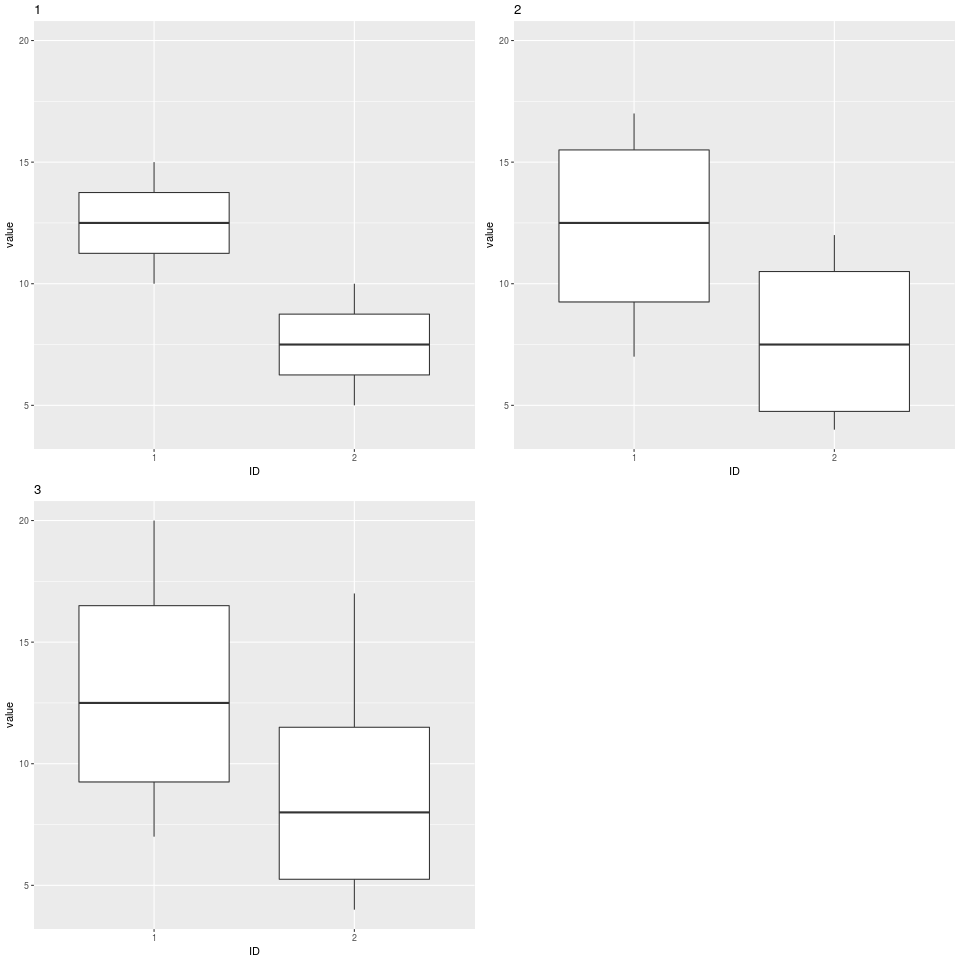
页面原文内容由Stack Overflow提供。腾讯云小微IT领域专用引擎提供翻译支持
原文链接:
https://stackoverflow.com/questions/44355035
复制相关文章
相似问题
腾讯云开发者

Copyright © 2013 - 2026 Tencent Cloud. All Rights Reserved. 腾讯云 版权所有
深圳市腾讯计算机系统有限公司 ICP备案/许可证号:粤B2-20090059  粤公网安备44030502008569号
腾讯云计算(北京)有限责任公司 京ICP证150476号 | 京ICP备11018762号