
在R中使用formattable时打印空白而不是NA
以示例data.frame为例
df <- data.frame(
  id = 1:4,
  name = c("Bob", "Ashley", "James", "David"),
  age = c(48, NA, 40, 28),
  test1_score = c(18.9, 19.5, NA, 12.9),
  stringsAsFactors = FALSE)
我用R包做了一个漂亮的桌子。
library(formattable)
formattable(df, list(
age = color_tile("white", "orange"),
test1_score = color_bar("pink", 'proportion', 0.2)
))
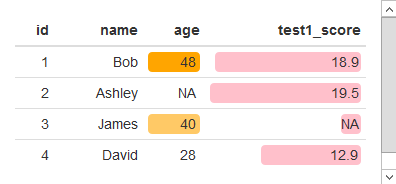
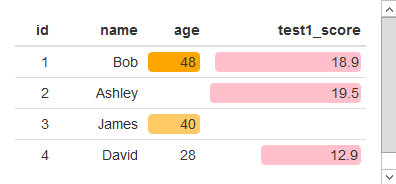
过去,NA是自动不打印的,而空白则被打印出来。这似乎不再是默认的,但我仍然想打印一个空白的NA。替换这样的NA是有效的:
df[is.na(df)]=''
formattable(df, list(
  age = color_tile("white", "orange"),
  test1_score = color_bar("pink", 'proportion', 0.2)
))
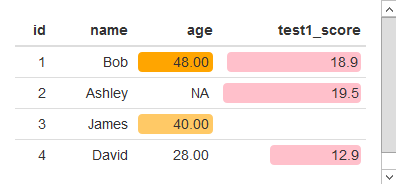
但是,如果我试图格式化其中的一个列,强制它有两个小数位,那么这个讨厌的NA的返回:
df$age = digits(df$age, digits=2)
formattable(df, list(
age = color_tile("white", "orange"),
test1_score = color_bar("pink", 'proportion', 0.2)
))
如果我再次移除NA,NA就会消失,但是十进制数也会消失。
df[is.na(df)] = ''
formattable(df, list(
age = color_tile("white", "orange"),
test1_score = color_bar("pink", 'proportion', 0.2)
))
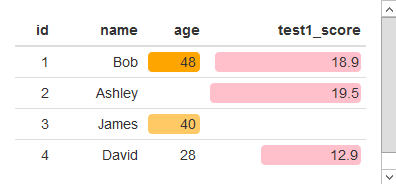
我认为原因是数字将df$age转换为formattable numeric对象并创建NA,而df[is.na(df)] = ''将df$age转换为formattable character对象:
> df$age = digits(df$age, digits=2)
> df$age
[1] 48.00  NA   40.00 28.00
> class(df$age)
[1] "formattable" "numeric"
> df[is.na(df)] = ''
> df$age
[1] "48" "  " "40" "28"
> class(df$age)
[1] "formattable" "character"
有什么解决办法吗?
最后,我还想将其与过滤后的data.frame一起使用,在这里,我使用来自可格式化的数据过滤的代码来确保在过滤data.frame时颜色标度保持不变:
df$age = digits(df$age, digits=2)
  subset_df <- function(m) {
    formattable(df[m, ], list(
      age = x ~ color_tile("white", "orange")(df$age)[m],
      test1_score = x ~ color_bar("pink", 'proportion', 0.2)(df$test1_score)[m],
      test2_score = x ~ color_bar("pink", 'proportion', 0.2)(df$test2_score)[m]
    ))
  }

subset_df(1:3)
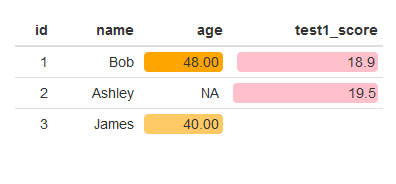
不过,问题似乎并不在于这段代码。
回答 2
Stack Overflow用户
发布于 2017-06-03 20:21:49
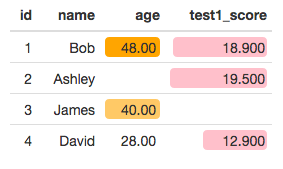
您可以使用sprintf函数将数字列格式化为具有所需小数位数的字符串。在下面的代码中,sprintf将NA转换为字符串"NA",然后我们将其转换为空字符串。
# Function to convert numeric values to strings with a given number of
#  decimal places, and convert NA to empty string
fnc = function(var, decimal.places) {
  var = sprintf(paste0("%1.",decimal.places,"f"), var)
  var[var=="NA"] = ""
  var
}

# Select the columns we want to reformat
vars = c('age', 'test1_score')

# Apply the function to the desired columns with the desired number of decimal places
df[ , vars] = mapply(fnc, df[ ,vars], 2:3)

formattable(df, list(
  age = color_tile("white", "orange"),
  test1_score = color_bar("pink", 'proportion', 0.2)
))
Stack Overflow用户
发布于 2020-05-06 20:49:03
另一个对我有用的解决方案是使用str_remove_all()。因为color_bar()在formattable中以字符的形式生成HTML,所以您可以只删除字符串"NA“。
请注意,如果您碰巧在其他任何地方都有NA ,那么这可能会破坏。还值得注意的是,我在your_var周围包装了一个百分比函数。这是我能想到的将数字转换为百分比并应用color_bar()的最佳方法。守则如下:
df %>%
    # First mutate w/color_bar()
    mutate(your_var= color_bar("green", na.rm=T)(percent(your_var, digits = 1))) %>%
    # Second mutate
    mutate(your_var = str_remove_all(your_var, "NA"))
第一次突变的输出
<span style="display: inline-block; direction: rtl; border-radius: 4px; padding-right: 2px; background-color: #00a657">NA</span>第二次突变的输出
<span style="display: inline-block; direction: rtl; border-radius: 4px; padding-right: 2px; background-color: #00a657"></span>另外,如果有人还没看过这个:HTML中的令人敬畏的表-与可格式化的集成
https://stackoverflow.com/questions/44347734
复制相似问题
腾讯云开发者

Copyright © 2013 - 2026 Tencent Cloud. All Rights Reserved. 腾讯云 版权所有
深圳市腾讯计算机系统有限公司 ICP备案/许可证号:粤B2-20090059  粤公网安备44030502008569号
腾讯云计算(北京)有限责任公司 京ICP证150476号 | 京ICP备11018762号