
将裁剪应用于对象的特定区域。
我使用THREE.Plane来剪辑我的STL模型。
localPlane = new THREE.Plane( new THREE.Vector3( 0, -1, 0 ), 4);
.
.
.
material = new THREE.MeshPhongMaterial( {
    color: 0xffffff,
    side: THREE.DoubleSide,
    clippingPlanes: [
        localPlane,
    ],
    clipShadows: true
} );
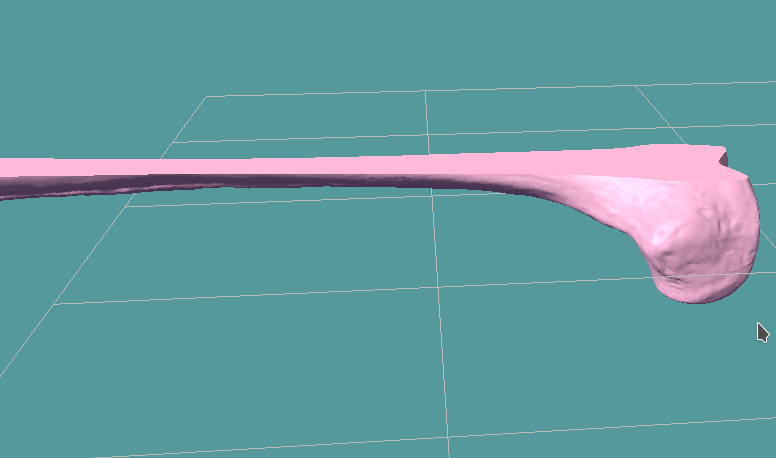
它是工作的,但问题是整个物体的顶部被这个无限大小的平面所剪裁。我希望它只剪短其中的一小部分(似乎没有方法来缩放THREE.Plane)
我也尝试过使用ThreeCSG.js,但它似乎不方便使用STL对象!
我得到的是:
回答 2
Stack Overflow用户
发布于 2017-06-02 20:05:29
是的,在three.js中支持删除裁剪平面的相交。您可以使用这样的模式:
// clipping planes
var localPlanes = [
    new THREE.Plane( new THREE.Vector3( - 1, 0, 0 ), 1 ),
    new THREE.Plane( new THREE.Vector3( 0, - 1, 0 ), 1 )
];

// material
var material = new THREE.MeshPhongMaterial( {
    color: 0xffffff,
    side: THREE.DoubleSide,
    clippingPlanes: localPlanes,
    clipIntersection: true
} );另外,请参阅three.js实例。
three.js r.85
Stack Overflow用户
发布于 2017-06-02 16:57:50
编辑:听从了WestLangley的建议。我会让她作为一个替代的,但不太有效的方式来执行剪辑。
剪裁平面是无限的。那是无法回避的。那你能做什么?多个裁剪平面在多个渲染通行证!
要做到这一点,您将需要关闭自动清除,并进行您自己的手动缓冲区清除。
renderer = new THREE.WebGLRenderer();
renderer.autoClear = false;现在假设plane1是您目前拥有的剪贴机。
material = new THREE.MeshPhongMaterial( {
    ...
    clippingPlanes: [
        plane1,
    ],
    clipShadows: true
} );

var myMesh = new THREE.Mesh(geometry, material);它在调用render时剪辑myMesh的上半部分。所以你想和剩下的人一起工作。
首先,让另一个平面,plane2,是plane1的反义词。然后plane2将裁剪myMesh的底部。但是,如果您使用plane1呈现一次传递,使用plane2呈现另一次传递,那么您将返回一个完整的网格。因此,您将需要第三个剪辑平面,plane3,它只剪辑所需的一半myMesh。将plane2和plane3放在相同的呈现传递中,只会导致myMesh呈现的1/4。
var pass1ClipPlanes = [
        plane1
    ],
    pass2ClipLanes = [
        plane2, // this plane is the inverse of plane 1, so it clips the opposite of plane1
        plane3 // this clips the left/right half of the model
    ];
然后,当您要渲染时,首先清除绘制缓冲区,然后调用两个呈现传递,更新它们之间的剪辑平面。
// clear the draw buffers
renderer.clear();

// clip the top
myMesh.material.clipPlanes = pass1ClipPlanes;
renderer.render(scene, camera);

// clip the bottom and one side
myMesh.material.clipPlanes = pass2ClipPlanes;
renderer.render(scene, camera);
第一遍呈现模型的底部,第二次呈现顶部的一半。
ETA:示例
var renderer, scene, camera, controls, stats;

var cube,
  pass1ClipPlanes,
  pass2ClipPlanes;

var WIDTH = window.innerWidth,
  HEIGHT = window.innerHeight,
  FOV = 35,
  NEAR = 1,
  FAR = 1000;

function init() {
  document.body.style.backgroundColor = "slateGray";

  renderer = new THREE.WebGLRenderer({
    antialias: true,
    alpha: true
  });
  renderer.localClippingEnabled = true;
  renderer.autoClear = false;

  document.body.appendChild(renderer.domElement);
  document.body.style.overflow = "hidden";
  document.body.style.margin = "0";
  document.body.style.padding = "0";

  scene = new THREE.Scene();

  camera = new THREE.PerspectiveCamera(FOV, WIDTH / HEIGHT, NEAR, FAR);
  camera.position.z = 50;
  scene.add(camera);

  controls = new THREE.TrackballControls(camera, renderer.domElement);
  controls.dynamicDampingFactor = 0.5;
  controls.rotateSpeed = 3;

  var light = new THREE.PointLight(0xffffff, 1, Infinity);
  camera.add(light);

  stats = new Stats();
  stats.domElement.style.position = 'absolute';
  stats.domElement.style.top = '0';
  document.body.appendChild(stats.domElement);

  resize();
  window.onresize = resize;

  // POPULATE EXAMPLE
  var plane1 = new THREE.Plane(new THREE.Vector3(0, -1, 0), 0),
    plane2 = new THREE.Plane(new THREE.Vector3(0, 1, 0), 0),
    plane3 = new THREE.Plane(new THREE.Vector3(-1, 0, 0), 0);
  pass1ClipPlanes = [plane1];
  pass2ClipPlanes = [plane2, plane3];

  var cubeGeo = new THREE.BoxBufferGeometry(10, 10, 10),
    cubeMat = new THREE.MeshPhongMaterial({
      color: "red",
      side: THREE.DoubleSide
    });
  cube = new THREE.Mesh(cubeGeo, cubeMat);
  scene.add(cube);

  animate();
}

function resize() {
  WIDTH = window.innerWidth;
  HEIGHT = window.innerHeight;
  if (renderer && camera && controls) {
    renderer.setSize(WIDTH, HEIGHT);
    camera.aspect = WIDTH / HEIGHT;
    camera.updateProjectionMatrix();
    controls.handleResize();
  }
}

function render() {
  renderer.clear();
  cube.material.clippingPlanes = pass1ClipPlanes;
  renderer.render(scene, camera);
  cube.material.clippingPlanes = pass2ClipPlanes;
  renderer.render(scene, camera);
}

function animate() {
  requestAnimationFrame(animate);
  render();
  controls.update();
  stats.update();
}

function threeReady() {
  init();
}

(function() {
  function addScript(url, callback) {
    callback = callback || function() {};
    var script = document.createElement("script");
    script.addEventListener("load", callback);
    script.setAttribute("src", url);
    document.head.appendChild(script);
  }

  addScript("https://threejs.org/build/three.js", function() {
    addScript("https://threejs.org/examples/js/controls/TrackballControls.js", function() {
      addScript("https://threejs.org/examples/js/libs/stats.min.js", function() {
        threeReady();
      })
    })
  })
})();
https://stackoverflow.com/questions/44325757
复制相似问题
腾讯云开发者

Copyright © 2013 - 2026 Tencent Cloud. All Rights Reserved. 腾讯云 版权所有
深圳市腾讯计算机系统有限公司 ICP备案/许可证号:粤B2-20090059  粤公网安备44030502008569号
腾讯云计算(北京)有限责任公司 京ICP证150476号 | 京ICP备11018762号