
ScrollPane不允许向下滚动查看其内容
ScrollPane不允许向下滚动查看其内容
提问于 2017-06-02 07:41:17
我有一个VBox,我已经添加了50个标签。考虑到它封装在一个ScrollPane中,我认为它允许我向下滚动以查看其余的数据,但它不允许它。
当我通过场景生成器构建它时,它被配置为XML。
<?xml version="1.0" encoding="UTF-8"?>

<?import javafx.scene.control.Label?>
<?import javafx.scene.control.ScrollPane?>
<?import javafx.scene.layout.*?>
<AnchorPane maxHeight="-Infinity" maxWidth="-Infinity" minHeight="-Infinity" minWidth="-Infinity" prefHeight="454.0" prefWidth="641.0" xmlns="http://javafx.com/javafx/8" xmlns:fx="http://javafx.com/fxml/1" fx:controller="sample.Controller">
   <children>
      <VBox layoutX="111.0" layoutY="96.0" prefHeight="262.0" prefWidth="100.0">
         <children>
            <Label contentDisplay="TOP" style="-fx-font-size: 20;" text="Stack" />
            <VBox fx:id="stackBox" alignment="BOTTOM_LEFT" prefHeight="284.0" prefWidth="149.0" style="-fx-border-color: black; -fx-background-color: lightgrey;" />
         </children>
      </VBox>
      <VBox layoutX="298.0" layoutY="47.0" prefHeight="379.0" prefWidth="198.0">
         <children>
            <Label style="-fx-font-size: 20;" text="Heap" />
            <ScrollPane maxHeight="1.7976931348623157E308" maxWidth="1.7976931348623157E308" prefHeight="341.0" prefWidth="202.0" vbarPolicy="ALWAYS">
               <content>
                <AnchorPane minHeight="0.0" minWidth="0.0" prefHeight="200.0" prefWidth="200.0">
                     <children>
                        <VBox fx:id="heapBox" prefHeight="284.0" prefWidth="149.0" style="-fx-border-color: black; -fx-background-color: lightgrey;" />
                     </children>
                  </AnchorPane>
               </content>
            </ScrollPane>
         </children>
      </VBox>
   </children>
</AnchorPane>
目前的情况如下:
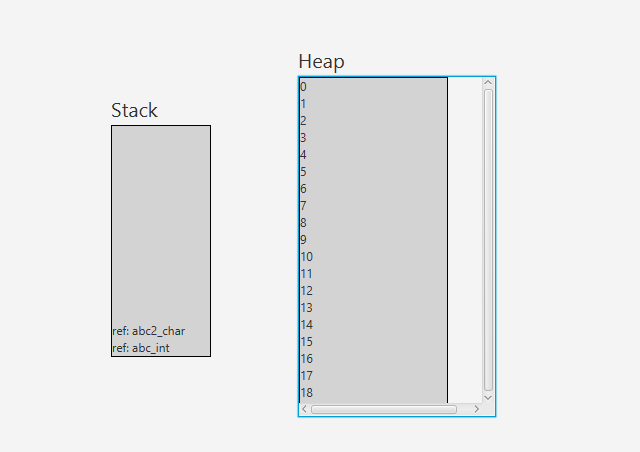
由于VBox中有50个元素,它应该允许我向下滚动以查看其余的32个元素,但是可以看到,滚动条不允许它。
在这种情况下能做些什么呢?
回答 1
Stack Overflow用户
回答已采纳
发布于 2017-06-02 08:01:59
将min和pref大小值从ScrollPane中的AnchorPane中移除。然后,您的AnchorPane可以适合ScrollPane内容。
<AnchorPane>
   <children>
      <VBox fx:id="heapBox" prefHeight="284.0" prefWidth="149.0" style="-fx-border-color: black; -fx-background-color: lightgrey;" />
   </children>
</AnchorPane>页面原文内容由Stack Overflow提供。腾讯云小微IT领域专用引擎提供翻译支持
原文链接:
https://stackoverflow.com/questions/44323398
复制相关文章
相似问题
腾讯云开发者

Copyright © 2013 - 2026 Tencent Cloud. All Rights Reserved. 腾讯云 版权所有
深圳市腾讯计算机系统有限公司 ICP备案/许可证号:粤B2-20090059  粤公网安备44030502008569号
腾讯云计算(北京)有限责任公司 京ICP证150476号 | 京ICP备11018762号