
天青控制台-宇宙数据库
我试图让控制台成功地操作Azure-Cosmosdb图形数据库。为了明确起见,我使用的是:
:远程连接tinkerpop.server conf/远程-安全-集合1.yaml
我知道有关联:
配置未定义.Graphs.azure.com/52.173.137.146:443
但是,在执行查询时出错。根据此消息拒绝访问:
"Gremlin websocket客户端未能提供有效的SASL授权信息。\t@:at GraphService.GremlinSession.d
试图跟踪在线帮助从修补程序和天蓝色,找不到我的配置错误的地方。任何帮助都将不胜感激。下面是完全错误文本。
意外的输入结束:期望字符串值在[来源:{"requestId":"2febb36e-b214-44f1-a811-f9a2afea324e",“状态”:{“代码”:401,“属性”:{},“消息”:“Gremlin客户端未能提供有效的SASL授权信息。\t@:在GraphService.GremlinSession.d__10.MoveNext()\r --从抛出异常的前一个位置开始的堆栈跟踪的结束--在System.Runtime.CompilerServices.TaskAwaiter.ThrowForNonSuccess(Task任务中抛出--\r在System.Runtime.CompilerServices.TaskAwaiter.HandleNonSuccessAndDebuggerNotification(Task任务中)\r在GraphService.GremlinSession.d__8.MoveNext()\r --堆栈跟踪的前一个抛出异常的位置。
访问受谴责的图形数据库。\t@:在GraphService.GraphConnectionFactory.CreateGraphConnection(String documentDBAccountUri,String documentDBAccountKey,String documentDBDatabaseName,String documentDBCollectionName)\r at GraphService.GraphConnectionFactory.GetGraphConnection(String documentDBAccountUri,String documentDBAccountKey,String documentDBDatabaseName,String documentDBCollectionName)\r在GraphService.GraphConnectionFactory.GetConnectionFromAuthMessage(String用户,字符串密码)\r在GraphService.GremlinSession.CheckSaslAuthorization(String challangeResponse)\r在GraphService.GremlinSession.d__10.MoveNext()\t--->
一个或多个错误发生。\t@:at System.Threading.Tasks.Task`1.GetResultCore(Boolean waitCompletionNotification)\r在GraphService.GraphConnectionFactory.CreateGraphConnection(String documentDBAccountUri,String documentDBAccountKey,String documentDBDatabaseName,String documentDBCollectionName)\t->
在发送请求时发生了错误。\t@:at System.Runtime.CompilerServices.TaskAwaiter.ThrowForNonSuccess(Task任务)\r在System.Runtime.CompilerServices.TaskAwaiter.HandleNonSuccessAndDebuggerNotification(Task任务)\r在Microsoft.Azure.Documents.Client.GatewayServiceConfigurationReader.d__0.MoveNext()\r --从抛出异常的前一个位置到堆栈跟踪的末尾从抛出异常的前一个位置开始的堆栈跟踪的结束\r在.Runtime.CompilerServices.TaskAwaiter.ThrowForNonSuccess(Task任务中)\r在System.Runtime.CompilerServices.TaskAwaiter.HandleNonSuccessAndDebuggerNotification(Task任务中)\r在Microsoft.Azure.Documents.Client.DocumentClient.d__35d.MoveNext()\r --堆栈跟踪的最后一个位置被抛出异常--\r在System.Runtime.CompilerServices.TaskAwaiter.ThrowForNonSuccess(Task任务中)\r在System.Runtime.CompilerServices.TaskAwaiter.HandleNonSuccessAndDebuggerNotification(Task任务上)\r在Microsoft.Azure.Documents.Client.DocumentClient.d_处System.Runtime.CompilerServices.TaskAwaiter.ThrowForNonSuccess(Task任务中抛出异常的前一个位置的堆栈跟踪的_29.MoveNext()\r )\r在System.Runtime.CompilerServices.TaskAwaiter.HandleNonSuccessAndDebuggerNotification(Tas;上行: 1,列: 8193]键入': help‘或':h’表示帮助。
回答 1
Stack Overflow用户
发布于 2017-06-01 16:14:29
在尝试将Gremlin控制台打开到Azure Cosmos db时,我也遇到了类似的问题。要连接到Azure Cosmos Db,需要在远程安全. you文件中查看以下几点:
- 对于主机条目-确保您的“主机”条目是正确的,看起来您有undefined.graphs.azure.com.我会重新检查蔚蓝门户,并确保这是正确的。您可以在Cosmos Db概述页面上找到这个值,它位于Gremlin下面。
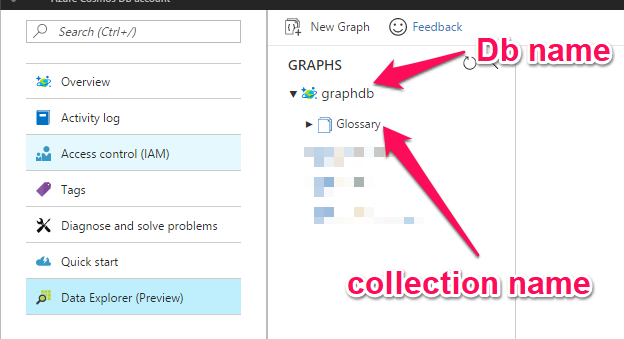
- 用户名条目应该是/dbs/‘您的数据库名’/colls/‘您的集合名’。因此,对于我的示例,如果您转到数据资源管理器,数据库名是'graphdb‘数据库名值,集合名是'Glossary’集合值,所以我在yaml文件中的用户名是/dbs/graphdb/colls/Glossary.数据库名不一定是主机名,这就是我出错的地方。
- 对于密码输入-密码是您的主键在密钥页上。确保你把它抄对了。
https://stackoverflow.com/questions/44272874
复制相似问题
腾讯云开发者

Copyright © 2013 - 2026 Tencent Cloud. All Rights Reserved. 腾讯云 版权所有
深圳市腾讯计算机系统有限公司 ICP备案/许可证号:粤B2-20090059  粤公网安备44030502008569号
腾讯云计算(北京)有限责任公司 京ICP证150476号 | 京ICP备11018762号