
EditorTemplate for TemplateColumn in XamGrid不起作用
EditorTemplate for TemplateColumn in XamGrid不起作用
提问于 2017-05-30 07:37:49
我有一个XamGrid,它有两个列,Name和Type。根据Type,我希望为Name有一个不同类型的列,因此我使用的是一个TemplateColumn。在数据模板中,我有一个带有默认ContentTemplate的ContentTemplate和一个DataTrigger,如果Type是一个特定的值,则将ContentTemplate设置为不同的列样式。我将ItemTemplate的所有四个模板( EditorTemplate、AddNewRowItemTemplate、AddNewRowEditorTemplate)都设置为这个数据模板。
ItemTemplate、AddNewRowItemTemplate和AddNewRowEditorTemplate按预期工作,但EditorTemplate没有,请参阅附件中的图片:
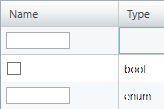
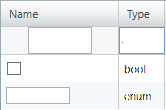
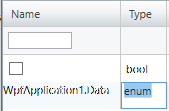
这是我的代码:
MainWindow.xaml:
<Window x:Class="WpfApplication1.MainWindow"
        xmlns="http://schemas.microsoft.com/winfx/2006/xaml/presentation"
        xmlns:x="http://schemas.microsoft.com/winfx/2006/xaml"
        xmlns:ig="http://schemas.infragistics.com/xaml"
        Width="640" Height="480" >
    <Window.Resources>
        <DataTemplate x:Key="EditorTemplate">
            <TextBox Width="64"/>
        </DataTemplate>
        <DataTemplate x:Key="BoolEditorTemplate">
            <CheckBox/>
        </DataTemplate>
        <DataTemplate x:Key="DataTemplate">
            <ContentControl Content="{Binding }">
                <ContentControl.Style>
                    <Style TargetType="{x:Type ContentControl}">
                        <Setter Property="ContentTemplate" Value="{StaticResource EditorTemplate}" />
                        <Style.Triggers>
                            <DataTrigger Binding="{Binding Type}" Value="bool">
                                <Setter Property="ContentTemplate" Value="{StaticResource BoolEditorTemplate}" />
                            </DataTrigger>
                        </Style.Triggers>
                    </Style>
                </ContentControl.Style>
            </ContentControl>
        </DataTemplate>
    </Window.Resources>
    <ig:XamGrid ItemsSource="{Binding DataCollection, RelativeSource={RelativeSource AncestorType=Window}}"
                AutoGenerateColumns="False">
        <ig:XamGrid.EditingSettings>
            <ig:EditingSettings AllowEditing="Row" />
        </ig:XamGrid.EditingSettings>
        <ig:XamGrid.AddNewRowSettings>
            <ig:AddNewRowSettings AllowAddNewRow="Top" />
        </ig:XamGrid.AddNewRowSettings>

        <ig:XamGrid.Columns>
            <ig:TemplateColumn Key="Name"
                               ItemTemplate="{StaticResource DataTemplate}"
                               AddNewRowItemTemplate="{StaticResource DataTemplate}"
                               EditorTemplate="{StaticResource DataTemplate}"
                               AddNewRowEditorTemplate="{StaticResource DataTemplate}"/>
            <ig:TextColumn Key="Type"/>
        </ig:XamGrid.Columns>
    </ig:XamGrid>
</Window>
MainWindow.xaml.cs:
using System.Collections.ObjectModel;

namespace WpfApplication1
{
  public partial class MainWindow
  {
    public MainWindow()
    {
      InitializeComponent();
    }

    public ObservableCollection<Data> DataCollection { get; } = new ObservableCollection<Data>
    {
      new Data { Name = "Foo", Type = "bool" },
      new Data { Name = "Bar", Type = "enum" }
    };
  }

  public class Data
  {
    public string Name { get; set; }
    public string Type { get; set; }
  }
}回答 1
Stack Overflow用户
回答已采纳
发布于 2017-06-01 11:05:31
正如解释过的关于“不脆弱”的论坛一样,对于这个用例,不仅需要一个EditorTemplate,而且还需要一个EditorStyle。
<Style x:Key="EditorStyle" TargetType="{x:Type ContentControl}">
    <Setter Property="ContentTemplate" Value="{StaticResource EditorTemplate}" />
    <Style.Triggers>
        <DataTrigger Binding="{Binding Type}" Value="bool">
            <Setter Property="ContentTemplate" Value="{StaticResource BoolEditorTemplate}" />
        </DataTrigger>
    </Style.Triggers>
</Style>

<DataTemplate x:Key="DataTemplate">
    <ContentControl Content="{Binding }"
                    Style="{StaticResource EditorStyle}" />>
</DataTemplate>

[...]

<ig:TemplateColumn Key="Name"
                   ItemTemplate="{StaticResource DataTemplate}"
                   AddNewRowItemTemplate="{StaticResource DataTemplate}"
                   EditorTemplate="{StaticResource DataTemplate}"
                   AddNewRowEditorTemplate="{StaticResource DataTemplate}"
EditorStyle="{StaticResource EditorStyle}" />页面原文内容由Stack Overflow提供。腾讯云小微IT领域专用引擎提供翻译支持
原文链接:
https://stackoverflow.com/questions/44256272
复制相关文章
相似问题
腾讯云开发者

Copyright © 2013 - 2026 Tencent Cloud. All Rights Reserved. 腾讯云 版权所有
深圳市腾讯计算机系统有限公司 ICP备案/许可证号:粤B2-20090059  粤公网安备44030502008569号
腾讯云计算(北京)有限责任公司 京ICP证150476号 | 京ICP备11018762号