
Android -如何在驱动模式下启动谷歌地图意图?
Android -如何在驱动模式下启动谷歌地图意图?
提问于 2017-05-29 19:18:31
我能够发布Google意图
Uri location = Uri.parse("geo:0,0");
Intent mapIntent = new Intent(Intent.ACTION_VIEW, location);
startActivity(mapIntent);我如何在驱动模式下启动意图(没有目的地,除非事先在地图中设置),以便在下面的屏幕截图上看起来像?
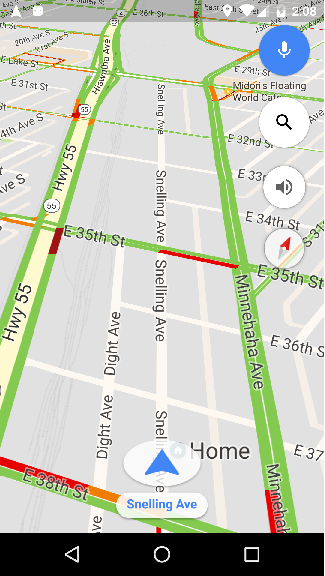
我尝试设置mode=driving,但这只会打开常规地图,并选中“驱动”选项卡:
Uri location = Uri.parse("geo:0,0?mode=driving");回答 2
Stack Overflow用户
回答已采纳
发布于 2017-08-20 23:33:04
这将在驱动模式下启动谷歌地图
    Intent intent = getPackageManager().getLaunchIntentForPackage("com.google.android.apps.maps");
    intent.setAction(Intent.ACTION_VIEW);
    intent.setData(Uri.parse("google.navigation:/?free=1&mode=d&entry=fnls"));
startActivity(intent);Stack Overflow用户
发布于 2017-06-06 15:10:45
我知道您想在导航模式下打开Google应用程序。为此,您可以使用Google API中描述的URL:
https://developers.google.com/maps/documentation/urls/guide#directions-action
下面的代码应该很有用,我相信您需要提供一个目标参数来直接打开这个模式。
String URL = "https://www.google.com/maps/dir/?api=1&travelmode=driving&dir_action=navigate&destination=Los+Angeles";
Uri location = Uri.parse(URL);
Intent mapIntent = new Intent(Intent.ACTION_VIEW, location);
startActivity(mapIntent);
我希望这能帮到你!
页面原文内容由Stack Overflow提供。腾讯云小微IT领域专用引擎提供翻译支持
原文链接:
https://stackoverflow.com/questions/44249206
复制相关文章
相似问题
腾讯云开发者

Copyright © 2013 - 2026 Tencent Cloud. All Rights Reserved. 腾讯云 版权所有
深圳市腾讯计算机系统有限公司 ICP备案/许可证号:粤B2-20090059  粤公网安备44030502008569号
腾讯云计算(北京)有限责任公司 京ICP证150476号 | 京ICP备11018762号