
LeafletJS :如何在传单和悬停事件中使用L.Routing.itinerary?
LeafletJS :如何在传单和悬停事件中使用L.Routing.itinerary?
提问于 2017-05-29 06:21:08
var mymap = L.map('mapid').setView([1.369115, 103.845436], 12);
        L.tileLayer('https://api.mapbox.com/styles/v1/mapbox/dark-v9/tiles/256/{z}/{x}/{y}?access_token=pk.eyJ1IjoibmF5dGh1cmFvaG5teWludCIsImEiOiJjajMxN25pNjMwMDFxMndvNzZhb2xqZmxxIn0._RFHs1Tj81KAk7u-5CJ6bA', {
            attribution: 'My Office',
            maxZoom: 18,
            id: 'mapbox',
            accessToken: 'pk.eyJ1IjoibmF5dGh1cmFvaG5teWludCIsImEiOiJjajMxOGFsa3owMDBkMnZwZHdmeHdmdzBlIn0.jg5bQjGhfAEmFMRxLArGFQ'
        }).addTo(mymap);

        var carIconStart = L.icon({
        iconUrl: 'img/car-onmap.png',
        iconSize:     [40, 40], // size of the icon
        popupAnchor:  [0, -20] // point from which the popup should open relative to the iconAnchor
    });

        var carIconEnd = L.icon({
        iconUrl: 'img/car-onmap.png',
        iconSize:     [40, 40], // size of the icon
        popupAnchor:  [0, -20] // point from which the popup should open relative to the iconAnchor
    });


        L.marker([1.29828408457,103.789110693]).addTo(mymap).bindPopup("Start from Office");
 L.marker([1.41887924373,103.847815159]).addTo(mymap).bindPopup("End in MyHome");

        var control = L.Routing.control({
            waypoints: [
                L.latLng(1.29828408457,103.789110693),
                L.latLng(1.41887924373,103.847815159)
            ],
            lineOptions:{
                styles: [{color: 'lightgreen', opacity: 1, weight: 5}],
                addWaypoints:false
            },
            draggableWaypoints: false,
            createMarker: function(){ return false; },
            router: L.Routing.mapbox('pk.eyJ1IjoibmF5dGh1cmFvaG5teWludCIsImEiOiJjajMxOGFsa3owMDBkMnZwZHdmeHdmdzBlIn0.jg5bQjGhfAEmFMRxLArGFQ'),

            }).addTo(mymap);

        L.Routing.itinerary({pointMarkerStyle: {radius: 5,color: '#03f',fillColor: 'white',opacity: 1,fillOpacity: 0.7}});
L.Routing.errorControl(control).addTo(mymap);<link href="https://unpkg.com/leaflet@1.0.3/dist/leaflet.css" rel="stylesheet"/>
<link href="https://cdnjs.cloudflare.com/ajax/libs/leaflet-routing-machine/3.2.5/leaflet-routing-machine.css" rel="stylesheet"/>
<script src="https://unpkg.com/leaflet@1.0.3/dist/leaflet.js"></script>
<script src="https://cdnjs.cloudflare.com/ajax/libs/leaflet-routing-machine/3.2.5/leaflet-routing-machine.js"></script>
<style>
body { margin:0; padding:0; }
#mapid { height:220px;}
.leaflet-routing-container{
display: none;
}
</style>
<body>
<div id="mapid"></div>
</body>
我想在路径点的路径上添加悬停事件。
在传单的文档中,要添加悬停事件可以使用L.Routing.itinerary。
http://www.liedman.net/leaflet-routing-machine/api/#itineraryoptions
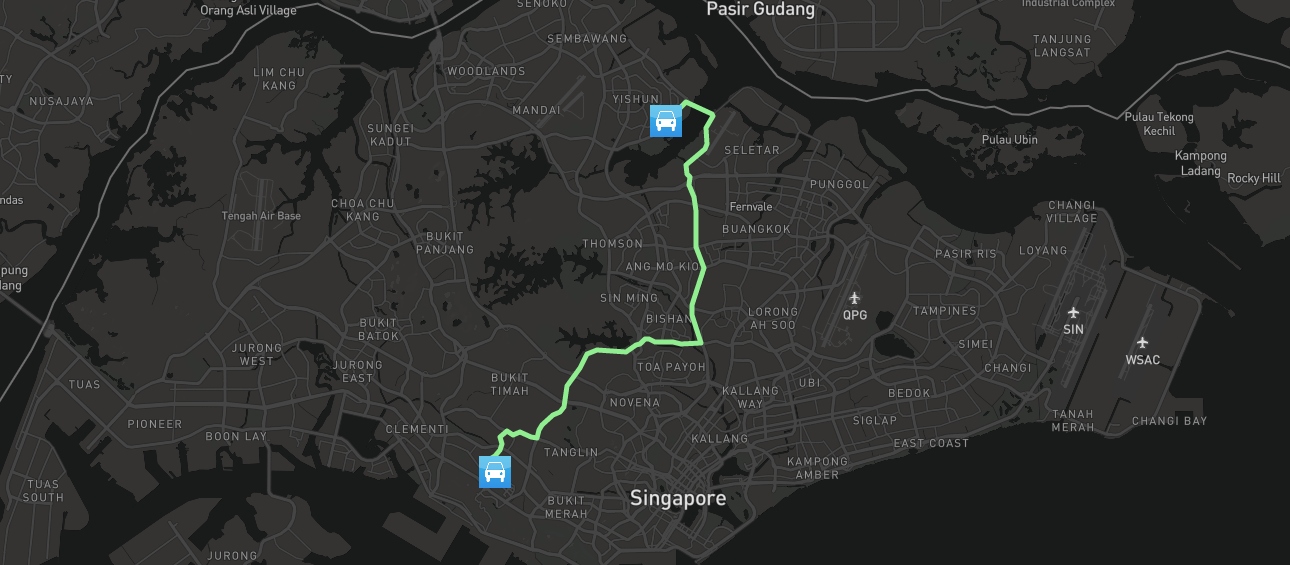
请告诉我..。非常感谢
回答 1
Stack Overflow用户
回答已采纳
发布于 2017-05-31 09:38:00
页面原文内容由Stack Overflow提供。腾讯云小微IT领域专用引擎提供翻译支持
原文链接:
https://stackoverflow.com/questions/44235802
复制相关文章
相似问题
腾讯云开发者

Copyright © 2013 - 2026 Tencent Cloud. All Rights Reserved. 腾讯云 版权所有
深圳市腾讯计算机系统有限公司 ICP备案/许可证号:粤B2-20090059  粤公网安备44030502008569号
腾讯云计算(北京)有限责任公司 京ICP证150476号 | 京ICP备11018762号