
office 365邮件无法打开便笺链接
情况发生:用户从Notes邮件更改为Office 365,他们的电子邮件包含无法访问的Lotus链接(文档链接)。
打电话给rtBody.Appenddoclink(LateInVw,"",“点击查看你今天的出席情况”),我把“NotesView”放在没有出现在办公室365号的电子邮件中。我是否可以知道office 365有任何方法来识别这是notes客户端应用程序并尝试打开该视图的notes应用程序?
Dim tdy As Variant
Sub Initialize()
Print"Agent:Request for LateIn Reason started running at " & DateValue(Now()) & "," + TimeValue(Now())
    On Error GoTo errhandler
    Dim ss As New NotesSession
    Dim db As NotesDatabase
    Dim LateInVw As NotesView
    Dim LateInDocs As NotesViewEntryCollection
    Dim LateEntry As NotesViewEntry
    Dim LateDoc As NotesDocument
    Dim StaffVw As NotesView, StaffDoc As NotesDocument
    Dim AttVw As NotesView, Attdoc As notesdocument
    Dim MailDoc As NotesDocument
    Dim rtBody As NotesRichTextItem

    Set db=ss.Currentdatabase
    Set LateInVw=db.getview("($Today Not Alerted Late-In Time Records)")
    Set StaffVw=db.getview("($Active Staff by ID)")
    Set AttVw = db.Getview("($Effective Attendance Setting By ID)")
    tdy=Datevalue(Now)

    'get all time records for today
    Set LateInDocs=LateInVw.Allentries
    Set lateEntry=LateInDocs.getfirstentry
    Do While Not LateEntry Is Nothing
        Set LateDoc=LateEntry.Document
        Set Attdoc=Attvw.Getdocumentbykey(LateDoc.TStaffID(0), True)
        If Attdoc.LateAtt(0)="Yes" Then
            If Not ApprovedLateIn(LateDoc, LateDoc.TAmend(0), False) Then
                'get staff mail
                Set staffDoc=StaffVw.Getdocumentbykey(LateDoc.TStaffID(0), True)
                If Not staffdoc Is Nothing Then
                    'send email with link to main menu
                    email$=staffDoc.email(0)
                    Set Maildoc=New NotesDocument(db)
                    maildoc.Sendto=email$
                    maildoc.Subject="Smartcard Attendance System: Late-In Notification for " +Format$(LateDoc.TDate(0),"dd/mm/yyyy")
                    Set rtBody=New NotesRichTextItem(maildoc, "Body")
                    Call rtBody.appendtext(" Dear"+" "+ staffDoc.StaffName(0)+",")
                    Call rtBody.AddNewline(2)
                    Call rtBody.appendtext("You clocked in to work today at "+lateDoc.TAmend(0)+". Please click on the link below to submit your reason for the late attendance. Thank You!")
                    Call rtBody.Addnewline(1)
                    Call rtBody.Appenddoclink(LateInVw, "", "Click to view your attendance today")
                    Call rtBody.Addnewline(2)
                    Call rtBody.Appendtext("***If the box to key in the late-in reason does not appear, kindly use the 'History Attendance' to key-in instead.")
                    maildoc.send(False)
                End If
            End If
            'End If 'check late-in on/off in attendance settings
            LateDoc.LateInAlert="Send"
            Call LateDoc.save(True,False)
        End If 'check late-in on/off in attendance settings
        Set LateEntry=LateInDocs.Getnextentry(LateEntry)
    Loop
Print"Agent:Request for LateIn Reason ended running at " & DateValue(Now()) & "," + TimeValue(Now())
    Exit Sub
errhandler:
    Print "Got error " & Error$ & " on line " & CStr(Erl)
    Resume next
Print"Agent:Request for LateIn Reason ended running at " & DateValue(Now()) & "," + TimeValue(Now())
End Sub
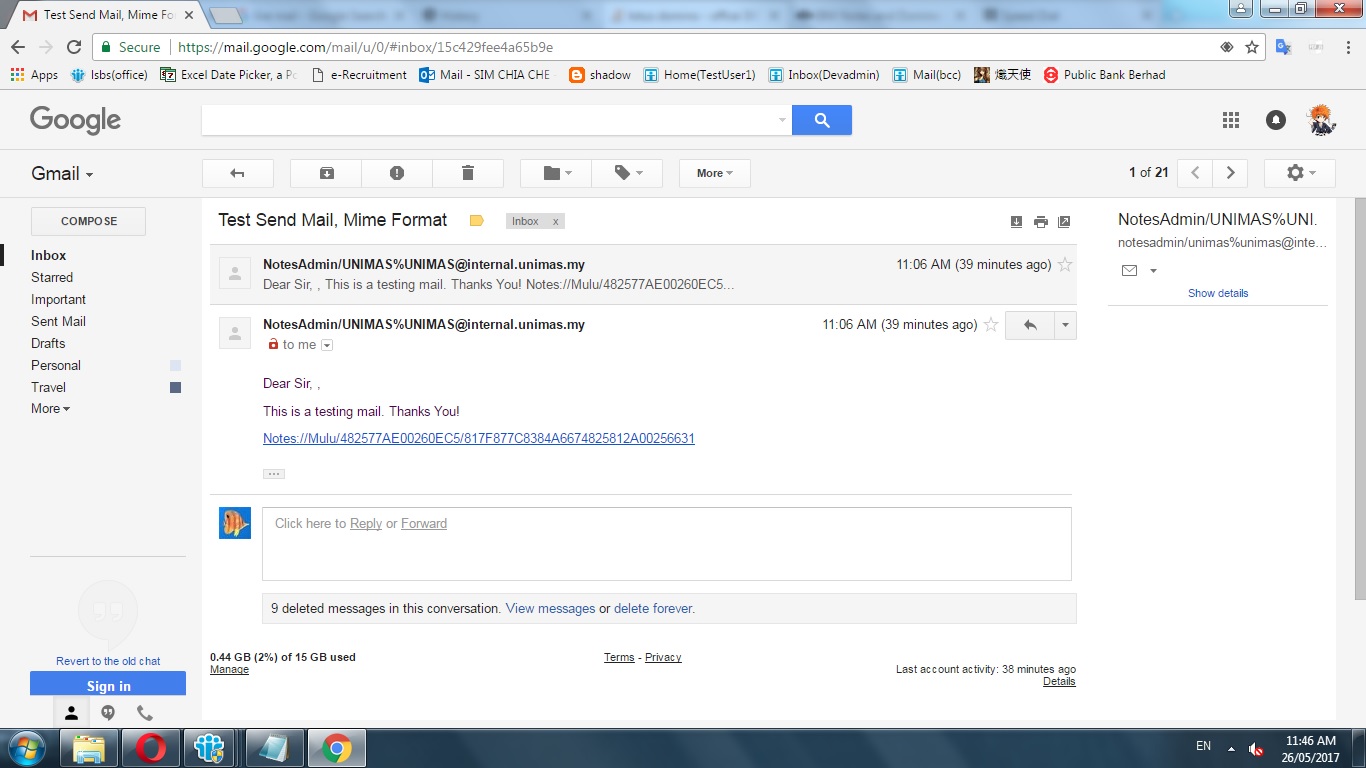
这是我用Mime格式重写代码的示例..。
Sub Initialize
    Dim ss As New NotesSession
    Dim db As NotesDatabase
    Dim vw As NotesView
    'Dim Doc As NotesViewEntryCollection

    Dim LateInVw As NotesView
    Dim Ec As NotesViewEntryCollection
    Dim Entry As NotesViewEntry
    Dim Doc As NotesDocument

    Dim MailDoc As NotesDocument
    Dim rtBody As NotesRichTextItem

    Set db=ss.Currentdatabase
    Set vw=db.getview("(test send mail)")
    tdy=DateValue(Now)


    %Rem
    Set replydoc = db.Createdocument()
    Call replydoc.Replaceitemvalue("Form", "Memo")
    Call replydoc.Replaceitemvalue("Subject", "Pre-check Passed - " + apptitle)
    Call replydoc.Replaceitemvalue("SendTo", indoc.From(0))
    Call replydoc.Replaceitemvalue("BlindCopyTo", mailinadd)
    Set body = replydoc.Createmimeentity
    %End Rem
    Set EC = vw.Allentries
    Set Entry=Ec.getfirstentry
    Do While Not Entry Is Nothing
        Set Doc = Entry.Document

        email$="chee111385@gmail.com"
        Set Maildoc= db.Createdocument()
        Call Maildoc.Replaceitemvalue("Form", "Memo")
        Call Maildoc.Replaceitemvalue("Subject", "Test Send Mail, Mime Format")
        Call Maildoc.Replaceitemvalue("SendTo",email$)
        Set body = Maildoc.Createmimeentity

        ss.Convertmime = False
        Set stream = ss.Createstream()

        stream.Writetext(|<html><body>|)
        stream.Writetext(|<p>Dear Sir, | + |,</p>|)
        stream.Writetext(|<p>This is a testing mail. Thanks You!<br>| + |</p>|)
        stream.Writetext(|<p>|+|Notes://Mulu/482577AE00260EC5/|+ +Doc.Universalid+|</p>|)
        Call stream.Writetext(|</body></html>|)

        Call body.Setcontentfromtext(stream, "text/html;charset=UTF-8", 1725)
        Call maildoc.Send(False)
        ss.Convertmime = True

        Set Entry = EC.Getnextentry(Entry)
    Loop

End Sub
我不知道如何打开便笺文档directly...as,每次我点击链接,就会转到框架集itself...which是不正确的!
回答 1
Stack Overflow用户
发布于 2017-05-26 01:13:04
如果您只是询问这个应用程序,那么您需要做的是了解notes:// URL,您可以使用在这里读到。您只需要更改代码,为视图生成一个正确格式化的URL,而不是doclink,也可以是doclink。当用户单击notes:// URL时,Notes客户机将打开该用户并将其带到视图中。
但是,如果您实际上有很多应用程序向用户发送doclinks,那么您可能需要在Domino服务器上安装一个解决方案,并在无需更改任何代码的情况下为所有应用程序自动处理这个问题。一家名为Genii的公司拥有一款名为CoExLinks Fidelity的产品。
https://stackoverflow.com/questions/44174604
复制相似问题
腾讯云开发者

Copyright © 2013 - 2026 Tencent Cloud. All Rights Reserved. 腾讯云 版权所有
深圳市腾讯计算机系统有限公司 ICP备案/许可证号:粤B2-20090059  粤公网安备44030502008569号
腾讯云计算(北京)有限责任公司 京ICP证150476号 | 京ICP备11018762号