
Xamarin.Forms.CarouselView不适用于iOS
我尝试在Visual中使用Xamarin.Forms.CarouselView在iOS和Android上使用Xamarin.Forms来实现Xamarin.Forms。它在安卓系统中运行得很好,但在iOS上却不起作用。在iOS上,它显示了第一个幻灯片,但是它不允许我向右或向左滑动以更改当前的幻灯片。我已经在NuGet和安卓项目中安装了iOS软件包。XAML如下所示:
    <cv:CarouselView ItemsSource="{Binding Slider}" x:Name="CarouselSlider">
        <cv:CarouselView.ItemTemplate>
            <DataTemplate>
                <Grid>
                    <Grid.RowDefinitions>
                        <RowDefinition Height="*"/>
                        <!--<RowDefinition Height="Auto"/>-->
                    </Grid.RowDefinitions>
                    <Image Grid.RowSpan="1" Aspect="AspectFill" Source="{Binding ImageUrl}" />
                    <StackLayout BackgroundColor="#7F000000" Padding="12" VerticalOptions="Center" TranslationY="100">
                        <Label TextColor="White" Text="{Binding Title}" FontSize="26" HorizontalOptions="Center" VerticalOptions="CenterAndExpand"/>
                        <Label TextColor="White" Text="{Binding TextBody}" FontSize="16" HorizontalOptions="Center" HorizontalTextAlignment="Center" VerticalOptions="CenterAndExpand"/>
                    </StackLayout>
                </Grid>
            </DataTemplate>
        </cv:CarouselView.ItemTemplate>
    </cv:CarouselView>
后端看起来是这样的:
public partial class MainPage : ContentPage
{
    public System.Collections.ObjectModel.ObservableCollection<SliderContent> Slider { get; set; }

    public MainPage()
    {
        InitializeComponent();
        NavigationPage.SetHasNavigationBar(this, false);

        Slider = new System.Collections.ObjectModel.ObservableCollection<SliderContent>
        {
            new SliderContent
            {
                Id = 1,
                ImageUrl = "https://thumb9.shutterstock.com/display_pic_with_logo/1975943/561919966/stock-photo-brutal-strong-athletic-men-pumping-up-muscles-workout-bodybuilding-concept-background-muscular-561919966.jpg",
                Title = "Aliquam et neque arcu",
                TextBody = "Lorem ipsum dolor sit amet, consectetur adipiscing elit. Nunc porttitor erat arcu, vitae accumsan odio iaculis et."
            },
                new SliderContent
            {
                Id = 2,
                ImageUrl = "https://ifitlife.files.wordpress.com/2014/06/20140604-155437-57277345.jpg",
                Title = "Donec lobortis sodales dui",
                TextBody = "Morbi congue scelerisque vulputate. Vestibulum sit amet hendrerit justo. Nulla facilisi."
                },
            new SliderContent
            {
                Id = 3,
                ImageUrl = "https://uproxx.files.wordpress.com/2013/05/dmx-black.jpg?quality=100&w=650",
                Title = "Vestibulum arcu elit",
                TextBody = "Aliquam in maximus ante. Suspendisse facilisis posuere nulla quis hendrerit. Pellentesque habitant morbi tristique senectus et netus et malesuada fames ac turpis egestas."
            }
        };

        Grid dotsGrid = DotsIndicator;
        dotsGrid.HorizontalOptions = LayoutOptions.CenterAndExpand;

        dotsGrid.ColumnDefinitions = new ColumnDefinitionCollection
        {
            new ColumnDefinition { Width = new GridLength(1, GridUnitType.Star) },
            new ColumnDefinition { Width = new GridLength(1, GridUnitType.Star) },
            new ColumnDefinition { Width = new GridLength(1, GridUnitType.Star) }
        };

        dotsGrid.RowDefinitions = new RowDefinitionCollection
        {
            new RowDefinition { Height = new GridLength(6, GridUnitType.Star) },
            new RowDefinition { Height = new GridLength(2, GridUnitType.Star) },
            new RowDefinition { Height = new GridLength(6, GridUnitType.Star) }
        };

        int counter = 0;

        foreach (var i in Slider)
        {
            Button label = new Button();
            if (Slider.First() == i)
            {
                label = new Button
                {
                    BackgroundColor = Color.White,
                    BindingContext = i,
                    VerticalOptions = LayoutOptions.Fill,
                    WidthRequest = 20,
                    HeightRequest = 20,
                    BorderRadius = 30
                };
            }
            else
            {
                label = new Button
                {
                    BackgroundColor = Color.Gray,
                    BindingContext = i,
                    VerticalOptions = LayoutOptions.Fill,
                    WidthRequest = 20,
                    HeightRequest = 20,
                    BorderRadius = 30
                };
            }

            dotsGrid.Children.Add(label, counter, 1);
            counter++;
        }

        DotsIndicator = dotsGrid;
        this.BindingContext = this;
        CarouselSlider.ItemSelected += CarouselSlider_ItemSelected;
    }

    private void CarouselSlider_ItemSelected(object sender, SelectedItemChangedEventArgs e)
    {
        var item = e.SelectedItem as SliderContent;
        foreach (var i in DotsIndicator.Children)
        {
            i.BackgroundColor = Color.Gray;
            if (i.BindingContext == item)
            {
                i.BackgroundColor = Color.White;
            }
        }

        return;
    }
}
在iOS上使用iOS有什么已知的问题吗?还是我遗漏了什么?
回答 3
Stack Overflow用户
发布于 2017-06-07 17:28:38
我通过在StackLayout周围放置一个CarouselView标记来解决这个问题。
Stack Overflow用户
发布于 2017-05-22 09:49:51
我在各种Xamarin.Forms CarouselView项目中都使用了iOS,它工作得很好。下面是我的示例代码,详情请参见我的博客。希望能帮上忙。
将CarouselView Nuget软件包安装到您的所有项目(PCL、Android、iOS和CarouselView )--因为CarouselView位于一个单独的程序集中,因此在Xaml页面的根目录中添加CarouselView的命名空间,并在您的页面中这样使用;
<?xml version="1.0" encoding="UTF-8"?>
<ContentView xmlns="http://xamarin.com/schemas/2014/forms"
             xmlns:x="http://schemas.microsoft.com/winfx/2009/xaml"
             x:Class="XYZ.Mobile.App.Controls.ValidationControls.Confirmation"
             xmlns:valueconverters="clr-namespace:XYZ.Mobile.App.ValueConverters"
             xmlns:cv="clr-namespace:Xamarin.Forms;assembly=Xamarin.Forms.CarouselView">

  <StackLayout Grid.Row="1"
                 Orientation="Vertical">

      <cv:CarouselView x:Name="ConfirmationQuestionsCarousel"
                       ItemsSource="{Binding ConfirmationQuestions}">
        <cv:CarouselView.ItemTemplate>
          <DataTemplate>
          <!--You can now add other Xamarin controls in to your CarouselView-->
            <Grid>
              <Grid.RowDefinitions>
                <RowDefinition Height="50"/>
                <RowDefinition/>
                <RowDefinition Height="50"/>
              </Grid.RowDefinitions>

              <Grid.ColumnDefinitions>
                <ColumnDefinition/>
                <ColumnDefinition/>
              </Grid.ColumnDefinitions>

              <Label Grid.Row="0"
                     Grid.ColumnSpan="2"
                     Text="SOME TEXT"
                     FontAttributes="Bold" />
              <Label Grid.Row="1"
                     Grid.ColumnSpan="2"
                     Text="{Binding Question}"/>

              <Button Grid.Row="2"
                      Grid.Column="0"
                      Text="No"
                      StyleId="No"
                      CommandParameter="false"
                      Command="{Binding ToggleAgree}"
                      Clicked="OnQuestionAnswered"
                      BackgroundColor="{Binding Agreed, Converter={StaticResource BoolToToggleButtonColorConverter}, ConverterParameter='Invert'}"/>
              <Button Grid.Row="2"
                      Grid.Column="1"
                      Text="Yes"
                      StyleId="Yes"
                      CommandParameter="true"
                      Command="{Binding ToggleAgree}"
                      Clicked="OnQuestionAnswered"
                      BackgroundColor="{Binding Agreed, Converter={StaticResource BoolToToggleButtonColorConverter}}"/>

            </Grid>
          </DataTemplate>
        </cv:CarouselView.ItemTemplate>
      </cv:CarouselView>
    </StackLayout>
</ContentView>
此外,当我第一次使用Xamarin.Forms的CarouselView时,在获取CarouselView项的计数时遇到了一些问题。我需要这个计数信息,以便正确地滑动到下一个项目。每当我试图获取ConfirmationQuestionsCarousel.Count信息时,我都会得到“未知成员”错误,因此我最终使用了下面的代码来获取计数信息。
 private void OnQuestionAnswered(object sender, EventArgs args)
        {
            var buttonClicked = sender as Button;
            var buttonClickedAnswer = buttonClicked.StyleId;

            // Ugly way to get the count
            //var s = new List<object>(ConfirmationQuestionsCarousel.ItemsSource.Cast<object>()).Count;
            // Better way to get the count
            int count = 0;

            foreach (var item in ConfirmationQuestionsCarousel.ItemsSource)
            {
                count++;
            }

            // This is to set the Carosel's Position - this is unfinished code, I put it here only as an example
            ConfirmationQuestionsCarousel.Position = 3;
}Stack Overflow用户
发布于 2017-05-22 23:33:11
我得到了您的代码,并且能够编译和运行它,CarouselView在iOS和Android中都能工作。
这里显示了两个视图之间的转换:
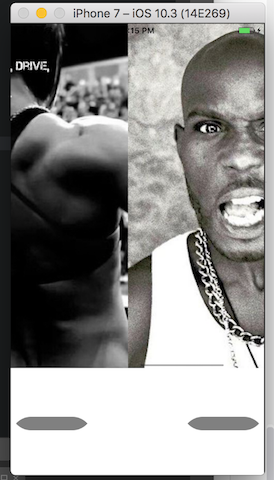
确保你:
- 拥有最新版本的库2.3.0-pre2。
- 在你的3个项目中安装这个库(表单,iOS和Android)
注:我使用了最新版本的Xamarin表格(2.3.4.247)
另外一个很好的方法是通过访问github项目来了解库中是否存在任何已知的问题。
https://stackoverflow.com/questions/44098638
复制相似问题
腾讯云开发者

Copyright © 2013 - 2026 Tencent Cloud. All Rights Reserved. 腾讯云 版权所有
深圳市腾讯计算机系统有限公司 ICP备案/许可证号:粤B2-20090059  粤公网安备44030502008569号
腾讯云计算(北京)有限责任公司 京ICP证150476号 | 京ICP备11018762号