
NotifyIcon不响应其ContextMenu的更改
我的程序有一个NotifyIcon,它的ContextMenu值必须在程序运行过程中动态变化。当程序启动时,通知图标对象被实例化,如下所示:
notifyIcon = new NotifyIcon()
{
    Icon = new Icon(@"C:\Users\basil\documents\visual studio 2015\Projects\Project Repository\Project Repository\Program Icon.ico"),
    Text = "My Program Name",
    Visible = false // Don't make it visible yet!
};
notifyIcon.ContextMenu = new ContextMenu();
notifyIcon.ContextMenu.MenuItems.AddRange(new MenuItem[] { new MenuItem("Host Service") { Index = 0 }, new MenuItem("Backup Configurations", new EventHandler(delegate { bckConf.Show(); })) { Index = 1 }, new MenuItem("Network Info", new EventHandler(delegate { new form_NetworkInfo().Show(); })) { Index = 2 }, new MenuItem("About", new EventHandler(delegate { new form_AboutUs().Show(); })) { Index = 3 }, new MenuItem("Exit", new EventHandler(delegate { TerminateProgram(ProgramTerminateReason.UserRequest); })) { Index = 4 } }); 为了更改ContextMenu的NotifyIcon,创建了一个名为ChangeNotifyIconState的公共方法,因为菜单项需要根据程序中声明如下的其他类的对象生成的结果进行更改:(请忽略"CurrentServiceState“数据类型的变量,并注意NotifyIcon对象被声明为类变量)。
static public void ChangeNotifyIconState(CurrentServiceState state)
{
   notifyIcon.ContextMenu.MenuItems[0].MenuItems.Clear(); // First clear all menu items of the to-be-updated block
   if (state==CurrentServiceState.Running)
   { // Service has started running; disable the start button and activate the stop and restart buttons
      notifyIcon.ContextMenu.MenuItems[0].MenuItems.Add(new MenuItem("Start service", new EventHandler(delegate { HostServices.Start(); })) { Index = 0, Enabled = false });
      notifyIcon.ContextMenu.MenuItems[0].MenuItems.Add(new MenuItem("Stop service", new EventHandler(delegate { HostServices.Stop(); })) { Index = 0, Enabled = true });
      notifyIcon.ContextMenu.MenuItems[0].MenuItems.Add(new MenuItem("Restart service", new EventHandler(delegate { HostServices.Restart(); })) { Index = 0, Enabled = true });
   } else if (state==CurrentServiceState.Stopped)
   { // Service has stopped running; disable the stop and restart button and activate the start button
      notifyIcon.ContextMenu.MenuItems[0].MenuItems.Add(new MenuItem("Start service", new EventHandler(delegate { HostServices.Start(); })) { Index = 0, Enabled = true });
      notifyIcon.ContextMenu.MenuItems[0].MenuItems.Add(new MenuItem("Stop service", new EventHandler(delegate { HostServices.Stop(); })) { Index = 0, Enabled = false });
      notifyIcon.ContextMenu.MenuItems[0].MenuItems.Add(new MenuItem("Restart service", new EventHandler(delegate { HostServices.Restart(); })) { Index = 0, Enabled = false })};
   }
}问题是:当我调用ChangeNotifyIconState(CurrentServiceState.Running)时,所需的ContextMenu的MenuItems不会更改/更新。有人能帮我摆脱这种意想不到的行为并解释其背后的原因吗?
提前谢谢。
编辑:
我甚至将NotifyIcon对象标记为易失性对象,因为我推测这是因为编译器缓存。事实证明,这并不是因为它使对象volatile没有解决手头的问题。
回答 1
Stack Overflow用户
发布于 2017-05-21 11:49:33
下面是如何在没有表单和使用NotifyIcon的情况下创建应用程序的示例,以及如何更改menuContextItems of NotifyIcon,例如单击事件:
using System;
using System.Drawing;
using System.Windows.Forms;

namespace WindowsFormsApp5
{
    static class Program
    {

        private static Random rd = new Random();
        private static NotifyIcon notifyIcon;
        /// <summary>
        /// The main entry point for the application.
        /// </summary>
        [STAThread]
        static void Main()
        {
            Application.EnableVisualStyles();
            Application.SetCompatibleTextRenderingDefault(false);

            NotifyIcon ni = new NotifyIcon(new System.ComponentModel.Container());
            ContextMenu cm = new ContextMenu();

            cm.MenuItems.Add(new MenuItem("First", Click));
            cm.MenuItems.Add(new MenuItem("Second", Click));
            cm.MenuItems.Add(new MenuItem("Third", Click));
            cm.MenuItems.Add(new MenuItem("Exit", (obj,e)=> { Application.Exit(); }));
            ni.Icon = new Icon(@"c:\Users\Admin\Desktop\img.ico");
            ni.Text = "Form1 (NotifyIcon example)";
            ni.ContextMenu = cm;
            ni.Visible = true;
            notifyIcon = ni;
            Application.Run();

        }

        public static bool  SomeCondition()
        {
            return (rd.Next(0, 9999) % 2) == 1;
        }

        public static void Click(object sender, EventArgs e)
        {
            if (SomeCondition())
            {
                ContextMenu cm = new ContextMenu();
                cm.MenuItems.Add(new MenuItem("Fourth", Click));
                cm.MenuItems.Add(new MenuItem("Fifth", Click));
                cm.MenuItems.Add(new MenuItem("Sixth", Click));
                cm.MenuItems.Add(new MenuItem("Exit", (obj, args) => { Application.Exit(); }));
                notifyIcon.ContextMenu = cm;
            }
            else
            {
                ContextMenu cm = new ContextMenu();
                cm.MenuItems.Add(new MenuItem("Third", Click));
                cm.MenuItems.Add(new MenuItem("Sixth", Click));
                cm.MenuItems.Add(new MenuItem("Fourth", Click));
                cm.MenuItems.Add(new MenuItem("Exit", (obj, args) => { Application.Exit(); }));
                notifyIcon.ContextMenu = cm;
            }
        }
    }
}
下面是截图:
在应用程序启动时,将出现notifyIcon,菜单如下:
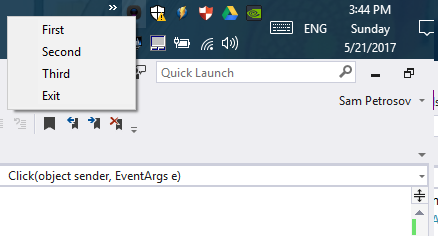
由于我的条件是在任何true上的click之后返回随机的click或menuItem,除了"Exit“,Click event handler和更改menucontext都会正常工作。因此,您将得到如下菜单之一:
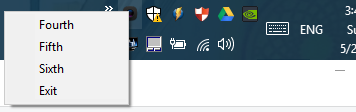
或
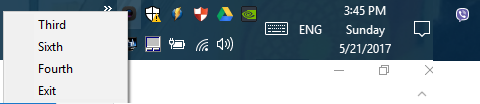
https://stackoverflow.com/questions/44093384
复制相似问题
腾讯云开发者

Copyright © 2013 - 2026 Tencent Cloud. All Rights Reserved. 腾讯云 版权所有
深圳市腾讯计算机系统有限公司 ICP备案/许可证号:粤B2-20090059  粤公网安备44030502008569号
腾讯云计算(北京)有限责任公司 京ICP证150476号 | 京ICP备11018762号