
来自网页的11 -Get文本
我有一个网页:https://www.brcdirectory.com/InternalSite/Site.aspx?BrcSiteCode=1832583
我想从这个页面中,从一个HTML <Span ID>中检索一些文本。
<span id="ctl00_ContentPlaceHolder1_FormView1_GridView1_ctl02_lb_ExpiryDate">Expiry Date : 07/12/2017</span>我有IE 11.0.9600.18639
通过Excel,我使用下面的代码打开IE11,导航到页面,并试图在<SPAN>中显示文本的消息框。
代码:
Option Explicit

Sub GoToWebsiteTest()
    Application.ScreenUpdating = False
    Application.DisplayAlerts = False

    Dim appIE As Object
    Dim objElement As Object
    Dim objCollection As Object
    Dim i As Long, LastRow As Long, sFolder As String
    Dim sURL As String, FILE As String

    LastRow = Range("I" & Rows.Count).End(xlUp).Row
    For i = 6 To LastRow
        Set appIE = New InternetExplorerMedium

        sURL = "https://www.brcdirectory.com/InternalSite/Site.aspx?BrcSiteCode=" & Range("I392").Value
        With appIE
            .navigate sURL
            .Visible = True
        End With

        Do While appIE.Busy Or appIE.READYSTATE <> READYSTATE_COMPLETE
            DoEvents
        Loop

        Set objCollection = appIE.document.getElementById("ctl00_ContentPlaceHolder1_FormView1_GridView1_ctl02_lb_ExpiryDate")
        MsgBox Replace(objCollection.innerText, "Expiry Date : ", "")

        appIE.Quit
        Set appIE = Nothing
    Next i

    Application.ScreenUpdating = True
    Application.DisplayAlerts = True

    MsgBox "All BRCs Succesfully Updated."
End Sub
我什么都试过了!我已经尝试过这行的许多不同的地方,我得到了错误:
Do While appIE.Busy Or appIE.READYSTATE <> READYSTATE_COMPLETE但是,唉,我遇到了一个令人讨厌的错误:
运行时错误:-2147467259 (80004005) 对象'IWebBrowser2‘的“繁忙”方法失败。
拜托,有人能告诉我我做错了什么吗?快把我逼疯了。提前谢谢。
回答 2
Stack Overflow用户
发布于 2017-05-19 08:13:49
如果您不想使用“从网络中获取”,您可以使用以下代码。
Sub expiry()

    Dim RE As Object
    Dim HTML As String
    Set RE = CreateObject("vbscript.regexp")
    HTML = GetHTML("https://www.brcdirectory.com/InternalSite/Site.aspx?BrcSiteCode=1832583")


    'Expiry Date : 07/12/2017
    RE.Pattern = "(Expiry Date : \d{2}\/\d{2}\/\d{4})"
    RE.Global = True
    RE.IgnoreCase = True
    Set Matches = RE.Execute(HTML)


    ExpiryDate = Matches.Item(0).submatches.Item(0)

End Sub


Function GetHTML(URL As String) As String
    Dim HTML As String
    With CreateObject("MSXML2.XMLHTTP")
        .Open "GET", URL, False
        .Send
        GetHTML = .ResponseText
    End With
End FunctionExpiryDate将包含您想要的文本(我认为)。
如果您只想要实际日期,可以使用RE.Pattern = "Expiry Date : (\d{2}\/\d{2}\/\d{4})"
编辑;
对以下评论意见的答复:
这是我启用的引用
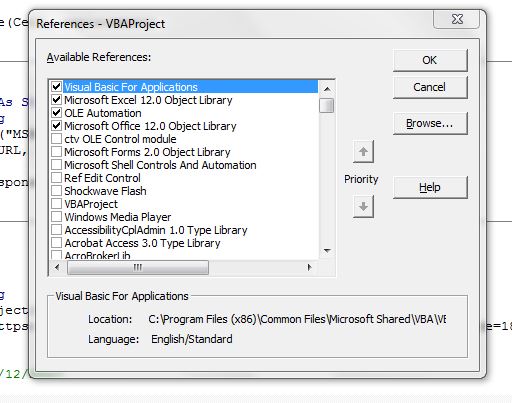
编辑基于下载到文本文件。
Private Declare Function URLDownloadToFileA Lib "urlmon" (ByVal pCaller As Long, _
ByVal szURL As String, ByVal szFileName As String, ByVal dwReserved As Long, _
ByVal lpfnCB As Long) As Long


    Sub expiry()

        Dim RE As Object
        Dim HTML As String
        Dim MyData As String

        Set RE = CreateObject("vbscript.regexp")
        DownloadFile "https://www.brcdirectory.com/InternalSite/Site.aspx?BrcSiteCode=1832583", "C:\TEST\goog.txt"


        Open "C:\TEST\goog.txt" For Binary As #1
        HTML = Space$(LOF(1))
        Get #1, , HTML
        Close #1


        'Expiry Date : 07/12/2017
        RE.Pattern = "(Expiry Date : \d{2}\/\d{2}\/\d{4})"
        RE.Global = True
        RE.IgnoreCase = True
        Set Matches = RE.Execute(HTML)


        ExpiryDate = Matches.Item(0).submatches.Item(0)

    End Sub


    Private Function DownloadFile(URL As String, LocalFilename As String) As Boolean
         'Thanks Mentalis:)
        Dim lngRetVal As Long
        lngRetVal = URLDownloadToFileA(0, URL, LocalFilename, 0, 0)
        If lngRetVal = 0 Then DownloadFile = True
    End Function
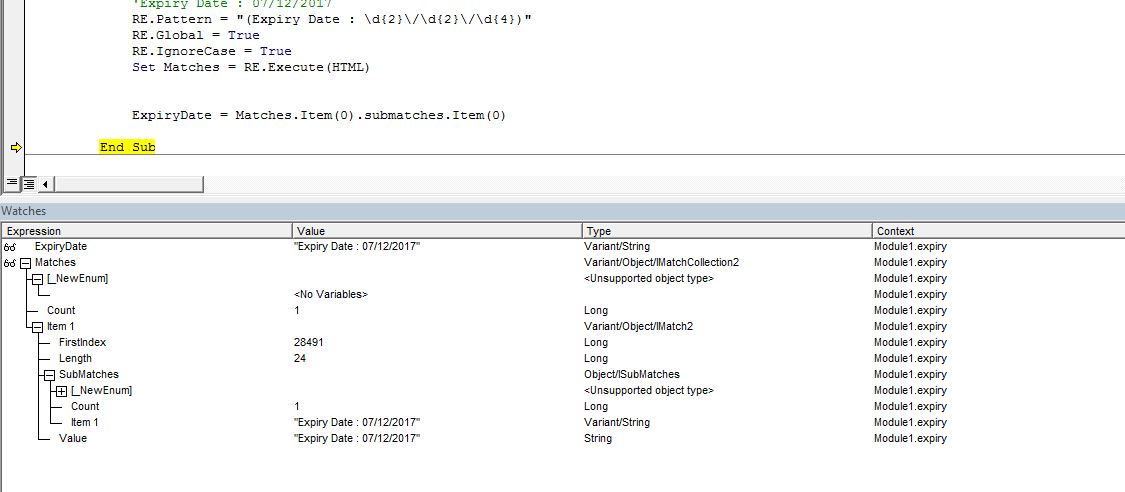
再编辑一遍。
Stack Overflow用户
发布于 2017-05-19 11:26:36
通过使用以下代码,我设法解决了这个问题:
Option Explicit
Private ieBrowser As InternetExplorer

Sub GetBRCText()
    Dim i As Long, LastRow As Long
    Dim a As Range, b As Range
    Dim strDocHTML As String, strDocHTML2 As String
    Dim dteStartTime As Date

    Application.ScreenUpdating = False
    Application.DisplayAlerts = False
    On Error Resume Next

    LastRow = ThisWorkbook.ActiveSheet.Range("I" & Rows.Count).End(xlUp).Row
    Set a = Range("I6:I" & LastRow)

    'Create a browser object
    Set ieBrowser = CreateObject("internetexplorer.application")


    For Each b In a.Rows
    If Not IsEmpty(b) Then

    'Start Browsing loop
    ieBrowser.navigate "https://www.brcdirectory.com/InternalSite/Site.aspx?BrcSiteCode=" & b.Value


   dteStartTime = Now
   Do While ieBrowser.READYSTATE <> READYSTATE_COMPLETE
      If DateDiff("s", dteStartTime, Now) > 240 Then Exit Sub
   Loop

   On Error Resume Next
   strDocHTML = ieBrowser.document.getElementById("ctl00_ContentPlaceHolder1_FormView1_GridView1_ctl02_lb_ExpiryDate").innerHTML
   strDocHTML2 = ieBrowser.document.getElementById("ctl00_ContentPlaceHolder1_FormView1_GridView1_ctl02_lb_Grade").innerHTML

   b.Offset(0, 2).Value = Replace(strDocHTML, "Expiry Date : ", "")
   b.Offset(0, 1).Value = Replace(strDocHTML2, "Grade : ", "")

   End If
   Next b


   ieBrowser.Quit
   Set ieBrowser = Nothing

   Application.ScreenUpdating = True
   Application.DisplayAlerts = True


End Subhttps://stackoverflow.com/questions/44064103
复制相似问题
腾讯云开发者

Copyright © 2013 - 2026 Tencent Cloud. All Rights Reserved. 腾讯云 版权所有
深圳市腾讯计算机系统有限公司 ICP备案/许可证号:粤B2-20090059  粤公网安备44030502008569号
腾讯云计算(北京)有限责任公司 京ICP证150476号 | 京ICP备11018762号