
Python和Matplotlib:字符作为x轴
嗨,Stack溢出社区。我想我是在用matplotlib编写不可能的代码,所以如果有不同的python库更适合我,请告诉我!
我有一个完整的氨基酸序列(在图像中表示为大写字母)的蛋白质(蛋白质x)。这将是我的x轴。
我有两个excel列:疾病和控制。这些列包含了整个蛋白质x的氨基酸序列的一部分。有时会有多个命中,疾病或控制列会包含两个相同的蛋白质x氨基酸部分。我希望它们相互叠加,这样人们就可以看到疾病和控制蛋白x的命中次数。
令人困惑?对不起,这是我使用powerpoint所能想到的一个例子。
氨基酸比较
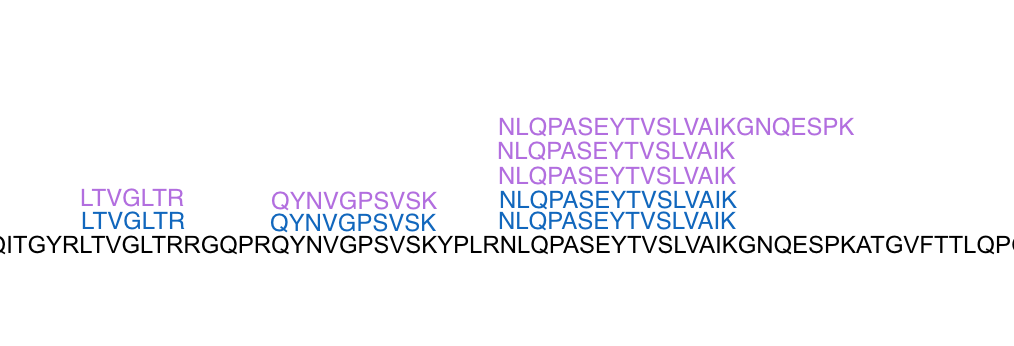
黑色文本是参考序列。紫色是控制。粉色就是疾病。现在说得通了?
我需要用一个巨大的数据集来做这件事,所以不,我不想“只使用powerpoint几个小时”。我也想用我选择的任何参考序列来做这件事。
我不是要别人替我做我的工作。我需要有人为我指明正确的方向。有特别的图书馆吗?我应该把所有东西都转换成数字,然后再重新贴上文字的标签吗?
谢谢,我很感激您的建议。
回答 2
Stack Overflow用户
发布于 2017-05-19 13:59:07
使用脚本创建SVG映像,这是一个XML文本。我要解决更简单的问题!
假设你的目标是这个。
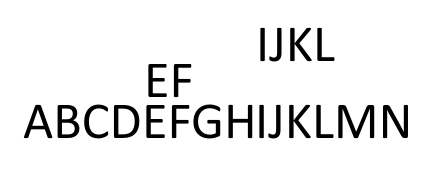
首先,在每个地方都会有一列字符串片段,在这个例子中,在'EF‘和'IJKL’处断开大字符串。您可以使用SVG的特性来定位大字符串的片段(现在更多)。因为您知道片段的起始位置和字符的高度,所以可以在列中定位层。
这是你必须要建造的东西。
<?xml version="1.0" encoding="UTF-8" standalone="no"?>
<!-- Created with Inkscape (http://www.inkscape.org/) -->

<svg
   xmlns:dc="http://purl.org/dc/elements/1.1/"
   xmlns:cc="http://creativecommons.org/ns#"
   xmlns:rdf="http://www.w3.org/1999/02/22-rdf-syntax-ns#"
   xmlns:svg="http://www.w3.org/2000/svg"
   xmlns="http://www.w3.org/2000/svg"
   xmlns:sodipodi="http://sodipodi.sourceforge.net/DTD/sodipodi-0.dtd"
   xmlns:inkscape="http://www.inkscape.org/namespaces/inkscape"
   width="210mm"
   height="297mm"
   viewBox="0 0 210 297"
   version="1.1"
   id="svg8"
   inkscape:version="0.92.0 r15299"
   sodipodi:docname="genes.svg">
  <defs
     id="defs2" />
  <sodipodi:namedview
     id="base"
     pagecolor="#ffffff"
     bordercolor="#666666"
     borderopacity="1.0"
     inkscape:pageopacity="0.0"
     inkscape:pageshadow="2"
     inkscape:zoom="1.4"
     inkscape:cx="170.60599"
     inkscape:cy="341.08014"
     inkscape:document-units="mm"
     inkscape:current-layer="layer1"
     showgrid="false"
     inkscape:window-width="1095"
     inkscape:window-height="676"
     inkscape:window-x="145"
     inkscape:window-y="122"
     inkscape:window-maximized="0" />
  <metadata
     id="metadata5">
    <rdf:RDF>
      <cc:Work
         rdf:about="">
        <dc:format>image/svg+xml</dc:format>
        <dc:type
           rdf:resource="http://purl.org/dc/dcmitype/StillImage" />
        <dc:title></dc:title>
      </cc:Work>
    </rdf:RDF>
  </metadata>
  <g
     inkscape:label="Layer 1"
     inkscape:groupmode="layer"
     id="layer1">
    <text
       xml:space="preserve"
       style="font-style:normal;font-variant:normal;font-weight:normal;font-stretch:normal;font-size:9.8777771px;line-height:6.61458302px;font-family:Courier;-inkscape-font-specification:Courier;font-variant-ligatures:normal;font-variant-caps:normal;font-variant-numeric:normal;font-feature-settings:normal;text-align:start;letter-spacing:0px;word-spacing:0px;writing-mode:lr-tb;text-anchor:start;fill:#000000;fill-opacity:1;stroke:none;stroke-width:0.26458332;"
       x="24.588797"
       y="179.4014"
       id="text12"><tspan
         sodipodi:role="line"
         id="tspan10"
         x="24.588797"
         y="185.32886"
         style="stroke-width:0.26458332;-inkscape-font-specification:Courier;font-family:Courier;font-weight:normal;font-style:normal;font-stretch:normal;font-variant:normal;" /></text>
    <text
       xml:space="preserve"
       style="font-style:normal;font-variant:normal;font-weight:normal;font-stretch:normal;font-size:9.8777771px;line-height:6.61458302px;font-family:Calibri;-inkscape-font-specification:'Calibri, Normal';font-variant-ligatures:normal;font-variant-caps:normal;font-variant-numeric:normal;font-feature-settings:normal;text-align:start;letter-spacing:0px;word-spacing:0px;writing-mode:lr-tb;text-anchor:start;fill:#000000;fill-opacity:1;stroke:none;stroke-width:0.26458332"
       x="23.8125"
       y="207.41963"
       id="text24"><tspan
         sodipodi:role="line"
         id="tspan22"
         x="23.8125"
         y="207.41963"
         style="stroke-width:0.26458332">ABCD</tspan></text>
    <text
       xml:space="preserve"
       style="font-style:normal;font-variant:normal;font-weight:normal;font-stretch:normal;font-size:9.8777771px;line-height:6.61458302px;font-family:Calibri;-inkscape-font-specification:'Calibri, Normal';font-variant-ligatures:normal;font-variant-caps:normal;font-variant-numeric:normal;font-feature-settings:normal;text-align:start;letter-spacing:0px;word-spacing:0px;writing-mode:lr-tb;text-anchor:start;fill:#000000;fill-opacity:1;stroke:none;stroke-width:0.26458332"
       x="46.302082"
       y="207.41965"
       id="text28"><tspan
         sodipodi:role="line"
         id="tspan26"
         x="46.302082"
         y="207.41963"
         style="stroke-width:0.26458332">EFGH</tspan></text>
    <text
       xml:space="preserve"
       style="font-style:normal;font-variant:normal;font-weight:normal;font-stretch:normal;font-size:9.8777771px;line-height:6.61458302px;font-family:Calibri;-inkscape-font-specification:'Calibri, Normal';font-variant-ligatures:normal;font-variant-caps:normal;font-variant-numeric:normal;font-feature-settings:normal;text-align:start;letter-spacing:0px;word-spacing:0px;writing-mode:lr-tb;text-anchor:start;fill:#000000;fill-opacity:1;stroke:none;stroke-width:0.26458332"
       x="67.657738"
       y="207.41963"
       id="text32"><tspan
         sodipodi:role="line"
         id="tspan30"
         x="67.657738"
         y="207.41963"
         style="stroke-width:0.26458332">IJKLMN</tspan></text>
    <text
       xml:space="preserve"
       style="font-style:normal;font-variant:normal;font-weight:normal;font-stretch:normal;font-size:9.8777771px;line-height:6.61458302px;font-family:Calibri;-inkscape-font-specification:'Calibri, Normal';font-variant-ligatures:normal;font-variant-caps:normal;font-variant-numeric:normal;font-feature-settings:normal;text-align:start;letter-spacing:0px;word-spacing:0px;writing-mode:lr-tb;text-anchor:start;fill:#000000;fill-opacity:1;stroke:none;stroke-width:0.26458332"
       x="46.680061"
       y="199.67113"
       id="text36"><tspan
         sodipodi:role="line"
         id="tspan34"
         x="46.302082"
         y="199.67113"
         style="stroke-width:0.26458332">EF</tspan></text>
    <text
       xml:space="preserve"
       style="font-style:normal;font-variant:normal;font-weight:normal;font-stretch:normal;font-size:9.8777771px;line-height:6.61458302px;font-family:Calibri;-inkscape-font-specification:'Calibri, Normal';font-variant-ligatures:normal;font-variant-caps:normal;font-variant-numeric:normal;font-feature-settings:normal;text-align:start;letter-spacing:0px;word-spacing:0px;writing-mode:lr-tb;text-anchor:start;fill:#000000;fill-opacity:1;stroke:none;stroke-width:0.26458332"
       x="67.846725"
       y="192.86755"
       id="text40"><tspan
         sodipodi:role="line"
         id="tspan38"
         x="67.657738"
         y="192.86755"
         style="stroke-width:0.26458332">IJKL</tspan></text>
  </g>
</svg>
很明显我在Inkscape做过,但你会明白的。这里没有什么是不能用Python做的
Stack Overflow用户
发布于 2017-05-19 03:30:08
我不太清楚你想做什么,所以我要重复一遍我认为你说的话。
您有一个字符串(A -> T?)它代表一个任意的蛋白质(让我们称之为X),每个字母对应于20个氨基酸中的一个。
您还拥有一个表,其中有两个列Control,并且列中的每个元素都是有序的,但必须与X的序列对齐。您没有询问如何执行对齐,而对齐本身就是一个完全不同的问题,所以我将重点关注您的数据的可视化。
你想要获取X对齐的控制和疾病序列,并在X之上对它们进行视觉比较。
你真的有三个选择。
- 使用matplotlib的文本功能和执行匹配之后,加载要显示的文本对象中的文本(可能是我提出的最困难的选项)。
- 使用python接口和同样的操作,但是对于文本框(在这里您将获得自动滚动功能)(您可以使用QT轻松地做到这一点),然后使用
setHtml并使用html格式对文本进行适当的着色。此外,您还可以使用使用Tkinter并做类似的事情。 - 最简单的解决方案,就是用你想要的东西制作一个文本文件,你可以放弃颜色,但是你可以更容易地创建一个与X的氨基酸长度相同的数组,并在其中设置单独的字符,然后把所有的内容都写进一个文件中,如果使用统一的文本大小字体,你可以看到氨基酸排列的位置。
如果您使用HTML来显示,也可以在HTML页面中显示它,但是您必须做更多的工作来创建可滚动区域(但您可以对文本进行着色),这样就完全不再是python了。
https://stackoverflow.com/questions/44060462
复制相似问题
腾讯云开发者

Copyright © 2013 - 2026 Tencent Cloud. All Rights Reserved. 腾讯云 版权所有
深圳市腾讯计算机系统有限公司 ICP备案/许可证号:粤B2-20090059  粤公网安备44030502008569号
腾讯云计算(北京)有限责任公司 京ICP证150476号 | 京ICP备11018762号