
如何在VSTS发布步骤上运行VisualStudio2017 dotnet测试项目
如何在VSTS发布步骤上运行VisualStudio2017 dotnet测试项目
提问于 2017-05-18 08:53:02
有人知道如何使用dotnet测试在VSTS上运行测试项目吗?
我的情况就是这样。我有一个简单的MVC dotnet核心web项目,它构建并托管在一个蔚蓝的web应用程序上。在解决方案中,我有一个xUnitTest项目。
我可以在解决方案中成功地构建两个项目,并在VSTS中为发布阶段发布构建阶段的结果。我可以很好地完成Webapp,但是我想在webapp部署之后运行测试,这就是我遇到问题的地方。
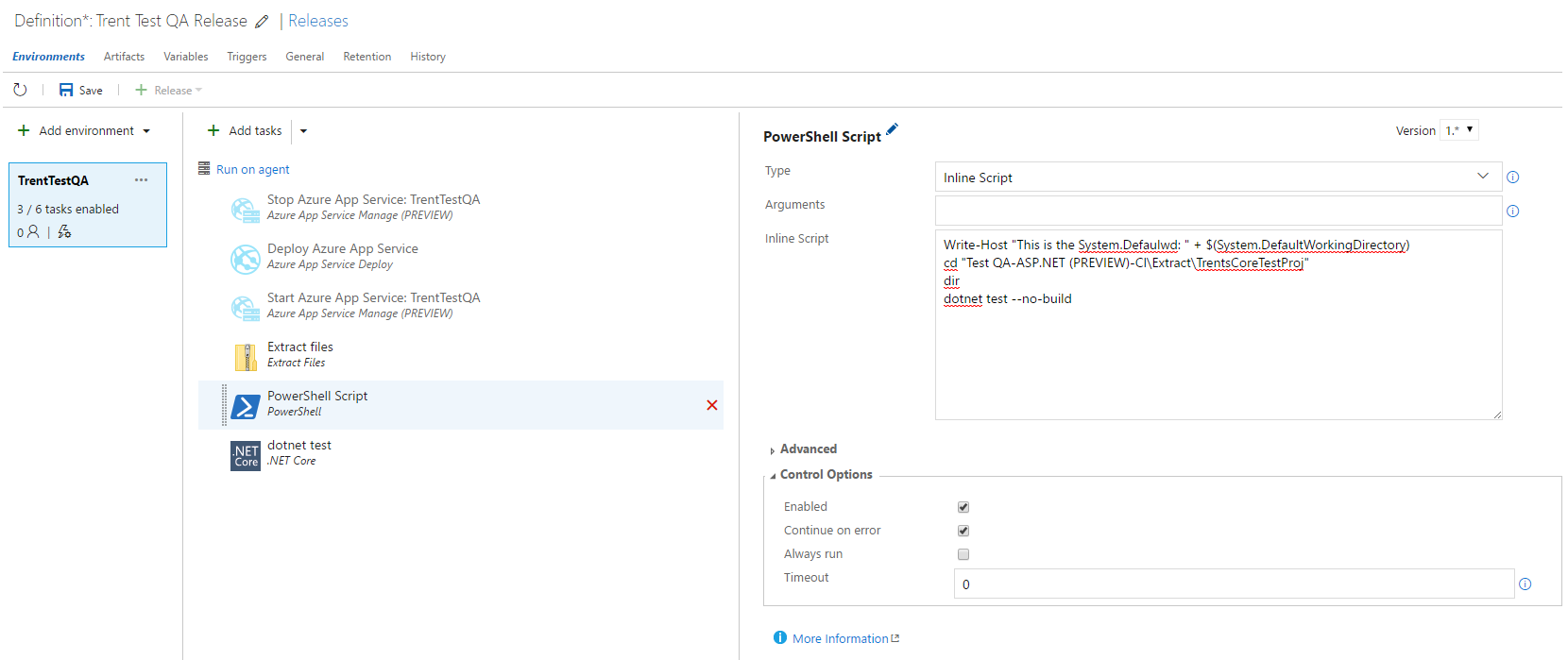
试图通过powershell运行"dotnet测试“失败,说它找不到VisualStudio2017项目没有的project.json。
         Directory: D:\a\r1\a\Test QA-ASP.NET (PREVIEW)-CI\Extract\TrentsCoreTestProj
2017-05-18T08:39:05.5423817Z
2017-05-18T08:39:05.5423817Z
2017-05-18T08:39:05.5433824Z Mode                LastWriteTime         Length Name
2017-05-18T08:39:05.5433824Z ----                -------------         ------ ----
2017-05-18T08:39:05.5513817Z d-----        5/18/2017   6:48 AM                bin
2017-05-18T08:39:05.5535129Z d-----        5/18/2017   6:50 AM                obj
2017-05-18T08:39:05.5673839Z -a----        5/18/2017   6:48 AM           1179 DemoTests.cs
2017-05-18T08:39:05.5693821Z -a----        5/18/2017   6:48 AM            637 TrentsCoreTestProj.csproj
2017-05-18T08:39:07.0767288Z
2017-05-18T08:39:07.0767288Z Welcome to .NET Core!
2017-05-18T08:39:07.0767288Z ---------------------
2017-05-18T08:39:07.0767288Z Learn more about .NET Core @ https://aka.ms/dotnet-docs. Use dotnet --help to see available commands or go to https://aka.ms/dotnet-cli-docs.
2017-05-18T08:39:07.0767288Z Telemetry
2017-05-18T08:39:07.0767288Z --------------
2017-05-18T08:39:07.0767288Z The .NET Core tools collect usage data in order to improve your experience. The data is anonymous and does not include commandline arguments. The data is collected by Microsoft and shared with the community.
2017-05-18T08:39:07.0767288Z You can opt out of telemetry by setting a DOTNET_CLI_TELEMETRY_OPTOUT environment variable to 1 using your favorite shell.
2017-05-18T08:39:07.0767288Z You can read more about .NET Core tools telemetry @ https://aka.ms/dotnet-cli-telemetry.
2017-05-18T08:39:07.0767288Z Configuring...
2017-05-18T08:39:07.0767288Z -------------------
2017-05-18T08:39:07.0767288Z A command is running to initially populate your local package cache, to improve restore speed and enable offline access. This command will take up to a minute to complete and will only happen once.
2017-05-18T08:39:12.5336298Z Decompressing 0%Decompressing 1%Decompressing 2%Decompressing 3%Decompressing 4%Decompressing
...
 97%Decompressing 98%Decompressing 99%Decompressing 100% 5339 ms
2017-05-18T08:39:33.4781464Z Expanding 0%Expanding 1%Expanding 2%Expanding 3%Expanding 4%Expanding
...
 97%Expanding 98%Expanding 99%Expanding 100% 20646 ms
2017-05-18T08:39:59.8431503Z ##[error]dotnet-test Error: 0 : System.InvalidOperationException: D:\a\r1\a\Test QA-ASP.NET (PREVIEW)-CI\Extract\TrentsCoreTestProj\project.json does not exist.
   at Microsoft.DotNet.Tools.Test.TestCommand.GetProjectPath(String projectPath)
   at Microsoft.DotNet.Tools.Test.TestCommand.DoRun(String[] args)

2017-05-18T08:40:01.1967180Z ##[error]Process completed with exit code -1 and had 1 error(s) written to the error stream.
2017-05-18T08:40:01.1977186Z ##[section]Finishing: PowerShell Script
当我使用'dotnet‘发布步骤时,它告诉我csproj不存在,我可以从powershell中看到它确实存在。
2017-05-18T08:40:01.1997188Z ==============================================================================
2017-05-18T08:40:01.1997188Z Task         : .NET Core
2017-05-18T08:40:01.1997188Z Description  : Build, test and publish using dotnet core command-line.
2017-05-18T08:40:01.1997188Z Version      : 1.0.1
2017-05-18T08:40:01.1997188Z Author       : Microsoft Corporation
2017-05-18T08:40:01.1997188Z Help         : [More Information](https://go.microsoft.com/fwlink/?linkid=832194)
2017-05-18T08:40:01.1997188Z ==============================================================================
2017-05-18T08:40:01.6787208Z [command]"C:\Program Files\dotnet\dotnet.exe" test "D:\a\r1\a\Test QA-ASP.NET (PREVIEW)-CI\Extract\TrentsCoreTestProj\TrentsCoreTestProj.csproj"
2017-05-18T08:40:01.8877228Z dotnet-test Error: 0 : System.InvalidOperationException: D:\a\r1\a\Test QA-ASP.NET (PREVIEW)-CI\Extract\TrentsCoreTestProj\TrentsCoreTestProj.csproj\project.json does not exist.
2017-05-18T08:40:01.8887223Z    at Microsoft.DotNet.Tools.Test.TestCommand.GetProjectPath(String projectPath)
2017-05-18T08:40:01.8887223Z    at Microsoft.DotNet.Tools.Test.TestCommand.DoRun(String[] args)
2017-05-18T08:40:01.9397245Z ##[error]Error: C:\Program Files\dotnet\dotnet.exe failed with return code: 4294967295
2017-05-18T08:40:01.9397245Z ##[error]Dotnet command failed with non-zero exit code on the following projects : D:\a\r1\a\Test QA-ASP.NET (PREVIEW)-CI\Extract\TrentsCoreTestProj\TrentsCoreTestProj.csproj
2017-05-18T08:40:01.9397245Z ##[section]Finishing: dotnet test
我可以使用完全相同的命令在我的本地命令行上成功地运行"dotnet测试“,但是我需要在VSTS上运行,这样我就可以将测试部分作为CI构建的一部分。
回答 1
Stack Overflow用户
发布于 2017-05-18 09:40:17
检查:
- 您使用托管的VS 2017队列,而不是默认的托管队列或安装了1.0.0+ CLI的自定义计算机。
- 确保在您的项目(或在
global.json上)中没有使用1.0.0-preview2-*版本的CLI文件--这可能是您看到project.json does not exist消息的原因。
页面原文内容由Stack Overflow提供。腾讯云小微IT领域专用引擎提供翻译支持
原文链接:
https://stackoverflow.com/questions/44043021
复制相关文章
相似问题
腾讯云开发者

Copyright © 2013 - 2026 Tencent Cloud. All Rights Reserved. 腾讯云 版权所有
深圳市腾讯计算机系统有限公司 ICP备案/许可证号:粤B2-20090059  粤公网安备44030502008569号
腾讯云计算(北京)有限责任公司 京ICP证150476号 | 京ICP备11018762号