
带R: webshot.js返回故障值1的Web快照
带R: webshot.js返回故障值1的Web快照
提问于 2017-05-16 15:54:13
我想用网照 R库从一个特定的站点导出一些web元素到png文件。
首先,安装和加载库:
install.packages("webshot",dependencies = TRUE)
library(webshot)
webshot::install_phantomjs()我正在用webshot() www.google.es URL测试。它工作得很好:
webshot("https://www.google.es/","google.png", selector="#hplogo")

但是,如果我想将搜索引擎元素导出到PNG图像:
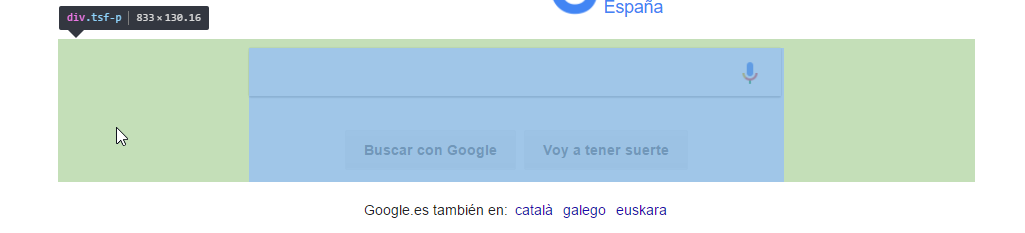
我编写了以下代码:
webshot("https://www.google.es/","google.png", selector=".tsf-p")怎么啦?
> webshot("https://www.google.es/","google.png", selector=".tsf-p")
PHANTOM ERROR: CasperError: No element matching selector found: .tsf-p
TRACE:
 -> phantomjs://platform/casper.js: 1066 (in function getElementBounds)
 -> phantomjs://code/webshot.js: 137
 -> undefined: 0 (in function map)
 -> phantomjs://code/webshot.js: 136 (in function findClipRect)
 -> phantomjs://code/webshot.js: 85
 -> phantomjs://platform/casper.js: 2188 (in function _check)
Error in webshot("https://www.google.es/", "google.png", selector = ".tsf-p") :
  webshot.js returned failure value: 1
In addition: Warning message:
running command '"C:\Users\Mario Martínez\AppData\Roaming/PhantomJS/phantomjs.exe" "C:/Users/Mario Martínez/Documents/R/win-library/3.3/webshot/webshot.js" "[{\"url\":\"https://www.google.es/\",\"file\":\"google.png\",\"vwidth\":992,\"vheight\":744,\"selector\":\".tsf-p\",\"delay\":0.2,\"zoom\":1}]"' had status 1 回答 2
Stack Overflow用户
发布于 2022-01-11 11:15:13
有可能在此之前打开一个网页(接受cookie的页面)。因此,有必要模拟单击以接受cookie。
那么这个类似乎有changed:div.o3j99.ikrT4e.om7nvf

下面是对我有用的代码:
    webshot("https://www.google.com/", file = "Test.png",
    eval = "casper.then(function() {
    this.click('#L2AGLb'); // click cookies accept
    this.sendKeys('input.gLFyf.gsfi', 'test_text_research', {keepFocus: true}); // add text in search bar
    this.wait(1000);
    });",
    cliprect = c(200, 150, 800, 300))
允许为拍摄选择矩形
Stack Overflow用户
发布于 2022-11-16 22:04:00
我将首先尝试更新webshot包。帮我修好了。
页面原文内容由Stack Overflow提供。腾讯云小微IT领域专用引擎提供翻译支持
原文链接:
https://stackoverflow.com/questions/44006186
复制相关文章
相似问题
腾讯云开发者

Copyright © 2013 - 2026 Tencent Cloud. All Rights Reserved. 腾讯云 版权所有
深圳市腾讯计算机系统有限公司 ICP备案/许可证号:粤B2-20090059  粤公网安备44030502008569号
腾讯云计算(北京)有限责任公司 京ICP证150476号 | 京ICP备11018762号