
Array.prototype.map()。索引未定义
Array.prototype.map()。索引未定义
提问于 2017-05-16 04:03:45
我不知道错误的原因:
 { (questionList.length > 0) && questionList.map((item,index)
          =>
          <View key={index} style={styles.oneMonthV}>
            <Text
                style={[styles.textTGray, styles.fontTSize, TEXT_STYLE, styles.fontTQuestion]}>{item.content}</Text>
            <View style={styles.VTags}>
              {item.optionsList.map((item1, index1) =>
                  <TouchableOpacity key={index1}
                                    onPress={this._onPressButton.bind(this, index1)}>
                    <View>
                      { (item1.selected) ? (<TagCell modeColor='red'
                                                     content={item1.content}></TagCell>) : (
                          <TagCell
                              content={item1.content}></TagCell>) }
                    </View>
                  </TouchableOpacity>
              ) }
            </View>
          </View>
          )}
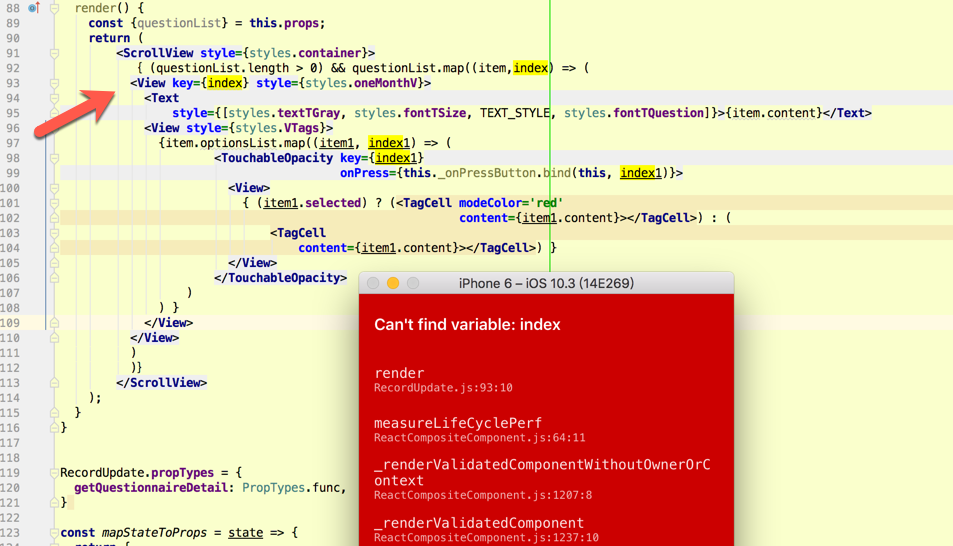
错误显示在
<View key={index} style={styles.oneMonthV}>。为什么索引没有定义。
我在chrome控制台中输入下面的代码是正确的。
['xxx','xx','xxx','www'].map((item,index) => {        console.log(`index==${index}`);  console.log(`item==${item}`);
    return (
        item + 'hahaha' )});
结果:
> index==0
  item==xxx
  index==1
  item==xx
  index==2
  item==xxx
  index==3
  item==www
(4) ["xxxhahaha", "xxhahaha", "xxxhahaha", "wwwhahaha"]
我认为我的代码是正确的。谁知道这个错误的原因?
因为这个错误太难了。我添加了这个问题的更多代码。
render() {
    const {questionList} = this.props;
    return (
        <ScrollView style={styles.container}>
          { (questionList.length > 0) && questionList.map((item,index) => (
          <View key={index} style={styles.oneMonthV}>
            <Text
                style={[styles.textTGray, styles.fontTSize, TEXT_STYLE, styles.fontTQuestion]}>{item.content}</Text>
            <View style={styles.VTags}>
              {item.optionsList.map((item1, index1) => (
                      <TouchableOpacity key={index1}
                                        onPress={this._onPressButton.bind(this, index1)}>
                        <View>
                          { (item1.selected) ? (<TagCell modeColor='red'
                                                         content={item1.content}></TagCell>) : (
                              <TagCell
                                  content={item1.content}></TagCell>) }
                        </View>
                      </TouchableOpacity>
                  )
              ) }
            </View>
          </View>
          )
          )}
        </ScrollView>
    );
  }
回答 1
Stack Overflow用户
回答已采纳
发布于 2017-05-16 04:33:52
有几件事情出了问题,无论何时使用箭头函数,都应该从同一行的函数体开始。另外,在()中包装它也是一个很好的实践,您的检查也是不必要的,因为如果没有元素,它将不会映射,但是您必须检查undefined。还将{}更改为{}。
{questionList && questionList.map((item,index) => (
      <View key={index} style={styles.oneMonthV}>
        <Text
            style={[styles.textTGray, styles.fontTSize, TEXT_STYLE, styles.fontTQuestion]}>{item.content}</Text>
        <View style={styles.VTags}>
          {item.optionsList.map((item1, index1) => (
              <TouchableOpacity key={index1}
                                onPress={this._onPressButton.bind(this, index1)}>
                <View>
                  { (item1.selected) ? (<TagCell modeColor='red'
                                                 content={item1.content}></TagCell>) : (
                      <TagCell
                          content={item1.content}></TagCell>) }
                </View>
              </TouchableOpacity>
              )
          ) }
        </View>
      </View>
    )
)}页面原文内容由Stack Overflow提供。腾讯云小微IT领域专用引擎提供翻译支持
原文链接:
https://stackoverflow.com/questions/43992286
复制相关文章
相似问题
腾讯云开发者

Copyright © 2013 - 2026 Tencent Cloud. All Rights Reserved. 腾讯云 版权所有
深圳市腾讯计算机系统有限公司 ICP备案/许可证号:粤B2-20090059  粤公网安备44030502008569号
腾讯云计算(北京)有限责任公司 京ICP证150476号 | 京ICP备11018762号