
SpyOn不能正常工作-角度
SpyOn不能正常工作-角度
提问于 2017-05-12 17:22:25
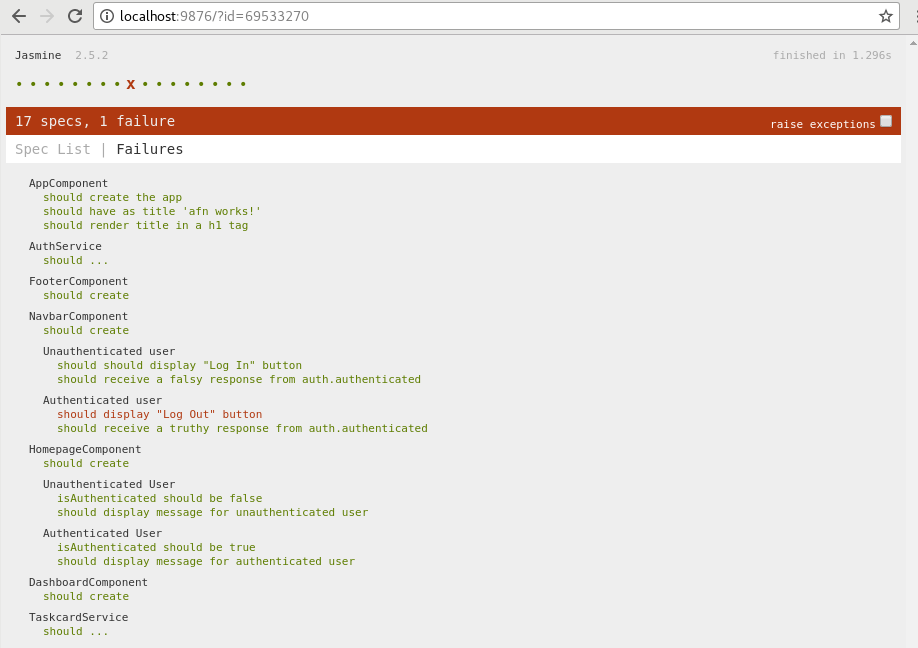
当我运行我的规范时,我收到的集成测试失败了,表明我的spyOn for Auth0 service auth.authenticated()没有设置正确的返回值。基本上,这个规范应该返回一个真实值(id_token),以便显示注销按钮。由于它仍然显示Log 按钮,所以假设null值被粘贴,而不是设置在AuthResponse变量中的字符串上。
我是不是错过了什么在我的设置?任何帮助将不胜感激。
//navbar.component.ts
import { Component, OnInit } from '@angular/core';
import { AuthService } from '../auth.service';

@Component({
  selector: 'afn-navbar',
  templateUrl: './navbar.component.html',
  styleUrls: ['./navbar.component.css']
})
export class NavbarComponent implements OnInit {

  constructor(private auth: AuthService) { }

  ngOnInit() {
  }

}


//navbar.component.spec.ts
import { async, ComponentFixture, TestBed } from '@angular/core/testing';

import { NavbarComponent } from './navbar.component';
import { AuthService } from '../auth.service';

describe('NavbarComponent', () => {
  let component: NavbarComponent;
  let navbar: NavbarComponent;
  let fixture: ComponentFixture<NavbarComponent>;
  let auth: AuthService;
  let authResponse: string;


  beforeEach(async(() => {
    TestBed.configureTestingModule({
      declarations: [ NavbarComponent ],
      providers: [ AuthService ]
    })
    .compileComponents();
  }));

  beforeEach(() => {
    fixture = TestBed.createComponent(NavbarComponent);
    component = fixture.componentInstance;
    fixture.detectChanges();
  });


  beforeEach(() => {
    auth = new AuthService();
    spyOn(auth, 'authenticated').and.returnValue(authResponse);
  });

  it('should create', () => {
    expect(component).toBeTruthy();
  });

  describe('Unauthenticated user', () => {

    beforeEach(() => {
      authResponse = null;
      navbar = fixture.debugElement.componentInstance;
    });

    it('should should display "Log In" button', async(() => {
      const compiled = fixture.debugElement.nativeElement;
      expect(compiled.querySelector('button').textContent).toContain('Log In');
    }));

    it('should receive a falsy response from auth.authenticated', async(() => {
      navbar.ngOnInit();
      expect(auth.authenticated()).toBeFalsy();
    }));
  });

  describe('Authenticated user', () => {

    beforeEach(() => {
      authResponse = '23kjsfdi723bsai7234dfsfghfg';
      navbar = fixture.debugElement.componentInstance;
    });

    it('should display "Log Out" button', async(() => {
      fixture.detectChanges();
      const compiled = fixture.debugElement.nativeElement;
      expect(compiled.querySelector('button').textContent).toContain('Log Out');
    }));

    it('should receive a truthy response from auth.authenticated', async(() => {
      navbar.ngOnInit();
      expect(auth.authenticated()).toBeTruthy();
    }));
  });
});Navbar组件的模板
//navbar.component.html
    <div class="navbar-header">
      <a class="navbar-brand" href="#">Auth0 - Angular 2</a>
      <button class="btn btn-primary btn-margin" (click)="auth.login()" *ngIf="!auth.authenticated()">Log In</button>
      <button class="btn btn-primary btn-margin" (click)="auth.logout()" *ngIf="auth.authenticated()">Log Out</button>
    </div>
Auth0服务
//auth.service.ts
import { Injectable } from '@angular/core';
import { tokenNotExpired } from 'angular2-jwt';
import Auth0Lock from 'auth0-lock';

@Injectable()
export class AuthService {
  // Configure Auth0
  lock = new Auth0Lock('hcDsjVxfeZuAVWg39KIWFXV63n8DjHli', 'afn.auth0.com', {});

  constructor() {
    // Add callback for lock `authenticated` event
    this.lock.on('authenticated', (authResult) => {
      localStorage.setItem('id_token', authResult.idToken);
    });
  }

  public login() {
    // Call the show method to display the widget.
    this.lock.show();
  }

  public authenticated() {
    // Check if there's an unexpired JWT
    // This searches for an item in localStorage with key == 'id_token'
    return tokenNotExpired('id_token');
  }

  public logout() {
    // Remove token from localStorage
    localStorage.removeItem('id_token');
  }
}

回答 1
Stack Overflow用户
回答已采纳
发布于 2017-05-12 17:54:49
在从@JBNizet获得提示后,我没有从TestBed实例化TestBed,而是决定为每个响应创建一个单独的spyOn。虽然看上去不干,但很管用。
以下是navbar.component.spec.ts的解决方案:
import { async, ComponentFixture, TestBed } from '@angular/core/testing';

import { NavbarComponent } from './navbar.component';
import { AuthService } from '../auth.service';

describe('NavbarComponent', () => {
  let component: NavbarComponent;
  let navbar: NavbarComponent;
  let fixture: ComponentFixture<NavbarComponent>;
  let auth: AuthService;
  let falsyResponse = null;
  let truthyResponse = '23kjsfdi723bsai7234dfsfghfg';

  beforeEach(async(() => {
    TestBed.configureTestingModule({
      declarations: [ NavbarComponent ],
      providers: [ AuthService ]
    })
    .compileComponents();
  }));

  beforeEach(() => {
    fixture = TestBed.createComponent(NavbarComponent);
    component = fixture.componentInstance;
    fixture.detectChanges();
  });

  beforeEach(() => {
    auth = TestBed.get(AuthService);
  });

  it('should create', () => {
    expect(component).toBeTruthy();
  });

  describe('Unauthenticated user', () => {

    beforeEach(() => {
      spyOn(auth, 'authenticated').and.returnValue(falsyResponse);
      navbar = fixture.debugElement.componentInstance;
    });

    it('should receive a falsy response from auth.authenticated', async(() => {
      navbar.ngOnInit();
      expect(auth.authenticated()).toBeFalsy();
    }));

    it('should should display "Log In" button', async(() => {
      const compiled = fixture.debugElement.nativeElement;
      expect(compiled.querySelector('button').textContent).toContain('Log In');
    }));
  });

  describe('Authenticated user', () => {

    beforeEach(() => {
      spyOn(auth, 'authenticated').and.returnValue(truthyResponse);
      navbar = fixture.debugElement.componentInstance;
    });

    it('should receive a truthy response from auth.authenticated', async(() => {
      navbar.ngOnInit();
      expect(auth.authenticated()).toBeTruthy();
    }));

    it('should display "Log Out" button', async(() => {
      fixture.detectChanges();
      const compiled = fixture.debugElement.nativeElement;
      expect(compiled.querySelector('button').textContent).toContain('Log Out');
    }));
  });
});页面原文内容由Stack Overflow提供。腾讯云小微IT领域专用引擎提供翻译支持
原文链接:
https://stackoverflow.com/questions/43943297
复制相关文章
相似问题
腾讯云开发者

Copyright © 2013 - 2026 Tencent Cloud. All Rights Reserved. 腾讯云 版权所有
深圳市腾讯计算机系统有限公司 ICP备案/许可证号:粤B2-20090059  粤公网安备44030502008569号
腾讯云计算(北京)有限责任公司 京ICP证150476号 | 京ICP备11018762号