
未为导入语句找到规则‘jsx-a11y/img-has’的定义。
未为导入语句找到规则‘jsx-a11y/img-has’的定义。
提问于 2017-05-11 19:15:13
我使用的是airbnb代码样式的eslint,我刚刚升级了所有的npm包。现在我看到了错误
1:1没有找到jsx-a11y/img-has规则的错误定义。
对于我所有的import文件中的第一个JavaScript语句。这是我的package.json
{
  "name": "oembed",
  "version": "0.0.1",
  "description": "oEmbed API for embedding content at welt.de",
  "engines": {
    "node": "6.2.1",
    "npm": "3.9.3"
  },
  "main": "server.js",
  "scripts": {
    "dev-webpack": "webpack --progress --colors --watch --config webpack.config.dev.js",
    "dev-server": "NODE_ENV=development nodemon ./server/dist/server.dev.js",
    "dev": "concurrently --kill-others -r \"npm run dev-server\" \"npm run dev-webpack\"",
    "lint": "eslint server/src *.js",
    "build-webpack": "webpack --config webpack.config.prod.js",
    "build": "npm run lint && npm run test && npm run build-webpack",
    "test-watch": "NODE_ENV=test mocha --compilers js:babel-core/register --colors -w ./server/test/*.spec.js ./server/test/**/*.spec.js",
    "test": "NODE_ENV=test mocha --compilers js:babel-core/register --colors ./server/test/*.spec.js ./server/test/**/*.spec.js",
    "report-coverage": "NODE_ENV=test nyc --reporter=lcov --report-dir ./server/coverage npm test",
    "show-coverage": "open ./server/coverage/lcov-report/index.html",
    "coverage": "npm run report-coverage && npm run show-coverage",
    "prestart": "npm run build-webpack",
    "start": "NODE_ENV=production node ./server/dist/server.prod.js weltn24-oembed-service",
    "stop": "killall -SIGINT weltn24-oembed-service"
  },
  "repository": {
    "type": "git",
    "url": "git+https://github.com/WeltN24/oembed.git"
  },
  "keywords": [
    "oembed",
    "embed"
  ],
  "author": "Lukas Bombach",
  "license": "ISC",
  "bugs": {
    "url": "https://github.com/WeltN24/oembed/issues"
  },
  "homepage": "https://github.com/WeltN24/oembed#readme",
  "dependencies": {
    "aws-sdk": "^2.3.19",
    "compression": "^1.6.2",
    "cookie-parser": "^1.4.3",
    "cors": "^2.7.1",
    "debug": "^2.2.0",
    "es6-promisify": "^5.0.0",
    "express": "^4.13.4",
    "express-healthcheck": "^0.1.0",
    "express-winston": "^2.4.0",
    "html-minifier": "^3.4.4",
    "http-status": "^1.0.1",
    "i": "^0.3.5",
    "is-json": "^2.0.1",
    "joi": "^10.4.1",
    "json-promise": "^1.1.8",
    "lru-cache": "^4.0.1",
    "md5": "^2.1.0",
    "morgan": "^1.7.0",
    "mustache": "^2.2.1",
    "node-fetch": "^1.6.3",
    "npm": "^4.5.0",
    "regexp-clone": "0.0.1",
    "request": "^2.72.0",
    "winston": "^2.2.0",
    "winston-logentries": "^3.0.0",
    "xml2js": "^0.4.17",
    "xregexp": "^3.1.1",
    "xss": "^0.3.3"
  },
  "devDependencies": {
    "babel-core": "^6.9.1",
    "babel-eslint": "^7.2.3",
    "babel-loader": "^7.0.0",
    "babel-polyfill": "^6.9.1",
    "babel-preset-env": "^1.4.0",
    "babel-preset-es2015": "^6.9.0",
    "babel-preset-stage-0": "^6.5.0",
    "chai": "^3.5.0",
    "chai-as-promised": "^6.0.0",
    "chai-joi": "^1.1.0",
    "chai-json-schema": "^1.2.0",
    "chai-string": "^1.2.0",
    "concurrently": "^3.4.0",
    "cz-conventional-changelog": "^2.0.0",
    "eslint": "^3.19.0",
    "eslint-config-airbnb": "^14.1.0",
    "eslint-plugin-import": "^2.2.0",
    "eslint-plugin-jsx-a11y": "^5.0.1",
    "eslint-plugin-react": "^7.0.0",
    "ghooks": "^2.0.0",
    "istanbul": "^0.4.3",
    "mocha": "^3.3.0",
    "mocha-lcov-reporter": "^1.2.0",
    "nodemon": "^1.9.2",
    "nyc": "^10.3.2",
    "sinon": "^2.2.0",
    "sinon-chai": "^2.8.0",
    "supertest": "^3.0.0",
    "supertest-as-promised": "^4.0.2",
    "supertest-chai": "0.0.8",
    "webpack": "^2.5.1",
    "webpack-config": "^7.0.0",
    "webpack-node-externals": "^1.2.0"
  },
  "babel": {
    "presets": [
      [
        "env",
        {
          "targets": {
            "node": "current"
          }
        }
      ]
    ]
  },
  "eslintConfig": {
    "extends": "airbnb",
    "parser": "babel-eslint",
    "ecmaFeatures": {
      "classes": true
    },
    "rules": {
      "no-underscore-dangle": "off",
      "no-throw-literal": "off",
      "max-len": "off"
    },
    "plugins": [
      "jsx-a11y"
    ]
  }
}回答 1
Stack Overflow用户
回答已采纳
发布于 2017-05-12 00:13:24
@lukas在github上讨论了这一问题:
这可能是找出这类问题的答案的最佳方法,除非您在此之前尝试过这样做,否则最好的方法是研究项目的问题。
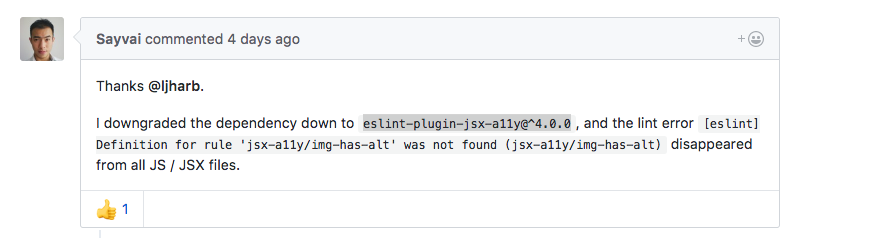
https://github.com/evcohen/eslint-plugin-jsx-a11y/issues/232
页面原文内容由Stack Overflow提供。腾讯云小微IT领域专用引擎提供翻译支持
原文链接:
https://stackoverflow.com/questions/43923862
复制相关文章
相似问题
腾讯云开发者

Copyright © 2013 - 2026 Tencent Cloud. All Rights Reserved. 腾讯云 版权所有
深圳市腾讯计算机系统有限公司 ICP备案/许可证号:粤B2-20090059  粤公网安备44030502008569号
腾讯云计算(北京)有限责任公司 京ICP证150476号 | 京ICP备11018762号