
D3.js未定义,表示提供静态文件
我有快递服务静态js文件,d3.js (v4)的本地副本就是其中之一。所有其他js文件都是从我的标记中加载的,但是它说没有定义d3。我也尝试过从url加载,但没有骰子,jquery加载很好("https://ajax.googleapis.com/ajax/libs/jquery/3.2.1/jquery.min.js"),但不加载d3 ("https://d3js.org/d3.v4.min.js")。
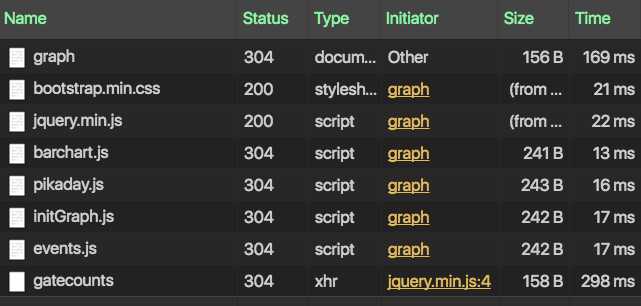
显然,它能够定位资源,因为我没有一个404,但它从未运行。当我将一个console.log('hello')抛到d3源代码中时,它就不会出现。
我在Chrome和Firefox上试过。我已经看到了使用http-server的答案,但是express的静态服务器不是在做同样的事情吗?
如果你有主意的话,先谢谢你。
档案结构:
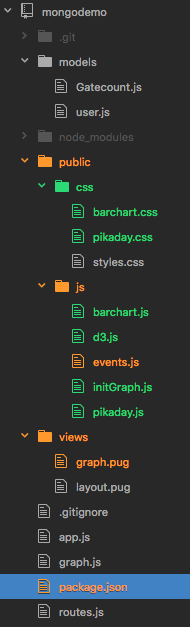
app.js:
const express = require('express');
const app = express();
const router = express.Router();
const mongoose = require('mongoose');
const bodyParser = require('body-parser');
const path = require('path');

const routes = require('./routes');
const graph = require('./graph');

//urls to use
const localMongoUrl = "mongodb://localhost:27017/test";

const url = localMongoUrl

//connect to db. make sure mongo daemon is running.
mongoose.connect(url);
const connection = mongoose.connection;

connection.on('error', err => console.err(err));
connection.on('open', err => {
  if (err) console.err(err);
  else console.log('connected to ' + url);
});

//middleware attaches form info to req.body
app.use(bodyParser.urlencoded({ extended: true }));
app.use(bodyParser.json());

//set up pug as the templating engine
app.set('view engine', 'pug');

//serve up files in public folder
app.use(express.static('public'));

//setup router as middleware
app.use('/', router);

//serve up the index page when root is hit
router.get('/', (req, res) => {
  connection.db.listCollections().toArray((err, collections) => {
    if (err) {
      console.log(err);
      res.json(err);
      res.end();
    } else {
      const collectionNames = collections.map(collection => {
        return collection.name;
      })
      req.collectionNames = collectionNames;
      res.render('layout', { names: req.collectionNames, url: url });
    }
  });
})

//route for when user selects which collection in dropdown
router.use('/collections', routes);
router.use('/graph', graph);

//listen for requests
app.listen(3000, () => {
  console.log('Listening on 3000');
});
graph.pug
html
head
title GateCounts Graph
link(rel="stylesheet" href="https://maxcdn.bootstrapcdn.com/bootstrap/3.3.7/css/bootstrap.min.css")
link(rel="stylesheet" href="/css/styles.css")
link(rel="stylesheet" href="/css/barchart.css")
link(rel="stylesheet" href="/css/pikaday.css")
body
.page-wrapper
.row
.col-md-2
h1 D3 Graph w/ Mongodb
.form-wrapper#graph-query
form(method="POST" action="/graph/getgraph")
fieldset.form-group
legend Date Range
input.form-control(type="text" id="fromDate" name="fromDate" placeholder="From:")
input.form-control(type="text" id="toDate" name="toDate" placeholder="To:")
fieldset.form-group
div.form-check
label.form-check-label(for="sunday") Sunday  
input.form-check-input(type="checkbox" id="sunday" name="weekdays" value="1" checked)
div.form-check
label.form-check-label(for="monday") Monday  
input.form-check-input(type="checkbox" id="monday" name="weekdays" value="2" checked)
div.form-check
label.form-check-label(for="tuesday") Tuesday  
input.form-check-input(type="checkbox" id="tuesday" name="weekdays" value="3" checked)
div.form-check
label.form-check-label(for="wednesday") Wednesday  
input.form-check-input(type="checkbox" id="wednesday" name="weekdays" value="4" checked)
div.form-check
label.form-check-label(for="thursday") Thursday  
input.form-check-input(type="checkbox" id="thursday" name="weekdays" value="5" checked)
div.form-check
label.form-check-label(for="friday") Friday  
input.form-check-input(type="checkbox" id="friday" name="weekdays" value="6" checked)
div.form-check
label.form-check-label(for="saturday") Saturday  
input.form-check-input(type="checkbox" id="saturday" name="weekdays" value="7" checked)
fieldset.form-group
div.form-check
label.form-check-label(for="sunday") Include Closed Days?  
input.form-check-input(type="checkbox" id="includeClosed" name="includeClosed" value="true" checked)
button.btn(type="submit") Submit
hr
.summaryBox
h4 Summary
ul.list-group#summary-list
.col-md-10
h4 GateCounts Graph
.graphBox
#graph
script(src="https://ajax.googleapis.com/ajax/libs/jquery/3.2.1/jquery.min.js")
script(scr="js/d3.js")
script(src="js/barchart.js")
script(src="js/pikaday.js")
script(src="js/initGraph.js")
script(src="js/events.js")
回答 1
Stack Overflow用户
发布于 2017-05-11 19:16:26
您正在./public目录下的app.js目录下为静态文件提供服务。在该文件夹下,需要在该文件夹下有一个js目录和一个d3.js目录。如果您安装了来自npm的D3,那么它将在您的<project root>/node_modules中,您将需要从那里找到d3.js并复制它。您可以让构建任务使用大量的工具来实现这一点。
确保文件在public/js中,并且它是正确的。然后再试一次。
编辑:如果你在开发工具中检查你的网络选项卡,而不是404‘,那就转到请求d3.js的行,点击它,然后点击response选项卡。看看您做了什么,得到了什么,因为这可以很好地说明什么是错误的。
编辑#2:也可能是script(scr="")中的一个错误:)
https://stackoverflow.com/questions/43923188
复制相似问题
腾讯云开发者

Copyright © 2013 - 2026 Tencent Cloud. All Rights Reserved. 腾讯云 版权所有
深圳市腾讯计算机系统有限公司 ICP备案/许可证号:粤B2-20090059  粤公网安备44030502008569号
腾讯云计算(北京)有限责任公司 京ICP证150476号 | 京ICP备11018762号