
通过POST工作进行羽毛身份验证,但套接字没有
这是一个回购展示了我的最新进展,以及这是我的配置。从目前的情况来看,回购现在甚至没有与REST认证--尽管我认为socket auth有一些问题需要检查。
我配置了羽毛,能够完全用邮递员创建一个用户REST,甚至还可以得到一个auth令牌(我可以将其发送到/authenticate以获得一个令牌,然后验证这个令牌- yay!)( yay REST api!)
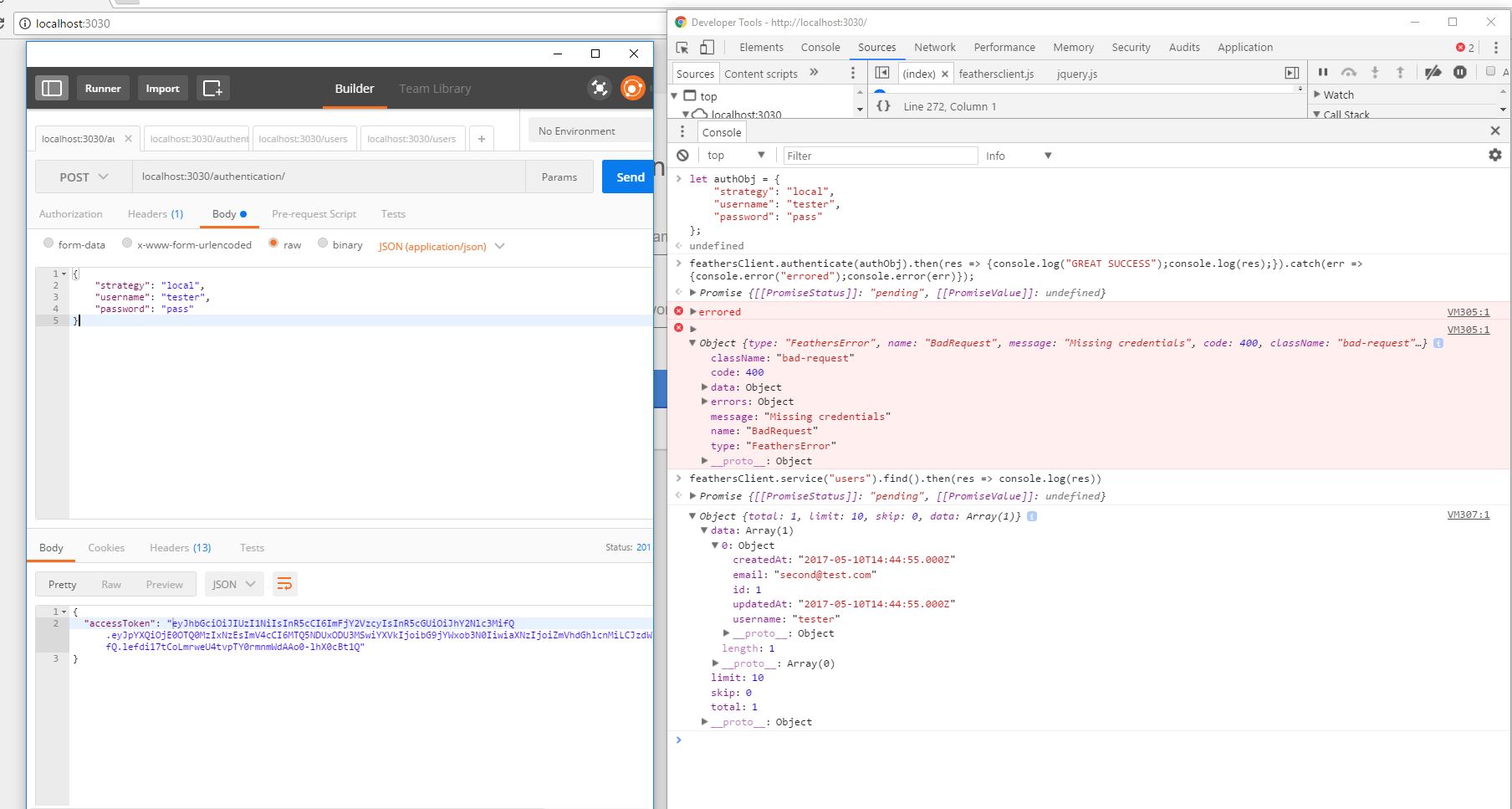
但在浏览器里,故事并不是那么愉快。我可以使用find来获取数据,但是authenticate只会给出错误。
在我的googling中,我找到了这个职位,并将我的客户端javascript更新为这。我也尝试过使用postman的令牌执行jwt auth,但这会导致相同的Missing Credentials错误。停下来!
密码传入..。
app.js (仅显示顺序的配置部分)
app.configure(configuration(path.join(__dirname, '..')))
  .use(cors())
  .use(helmet()) // best security practices
  .use(compress())
  .use(favicon(path.join(app.get('public'), 'favicon.ico')))
  .use('/', feathers.static(app.get('public')))
  .configure(socketio())
  .configure(rest())
  .configure(hooks())
  .use(bodyParser.json())
  .use(bodyParser.urlencoded({ extended: true }))
  .configure(services) // pull in all services from services/index.js
  .configure(middleware) // middleware from middleware/index.js
.hooks(appHooks)在服务中,我首先添加身份验证,它位于自己的文件中,类似于下面的authentication.js
const authentication = require('feathers-authentication');
const jwt = require('feathers-authentication-jwt');
const local = require('feathers-authentication-local');
const authManagement = require('feathers-authentication-management');

module.exports = function () {

  const app = this;
  const config = app.get('authentication');

  // Set up authentication with the secret
  app.configure(authentication(config));
  app.configure(authManagement(config));
  app.configure(jwt());
  app.configure(local(config.local));

  // The `authentication` service is used to create a JWT.
  // The before `create` hook registers strategies that can be used
  // to create a new valid JWT (e.g. local or oauth2)
  app.service('authentication').hooks({
    before: {
      create: [
        authentication.hooks.authenticate(config.strategies)
      ],
      remove: [
        authentication.hooks.authenticate('jwt')
      ]
    }
  });
};
index.html (大部分被剥离,只是显示了相关脚本)
let url = location.protocol + '//' + location.hostname +
    (location.port
      ? ':' + location.port
      : '');

const socket = io(url);

const feathersClient = feathers()
  .configure(feathers.socketio(socket))
  .configure(feathers.hooks())
  .configure(feathers.authentication({ storage: window.localStorage }));
这是一个屏幕截图,显示了铬调试器和邮递员中的一些请求。
回答 1
Stack Overflow用户
发布于 2017-05-12 20:21:20
当default.json被设置为使用' username‘作为usernameField时,它会输出我的usernameField用户名'Matt’。这是因为羽毛配置检查一个值是否是OS环境的一部分。
https://github.com/feathersjs/feathers-configuration/blob/master/src/index.js#L26
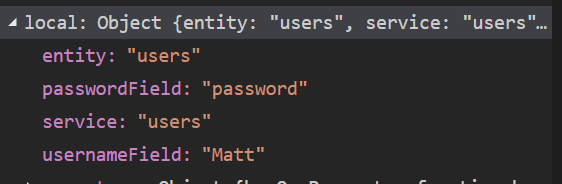
解决办法
例如,在authentication.js中手动设置此配置:
  // Set up authentication with the secret
  const localConfig = {
    'entity': 'users',
    'service': 'users',
    'usernameField': 'username',
    'passwordField': 'password'
  };

  app.configure(authentication(config));
app.configure(local(localConfig));https://stackoverflow.com/questions/43898049
复制相似问题
腾讯云开发者

Copyright © 2013 - 2026 Tencent Cloud. All Rights Reserved. 腾讯云 版权所有
深圳市腾讯计算机系统有限公司 ICP备案/许可证号:粤B2-20090059  粤公网安备44030502008569号
腾讯云计算(北京)有限责任公司 京ICP证150476号 | 京ICP备11018762号