
javafx graphicscontext.rotate不工作
javafx graphicscontext.rotate不工作
提问于 2017-05-09 01:26:43
其余的代码工作得很好,我只是不能在rotateCanvas事件处理程序中旋转它!我可以通过鼠标事件在画布上画画。fxml布局文件有一个按钮,该按钮映射到rotateCanavas()事件,handler.This是我的fxml布局控制器类的代码片段。请告诉我我错过了什么!!谢谢。
  public void initialize() {
    try {
        //initializing canvas
        gc = whiteCanvas.getGraphicsContext2D();
        initDraw(gc);

        //event handlers of canvas
        whiteCanvas.addEventHandler(MouseEvent.MOUSE_ENTERED,
                new EventHandler<MouseEvent>(){

            @Override
            public void handle(MouseEvent event) {
                if(true)
                {
                    lastAction = "START";
                    gc.beginPath();
                    gc.moveTo(event.getX(), event.getY());
                    gc.stroke();
                    ChatMessage whiteboardMSG = new ChatMessage();
                    whiteboardMSG.setMessageType(MessageConstants.WHITEBOARD);
                    whiteboardMSG.setWhiteboardAction(MessageConstants.START);
                    whiteboardMSG.setPointX(event.getX());
                    whiteboardMSG.setPointY(event.getY());
                    whiteboardMSG.setCurrentStroke(gc.getStroke().toString());
                    try
                    {
                        System.out.println(MessageConstants.START);
                        oos.writeObject(whiteboardMSG);
                    }
                    catch(IOException e)
                    {
                        //error in sending mouse entered event
                    }
                }

            }
        });

        whiteCanvas.addEventHandler(MouseEvent.MOUSE_DRAGGED,
                new EventHandler<MouseEvent>(){

            @Override
            public void handle(MouseEvent event) {
                if(true)
                {
                    if(lastAction == "DRAG")
                    {
                        gc.lineTo(event.getX(), event.getY());
                        gc.stroke();
                    }
                    if(lastAction == "END")
                    {
                        gc.moveTo(event.getX(), event.getY());
                        gc.stroke();
                    }
                    if(lastAction == "START")
                    {
                        gc.moveTo(event.getX(), event.getY());
                        gc.stroke();
                    }

                    lastAction = "DRAG";
                    ChatMessage whiteboardMSG = new ChatMessage();
                    whiteboardMSG.setMessageType(MessageConstants.WHITEBOARD);
                    whiteboardMSG.setWhiteboardAction(MessageConstants.DRAG);
                    whiteboardMSG.setPointX(event.getX());
                    whiteboardMSG.setPointY(event.getY());
                    whiteboardMSG.setCurrentStroke(gc.getStroke().toString());
                    try
                    {
                        System.out.println(MessageConstants.DRAG);
                        oos.writeObject(whiteboardMSG);
                    }
                    catch(IOException e)
                    {
                        //error in sending mouse entered event
                    }
                }

            }
        });

        whiteCanvas.addEventHandler(MouseEvent.MOUSE_RELEASED,
                new EventHandler<MouseEvent>(){

            @Override
            public void handle(MouseEvent event) {
                if(true)
                {
                    lastAction = "END";
                    ChatMessage whiteboardMSG = new ChatMessage();
                    whiteboardMSG.setMessageType(MessageConstants.WHITEBOARD);
                    whiteboardMSG.setWhiteboardAction(MessageConstants.END);
                     whiteboardMSG.setPointX(event.getX());
                        whiteboardMSG.setPointY(event.getY());
                        whiteboardMSG.setCurrentStroke(gc.getStroke().toString());
                        try
                        {
                            System.out.println(MessageConstants.END);
                            oos.writeObject(whiteboardMSG);
                        }
                        catch(IOException e)
                        {
                            //error in sending mouse entered event
                        }
                }

            }
        });
        //setting image on respective buttons-incomplete
        /*try {
            btnPencil.setStyle("-fx-background-image: url('/resources/pencil.png');-fx-min-height: 10px; -fx-min-width: 10px;");
            btnZoom.setStyle("-fx-background-image: url('/resources/zoom.png');-fx-min-height: 10px; -fx-min-width: 10px;");
            btnRotate.setStyle("-fx-background-image: url('/resources/rotate.png');-fx-min-height: 10px; -fx-min-width: 10px;");
          } catch (Exception ex) {
            System.out.println(ex);
          }*/
        //connecting server
        this.userName.setText(ClientMain.controller.getButtonLogin().getText());
        System.out.println(this.userName);
        this.serverIp.setText(ClientMain.controller.getServerId().getText());
        if (serverIp.getText() != null && !serverIp.getText().isEmpty()) {
            this.serverSocket = new Socket(this.serverIp.getText(), 9888);
        } else {
            this.serverIp.setText("Localhost");
            this.serverSocket = new Socket("localhost", 9888);
        }
        this.clientLogs.appendText("Connected to Server :" + serverSocket.getInetAddress() + " Port :"
                + serverSocket.getPort() + "\n");
        this.ois = new ObjectInputStream(this.serverSocket.getInputStream());
        this.oos = new ObjectOutputStream(this.serverSocket.getOutputStream());
        RunnableClient runnableClient = new RunnableClient(this, this.serverSocket, ois, oos);
        Thread runnableClientThread = new Thread(runnableClient);
        runnableClientThread.start();

    } catch (UnknownHostException e) {
        this.clientLogs.appendText("Unknown host error\n");
        e.printStackTrace();
    } catch (IOException e) {
        this.clientLogs.appendText("Internal server error\n");
        e.printStackTrace();
    }
    finally {
        registerClient();
    }

}

private void initDraw(GraphicsContext gc){
    double canvasWidth = gc.getCanvas().getWidth();
    double canvasHeight = gc.getCanvas().getHeight();

    gc.setFill(Color.LIGHTGRAY);
    gc.setStroke(Color.BLACK);
    gc.setLineWidth(5);

    gc.fill();
    gc.strokeRect(
            0,              //x of the upper left corner
            0,              //y of the upper left corner
            canvasWidth,    //width of the rectangle
            canvasHeight);  //height of the rectangle

    gc.setFill(Color.RED);
    gc.setStroke(Color.BLACK);
    gc.setLineWidth(1);

}


@FXML
void rotateCanvas(ActionEvent event)
{
    gc.rotate(90);

    System.out.println("rotated");
}
fxml布局文件
    <?xml version="1.0" encoding="UTF-8"?>
    <?import javafx.geometry.Insets?>
<?import javafx.scene.canvas.Canvas?>
<?import javafx.scene.control.Button?>
<?import javafx.scene.control.ListView?>
<?import javafx.scene.control.TextArea?>
<?import javafx.scene.control.TextField?>
<?import javafx.scene.effect.InnerShadow?>
<?import javafx.scene.layout.BorderPane?>
<?import javafx.scene.layout.ColumnConstraints?>
<?import javafx.scene.layout.GridPane?>
<?import javafx.scene.layout.HBox?>
<?import javafx.scene.layout.Pane?>
<?import javafx.scene.layout.RowConstraints?>
<?import javafx.scene.layout.VBox?>
<?import javafx.scene.text.Font?>
<?import javafx.scene.text.Text?>

<BorderPane id="borderPaneMain" maxHeight="-Infinity" maxWidth="1.7976931348623157E308" minHeight="-Infinity" minWidth="-Infinity" prefHeight="600.0" prefWidth="900.0" xmlns="http://javafx.com/javafx/8.0.111" xmlns:fx="http://javafx.com/fxml/1" fx:controller="com.unitalk.client.ClientController">
   <bottom>
      <VBox prefHeight="81.0" prefWidth="882.0" style="-fx-background-color: #adebad;" BorderPane.alignment="CENTER">
         <children>
            <HBox prefHeight="0.0" prefWidth="882.0">
               <children>
                  <TextField id="message" fx:id="message" prefHeight="54.0" prefWidth="433.0" promptText="Enter your message">
                     <HBox.margin>
                        <Insets bottom="10.0" left="50.0" top="25.0" />
                     </HBox.margin>
                  </TextField>
                  <Button id="buttonSend" fx:id="buttonSend" contentDisplay="CENTER" mnemonicParsing="false" onAction="#buttonSendAction" prefHeight="30.0" prefWidth="92.0" style="-fx-background-color: #46d246;" text="Send" textFill="#136e4b">
                     <HBox.margin>
                        <Insets bottom="10.0" left="20.0" top="23.0" />
                     </HBox.margin>
                     <font>
                        <Font name="System Bold" size="14.0" />
                     </font>
                  </Button>
               </children>
            </HBox>
         </children>
      </VBox>
   </bottom>
   <right>
      <VBox prefHeight="450.0" prefWidth="113.0" style="-fx-background-color: #adebad;" BorderPane.alignment="CENTER">
         <children>
            <Text fill="#012c09" strokeType="OUTSIDE" strokeWidth="0.0" text="Online Users" textAlignment="CENTER" wrappingWidth="271.63671875">
               <font>
                  <Font size="18.0" />
               </font>
               <VBox.margin>
                  <Insets top="10.0" />
               </VBox.margin>
            </Text>
            <ListView id="userList" fx:id="userList" prefHeight="478.0" prefWidth="252.0">
               <effect>
                  <InnerShadow />
               </effect>
               <VBox.margin>
                  <Insets bottom="5.0" left="10.0" right="10.0" top="40.0" />
               </VBox.margin>
            </ListView>
         </children>
         <BorderPane.margin>
            <Insets />
         </BorderPane.margin>
      </VBox>
   </right>
   <center>
      <VBox prefHeight="503.0" prefWidth="540.0" style="-fx-background-color: #adebad;" BorderPane.alignment="CENTER">
         <children>
            <HBox prefHeight="38.0" prefWidth="619.0">
               <children>
                  <Text fill="#928b8b" strokeType="OUTSIDE" strokeWidth="0.0" text="Connected:">
                     <HBox.margin>
                        <Insets left="5.0" top="10.0" />
                     </HBox.margin>
                     <font>
                        <Font size="14.0" />
                     </font>
                  </Text>
                  <Text id="serverIp" fx:id="serverIp" fill="#033707" strokeType="OUTSIDE" strokeWidth="0.0" text="Localhost">
                     <HBox.margin>
                        <Insets left="10.0" top="10.0" />
                     </HBox.margin>
                     <font>
                        <Font size="14.0" />
                     </font>
                  </Text>
                  <Text id="textUser" fill="#6b6a6a" strokeType="OUTSIDE" strokeWidth="0.0" text="User:">
                     <HBox.margin>
                        <Insets left="200.0" top="10.0" />
                     </HBox.margin>
                     <font>
                        <Font size="14.0" />
                     </font>
                  </Text>
                  <Text id="userName" fx:id="userName" fill="#0d4a11" strokeType="OUTSIDE" strokeWidth="0.0" text="userName">
                     <HBox.margin>
                        <Insets left="10.0" top="10.0" />
                     </HBox.margin>
                     <font>
                        <Font size="14.0" />
                     </font>
                  </Text>
                  <Button id="buttonLogout" fx:id="logoutButton" alignment="CENTER" contentDisplay="CENTER" mnemonicParsing="false" onAction="#buttonLogoutAction" prefHeight="30.0" prefWidth="94.0" style="-fx-background-color: #46d246;" text="Logout" textFill="#136e4b">
                     <font>
                        <Font name="System Bold" size="14.0" />
                     </font>
                     <HBox.margin>
                        <Insets left="20.0" top="5.0" />
                     </HBox.margin>
                  </Button>
               </children>
               <VBox.margin>
                  <Insets left="10.0" />
               </VBox.margin>
            </HBox>
            <Text id="textGroupChat" fill="#052811" strokeType="OUTSIDE" strokeWidth="0.0" text="Chats:" wrappingWidth="613.63671875">
               <font>
                  <Font name="System Bold" size="18.0" />
               </font>
               <VBox.margin>
                  <Insets left="15.0" top="10.0" />
               </VBox.margin>
            </Text>
            <HBox prefHeight="272.0" prefWidth="611.0">
               <children>
                  <GridPane>
                    <columnConstraints>
                      <ColumnConstraints hgrow="SOMETIMES" minWidth="10.0" prefWidth="100.0" />
                      <ColumnConstraints hgrow="SOMETIMES" minWidth="10.0" prefWidth="100.0" />
                    </columnConstraints>
                    <rowConstraints>
                      <RowConstraints minHeight="10.0" prefHeight="30.0" vgrow="SOMETIMES" />
                      <RowConstraints minHeight="10.0" prefHeight="30.0" vgrow="SOMETIMES" />
                      <RowConstraints minHeight="10.0" prefHeight="30.0" vgrow="SOMETIMES" />
                        <RowConstraints minHeight="10.0" prefHeight="30.0" vgrow="SOMETIMES" />
                        <RowConstraints minHeight="10.0" prefHeight="30.0" vgrow="SOMETIMES" />
                        <RowConstraints minHeight="10.0" prefHeight="30.0" vgrow="SOMETIMES" />
                        <RowConstraints minHeight="10.0" prefHeight="30.0" vgrow="SOMETIMES" />
                        <RowConstraints minHeight="10.0" prefHeight="30.0" vgrow="SOMETIMES" />
                        <RowConstraints minHeight="10.0" prefHeight="30.0" vgrow="SOMETIMES" />
                    </rowConstraints>
                     <children>
                        <Button fx:id="btnBlack" mnemonicParsing="false" onAction="#setPencilColor" prefHeight="0.0" prefWidth="0.0" style="-fx-background-color: #000000;" text="  " />
                        <Button fx:id="btnBlue" mnemonicParsing="false" onAction="#setPencilColor" style="-fx-background-color: #0a014d;" text="   " GridPane.columnIndex="1" />
                        <Button fx:id="btnRed" mnemonicParsing="false" onAction="#setPencilColor" style="-fx-background-color: #ae030e;" text="   " GridPane.rowIndex="1" />
                        <Button fx:id="btnGreen" mnemonicParsing="false" onAction="#setPencilColor" style="-fx-background-color: #3eae40;" text="   " GridPane.columnIndex="1" GridPane.rowIndex="1" />
                        <Button fx:id="btnYellow" mnemonicParsing="false" onAction="#setPencilColor" style="-fx-background-color: #ccff00;" text="   " GridPane.rowIndex="2" />
                        <Button fx:id="btnCyan" mnemonicParsing="false" onAction="#setPencilColor" style="-fx-background-color: #00ffcc;" text="   " GridPane.columnIndex="1" GridPane.rowIndex="2" />
                        <Button fx:id="btnGrey" mnemonicParsing="false" onAction="#setPencilColor" style="-fx-background-color: #587e60;" text="   " GridPane.rowIndex="3" />
                        <Button fx:id="btnPurple" mnemonicParsing="false" onAction="#setPencilColor" style="-fx-background-color: #977ffa;" text="   " GridPane.columnIndex="1" GridPane.rowIndex="3" />
                        <Button mnemonicParsing="false" text="Button" GridPane.rowIndex="4" />
                        <Button mnemonicParsing="false" text="Button" GridPane.columnIndex="1" GridPane.rowIndex="4" />
                        <Button mnemonicParsing="false" text="Button" GridPane.rowIndex="5" />
                        <Button fx:id="btnClear" mnemonicParsing="false" onAction="#clearCanvas" text="Clear" GridPane.columnIndex="1" GridPane.rowIndex="5" />
                        <Button fx:id="btnPencil" mnemonicParsing="false" onAction="#setPencilTool" text="Pencil OFF" GridPane.rowIndex="6" />
                        <Button fx:id="btnRotate" mnemonicParsing="false" onAction="#rotateCanvas" text="Rotate" GridPane.columnIndex="1" GridPane.rowIndex="6" />
                        <Button fx:id="btnZoom" mnemonicParsing="false" text="Zoom" GridPane.rowIndex="7" />
                        <Button fx:id="btnSave" mnemonicParsing="false" text="Save" GridPane.columnIndex="1" GridPane.rowIndex="7" />
                     </children>
                  </GridPane>
                  <Pane id="canvasPane" fx:id="canvasPane" prefHeight="272.0" prefWidth="540.0" style="-fx-background-color: #ffffff;">
                     <children>
                        <Canvas id="whiteCanvas" fx:id="whiteCanvas" height="273.0" width="460.0" />
                     </children>
                  </Pane>
               </children>
            </HBox>
            <TextArea id="clientLogs" fx:id="clientLogs" editable="false" prefHeight="166.0" prefWidth="620.0">
               <effect>
                  <InnerShadow />
               </effect>
               <VBox.margin>
                  <Insets left="15.0" right="7.0" top="5.0" />
               </VBox.margin>
               <padding>
                  <Insets bottom="5.0" left="5.0" right="5.0" top="5.0" />
               </padding>
            </TextArea>
         </children>
      </VBox>
   </center>
   <opaqueInsets>
      <Insets />
   </opaqueInsets>
</BorderPane>回答 1
Stack Overflow用户
回答已采纳
发布于 2017-05-09 05:08:28
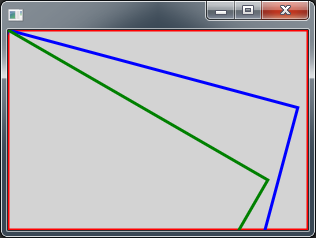
GraphicsContext::rotate将影响您从现在开始绘制的绘图。看这个案子,
GraphicsContext gc = canvas.getGraphicsContext2D();
gc.setFill(Color.LIGHTGRAY);
gc.fillRect(0, 0, canvas.getWidth(), canvas.getHeight());

gc.setStroke(Color.RED);
gc.setLineWidth(3.0);
gc.strokeRect(0, 0, canvas.getWidth(), canvas.getHeight());

gc.rotate(15);
gc.setStroke(Color.BLUE);
gc.strokeRect(0, 0, canvas.getWidth(), canvas.getHeight());

gc.rotate(15);
gc.setStroke(Color.GREEN);
gc.strokeRect(0, 0, canvas.getWidth(), canvas.getHeight());
如果您想旋转呈现的画布图像(从中心作为枢轴),例如:
gc.setStroke(Color.RED);
gc.setLineWidth(3.0);
gc.strokeRect(0, 0, canvas.getWidth(), canvas.getHeight());

Image snapshot = canvas.snapshot(null, null);
gc.setFill(Color.WHITE);
gc.fillRect(0, 0, canvas.getWidth(), canvas.getHeight());

gc.save(); // Save default transform
Affine rotate = new Affine();
rotate.appendRotation(90, canvas.getWidth()/2, canvas.getHeight()/2);
gc.setTransform(rotate);
gc.drawImage(snapshot, 0, 0);
gc.restore(); // Restore default transform
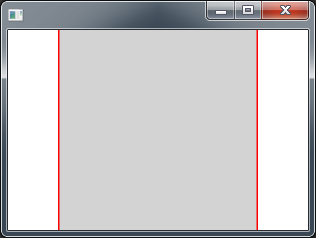
请试试看。
页面原文内容由Stack Overflow提供。腾讯云小微IT领域专用引擎提供翻译支持
原文链接:
https://stackoverflow.com/questions/43859583
复制相关文章
相似问题
腾讯云开发者

Copyright © 2013 - 2026 Tencent Cloud. All Rights Reserved. 腾讯云 版权所有
深圳市腾讯计算机系统有限公司 ICP备案/许可证号:粤B2-20090059  粤公网安备44030502008569号
腾讯云计算(北京)有限责任公司 京ICP证150476号 | 京ICP备11018762号