
BottomSheetDialogFragment的圆角
我有一个定制的BttomSheetDialogFragment,我希望在底部视图的顶部有圆角
这是我的自定义类,它膨胀了我想要从底部出现的布局
View mView;

@Override
public View onCreateView(LayoutInflater inflater, ViewGroup container, Bundle savedInstanceState) {
    mView = inflater.inflate(R.layout.charge_layout, container, false);
    initChargeLayoutViews();
    return mView;
}
此外,我还以这个XML资源文件为背景:
<shape xmlns:android="http://schemas.android.com/apk/res/android"
    android:shape="rectangle"
    >
    <corners android:topRightRadius="35dp"
        android:topLeftRadius="35dp"
        />
    <solid android:color="@color/white"/>

    <padding android:top="10dp"
        android:bottom="10dp"
        android:right="16dp"
        android:left="16dp"/>
</shape>
问题是,当我将这个资源文件设置为布局的根元素的背景时,角仍然没有四舍五入。
我不能使用下面的代码:
this.getDialog().getWindow().setBackgroundDrawableResource(R.drawable.charge_layout_background);因为它覆盖了BottomSheetDialog的默认背景,所以在我的底部视图上不会出现任何半透明的灰色。
回答 28
Stack Overflow用户
发布于 2018-06-19 13:37:34
创建自定义可绘制rounded_dialog.xml
<?xml version="1.0" encoding="utf-8"?>
<shape xmlns:android="http://schemas.android.com/apk/res/android"
    android:shape="rectangle">
    <solid android:color="@android:color/white"/>
    <corners android:topLeftRadius="16dp"
        android:topRightRadius="16dp"/>

</shape>然后使用可绘图作为背景,在styles.xml上重写styles.xml:
<style name="AppTheme" parent="Theme.AppCompat.Light.NoActionBar">
    <item name="bottomSheetDialogTheme">@style/AppBottomSheetDialogTheme</item>
</style>

<style name="AppBottomSheetDialogTheme"
    parent="Theme.Design.Light.BottomSheetDialog">
    <item name="bottomSheetStyle">@style/AppModalStyle</item>
</style>

<style name="AppModalStyle"
    parent="Widget.Design.BottomSheet.Modal">
    <item name="android:background">@drawable/rounded_dialog</item>
</style>
这将改变应用程序的所有BottomSheetDialogs。
Stack Overflow用户
发布于 2019-08-23 13:20:18
使用新的材料组分库,您可以使用样式中的材料组分属性对组件进行自定义形状 (注意:,它至少需要1.1.0版本)
只需使用BottomSheetDialogFragment重写onCreateView方法,然后为底部工作表对话框定义自定义样式。
在应用程序主题中在bottomSheetDialogTheme中定义styles.xml属性:
  <!-- Base application theme. -->
  <style name="AppTheme" parent="Theme.MaterialComponents.Light">
    <!-- Customize your theme here. -->
    <item name="colorPrimary">@color/colorPrimary</item>
    ....
    <item name="bottomSheetDialogTheme">@style/CustomBottomSheetDialog</item>
</style>然后用shapeAppearanceOverlay定义您最喜欢的形状
  <style name="CustomBottomSheetDialog" parent="@style/ThemeOverlay.MaterialComponents.BottomSheetDialog">
    <item name="bottomSheetStyle">@style/CustomBottomSheet</item>
  </style>

  <style name="CustomBottomSheet" parent="Widget.MaterialComponents.BottomSheet">
    <item name="shapeAppearanceOverlay">@style/CustomShapeAppearanceBottomSheetDialog</item>
  </style>

  <style name="CustomShapeAppearanceBottomSheetDialog" parent="">
    <item name="cornerFamily">rounded</item>
    <item name="cornerSizeTopRight">16dp</item>
    <item name="cornerSizeTopLeft">16dp</item>
    <item name="cornerSizeBottomRight">0dp</item>
    <item name="cornerSizeBottomLeft">0dp</item>
  </style>
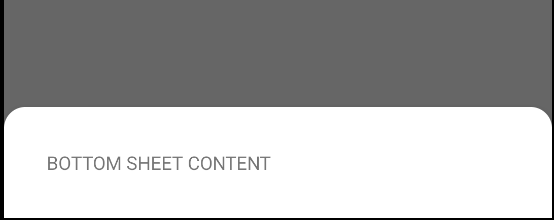
您可以获得在BottomSheetDialogFragment中重写此方法的相同行为(而不是在应用程序主题中添加bottomSheetDialogTheme ):
@Override public int getTheme() {
    return R.style.CustomBottomSheetDialog;
}在本例中,您只在单个themeOverlay中使用此BottomSheetDialogFragment,而不是在所有应用程序中使用。
重要注记关于展开状态
在扩展状态下,BottomSheet 有平坦的角。您可以在github回购中查看官方评论
我们的设计团队强烈认为圆角表示可滚动的内容,而平坦的角表示没有额外的内容。因此,他们不希望我们在fitToContents中添加此更改。
此行为由BottomSheetBehavior提供,不可能覆盖它。
不过,有一个解决办法是-> 免责声明:可以在下一个版本中停止工作!!
您可以在BottomSheetCallback中添加BottomSheetDialogFragment
  @NonNull @Override public Dialog onCreateDialog(@Nullable Bundle savedInstanceState) {
    Dialog dialog = super.onCreateDialog(savedInstanceState);


    ((BottomSheetDialog)dialog).getBehavior().addBottomSheetCallback(new BottomSheetBehavior.BottomSheetCallback() {

      @Override public void onStateChanged(@NonNull View bottomSheet, int newState) {
        if (newState == BottomSheetBehavior.STATE_EXPANDED) {
          //In the EXPANDED STATE apply a new MaterialShapeDrawable with rounded cornes
          MaterialShapeDrawable newMaterialShapeDrawable = createMaterialShapeDrawable(bottomSheet);
          ViewCompat.setBackground(bottomSheet, newMaterialShapeDrawable);
        }
      }

      @Override public void onSlide(@NonNull View bottomSheet, float slideOffset) {

      }
    });

    return dialog;
  }

  @NotNull private MaterialShapeDrawable createMaterialShapeDrawable(@NonNull View bottomSheet) {
    ShapeAppearanceModel shapeAppearanceModel =

      //Create a ShapeAppearanceModel with the same shapeAppearanceOverlay used in the style
      ShapeAppearanceModel.builder(getContext(), 0, R.style.CustomShapeAppearanceBottomSheetDialog)
        .build();

      //Create a new MaterialShapeDrawable (you can't use the original MaterialShapeDrawable in the BottoSheet)
      MaterialShapeDrawable currentMaterialShapeDrawable = (MaterialShapeDrawable) bottomSheet.getBackground();
      MaterialShapeDrawable newMaterialShapeDrawable = new MaterialShapeDrawable((shapeAppearanceModel));
      //Copy the attributes in the new MaterialShapeDrawable
      newMaterialShapeDrawable.initializeElevationOverlay(getContext());
      newMaterialShapeDrawable.setFillColor(currentMaterialShapeDrawable.getFillColor());
      newMaterialShapeDrawable.setTintList(currentMaterialShapeDrawable.getTintList());
      newMaterialShapeDrawable.setElevation(currentMaterialShapeDrawable.getElevation());
      newMaterialShapeDrawable.setStrokeWidth(currentMaterialShapeDrawable.getStrokeWidth());
      newMaterialShapeDrawable.setStrokeColor(currentMaterialShapeDrawable.getStrokeColor());
      return newMaterialShapeDrawable;
}Stack Overflow用户
发布于 2018-06-01 14:33:24
BottomSheetDialog设置了默认的白色背景色,这就是为什么角点是不可见的,为了向它们显示,您需要通过覆盖BottomSheetDialog的样式使对话框的背景变得透明。
在res/values/styles/styles.xml中定义此样式
<style name="BottomSheetDialog" parent="Theme.Design.Light.BottomSheetDialog">
    <item name="bottomSheetStyle">@style/bottomSheetStyleWrapper</item>
</style>

<style name="bottomSheetStyleWrapper" parent="Widget.Design.BottomSheet.Modal">
    <item name="android:background">@android:color/transparent</item>
</style>
并将此样式设置为您的BottomSheetDialog
View view = getLayoutInflater().inflate(R.layout.chooser_bottom_sheet, null);
BottomSheetDialog dialog = new BottomSheetDialog(this,R.style.BottomSheetDialog); // Style here
dialog.setContentView(view);
dialog.show();https://stackoverflow.com/questions/43852562
复制相似问题
腾讯云开发者

Copyright © 2013 - 2026 Tencent Cloud. All Rights Reserved. 腾讯云 版权所有
深圳市腾讯计算机系统有限公司 ICP备案/许可证号:粤B2-20090059  粤公网安备44030502008569号
腾讯云计算(北京)有限责任公司 京ICP证150476号 | 京ICP备11018762号