
带有双轴的matplotlib中的线图(轴上的字符串)
带有双轴的matplotlib中的线图(轴上的字符串)
提问于 2017-05-04 16:24:15
我正在尝试从Excel表中的数据创建一个使用python的图表。数据如下所示
       Location Values
Trial 1 Edge    12
         M-2    13
       Center   14
         M-4    15
         M-5    12
         Top    13
Trial 2 Edge    10
        N-2     11
      Center    11
        N-4     12
        N-5     13
        Top     14
Trial 3 Edge    15
        R-2     13
     Center     12
       R-4      11
       R-5      10
Top 3我希望我的图形看起来像这样:图表-1 .The图表应该有X轴的位置列值,即string对象。这可以很容易地完成(通过使用/创建位置作为数组),

import numpy as np
import pandas as pd
import matplotlib.pyplot as plt
datalink=('/Users/Maxwell/Desktop/W1.xlsx')
df=pd.read_excel(datalink,skiprows=2)
x1=df.loc[:,['Location']]
x2=df.loc[:,['Values']]
x3=np.linspace(1,len(x2),num=len(x2),endpoint=True)
vals=['Location','Edge','M-2','Center','M-4','M-5','Top','Edge','N-2','Center','N-4','N-5','Top','Edge','R-2']
plt.figure(figsize=(12,8),dpi=300)
plt.subplot(1,1,1)
plt.xticks(x3,vals)
plt.plot(x3,x2)
plt.show()
但是,我也想展示审判-1,审判-2 .在X轴上。到目前为止,我一直在使用Excel生成图表,但是,我有很多类似的数据,并且希望使用python来实现任务的自动化。
回答 1
Stack Overflow用户
回答已采纳
发布于 2017-05-04 17:20:41
对于包含以下数据的excel工作表,
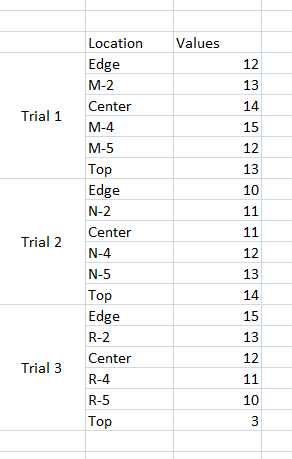
,
您可以使用matplotlib创建所需的情节。这不是直截了当的,但可以做到。见下文:
编辑:前面我提出了因子图,但是它不适用,因为每个试用版的location值都不是常数。
df = pd.read_excel(r'test_data.xlsx', header = 1, parse_cols = "D:F",
                  names = ['Trial', 'Location', 'Values'])
'''
  Trial Location  Values
0   Trial 1     Edge      12
1       NaN      M-2      13
2       NaN   Center      14
3       NaN      M-4      15
4       NaN      M-5      12
5       NaN      Top      13
6   Trial 2     Edge      10
7       NaN      N-2      11
8       NaN   Center      11
9       NaN      N-4      12
10      NaN      N-5      13
11      NaN      Top      14
12  Trial 3     Edge      15
13      NaN      R-2      13
14      NaN   Center      12
15      NaN      R-4      11
16      NaN      R-5      10
17      NaN      Top       3
'''


# this will replace the nan with corresponding trial number for each set of trials
df = df.fillna(method = 'ffill')
'''
 Trial Location  Values
0   Trial 1     Edge      12
1   Trial 1      M-2      13
2   Trial 1   Center      14
3   Trial 1      M-4      15
4   Trial 1      M-5      12
5   Trial 1      Top      13
6   Trial 2     Edge      10
7   Trial 2      N-2      11
8   Trial 2   Center      11
9   Trial 2      N-4      12
10  Trial 2      N-5      13
11  Trial 2      Top      14
12  Trial 3     Edge      15
13  Trial 3      R-2      13
14  Trial 3   Center      12
15  Trial 3      R-4      11
16  Trial 3      R-5      10
17  Trial 3      Top       3
'''

from matplotlib import rcParams
from matplotlib import pyplot as plt
import matplotlib.ticker as ticker

rcParams.update({'font.size': 10})
fig1 = plt.figure()
f, ax1 = plt.subplots(1, figsize = (10,3))

ax1.plot(list(df.Location.index), df['Values'],'o-')
ax1.set_xticks(list(df.Location.index))
ax1.set_xticklabels(df.Location, rotation=90 )
ax1.yaxis.set_label_text("Values")

# create a secondary axis
ax2 = ax1.twiny()
# hide all the spines that we dont need
ax2.spines['top'].set_visible(False)
ax2.spines['bottom'].set_visible(False)
ax2.spines['right'].set_visible(False)
ax2.spines['left'].set_visible(False)

pos1 = ax2.get_position() # get the original position
pos2 = [pos1.x0 + 0, pos1.y0 -0.2,  pos1.width , pos1.height ] # create a new position by offseting it
ax2.xaxis.set_ticks_position('bottom')
ax2.set_position(pos2) # set a new position


trials_ticks = 1.0 * df.Trial.value_counts().cumsum()/ (len(df.Trial)) # create a series object for ticks for each trial group
trials_ticks_positions = [0]+list(trials_ticks) # add a additional zero. this will make tick at zero.
trials_labels_offset = 0.5 * df.Trial.value_counts()/ (len(df.Trial)) # create an offset for the tick label, we want the tick label to between ticks
trials_label_positions = trials_ticks - trials_labels_offset # create the position of tick labels

# set the ticks and ticks labels
ax2.set_xticks(trials_ticks_positions)
ax2.xaxis.set_major_formatter(ticker.NullFormatter())
ax2.xaxis.set_minor_locator(ticker.FixedLocator(trials))
ax2.xaxis.set_minor_formatter(ticker.FixedFormatter(list(trials_label_positions.index)))
ax2.tick_params(axis='x', length = 10,width = 1)

plt.show()
结果:
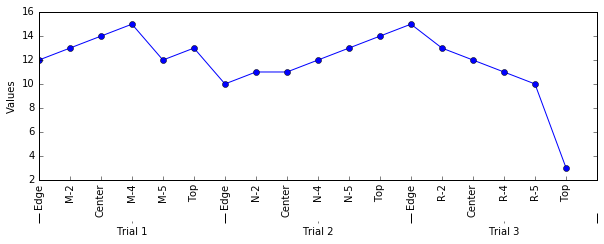
页面原文内容由Stack Overflow提供。腾讯云小微IT领域专用引擎提供翻译支持
原文链接:
https://stackoverflow.com/questions/43788223
复制相关文章
相似问题
腾讯云开发者

Copyright © 2013 - 2026 Tencent Cloud. All Rights Reserved. 腾讯云 版权所有
深圳市腾讯计算机系统有限公司 ICP备案/许可证号:粤B2-20090059  粤公网安备44030502008569号
腾讯云计算(北京)有限责任公司 京ICP证150476号 | 京ICP备11018762号