
在引导带3中响应HR对齐
在引导带3中响应HR对齐
提问于 2017-05-04 10:48:06
我希望HR标签具有与使用引导带3的文本相同的响应对齐,所以当文本居中时,它位于下面,也是居中的。当文本左对齐时,HR位于下面,也是左对齐。
我认为这是可能的,通过标签旁边的div包装它,使用文本-xs-中间和文本-lg-左,但类似乎只影响文本。
有什么聪明的办法来解决这个问题吗?
注意:我使用的是HR,而不是边框底部,因为它有一个特定的长度(60 as ),不管H1标题的长度如何,它都保持不变。
<div class="title-block text-xs-center text-lg-left">
  <h1>My Title</h1>
  <hr>
</div>
还有我的Sass
.title-block {
  display: block;
  h1 {
    margin: 0px;
    font-size: 35px;
  }
  hr {
    width: 60px;
    border-top: 1px solid #1c1c1c;
  }
}
以下是所需效果的图片;
左对齐;
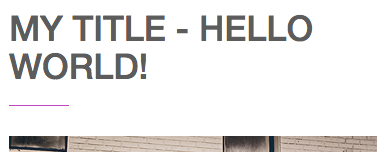
中心对齐

回答 2
Stack Overflow用户
回答已采纳
发布于 2017-05-04 10:56:51
使用pseduo元素 css,您可以实现这一点。给h1 position:relative并使用:after,添加一行width:60px,并赋予它position:absolute,设置其位置以实现所需的结果:)
.title-block {
  display: block;
    text-align:left;
}
.title-block h1 {
  margin: 0px;
  font-size: 35px;
 position:relative;
  display: inline-block;

}
.title-block h1:after{
content:'';
width:60px; height:1px; background:red; position:absolute; bottom:-5px;
left:0px; right:auto; margin:0px auto;
}

@media(max-width:768px){
.title-block{ text-align:center}
.title-block h1:after{left:0px; right:0px;}
}<link href="https://maxcdn.bootstrapcdn.com/bootstrap/3.3.7/css/bootstrap.min.css" rel="stylesheet"/>
<div class="title-block text-xs-center text-lg-left">
<h1>My Title</h1>
</div>
Stack Overflow用户
发布于 2017-05-04 10:55:18
如何在border-bottom中使用h1
编辑
嗨,谢谢,但hr有一个特定的宽度为60 Hi,这只是强调整个事情。抱歉,我应该说得更清楚
使用伪元素::before或::after
.title-block h1 {
  margin: 0;
  font-size: 35px;
  padding-bottom: 5px;
  position: relative;
}

.title-block h1::before {
  content: "";
  height: 1px;
  width: 60px;
  position: absolute;
  bottom: 0;
  border-bottom: 1px solid #1c1c1c;
}

.title-block.text-xs-center h1::before {
  left: 0;
  right: 0;
  margin: auto;
}

.title-block.text-lg-left h1::before {
  left: 0;
  right: auto;
}<link href="https://maxcdn.bootstrapcdn.com/bootstrap/3.3.7/css/bootstrap.min.css" rel="stylesheet" />
<div class="title-block text-xs-center text-lg-left">
<h1>My Title</h1>
</div>
页面原文内容由Stack Overflow提供。腾讯云小微IT领域专用引擎提供翻译支持
原文链接:
https://stackoverflow.com/questions/43780762
复制相关文章
相似问题
腾讯云开发者

Copyright © 2013 - 2026 Tencent Cloud. All Rights Reserved. 腾讯云 版权所有
深圳市腾讯计算机系统有限公司 ICP备案/许可证号:粤B2-20090059  粤公网安备44030502008569号
腾讯云计算(北京)有限责任公司 京ICP证150476号 | 京ICP备11018762号