
无法按下底部的页脚
无法按下底部的页脚
提问于 2017-05-04 05:59:10
我试图推动我的页脚在底部,但在我的布局,它是在顶部的部分。
这是我的密码。
样品结构
<body>
<!-- some codes here -->
<footer>
    <div id="main-footer">
        <div class="col-md-8 col-md-offset-2">
            <h1>hello world</h1>
        </div>
    </div>
</footer>
</body>
css
body {
    font-family: Helvetica, '游ゴシック', YuGothic, 'ヒラギノ角ゴ Pro W3', 'Hiragino Kaku Gothic Pro', 'メイリオ', Meiryo, sans-serif;
    font-weight: 300;
    position: relative;

    footer {
        position: absolute;
        bottom: 0; /** no effect **/
        min-height: 500px;
        background: #000;
        width: 100%;
        z-index: 4;
        /** top: 0; -- if enabled my footer goes on the top **/
    }

}
-更新css --
html { height: 100%; }
body {
    font-family: Helvetica, '游ゴシック', YuGothic, 'ヒラギノ角ゴ Pro W3', 'Hiragino Kaku Gothic Pro', 'メイリオ', Meiryo, sans-serif;
    font-weight: 300;
    min-height: 100%;
}

footer {
    height: 100px;
    background: red;
    z-index: 5;
    position: absolute;
    width: 100%;
    min-height: 100px;
    bottom: 0;
}
如果我将高度设置为100%,我试着检查整个身体是否会占据位置,但这是输出:
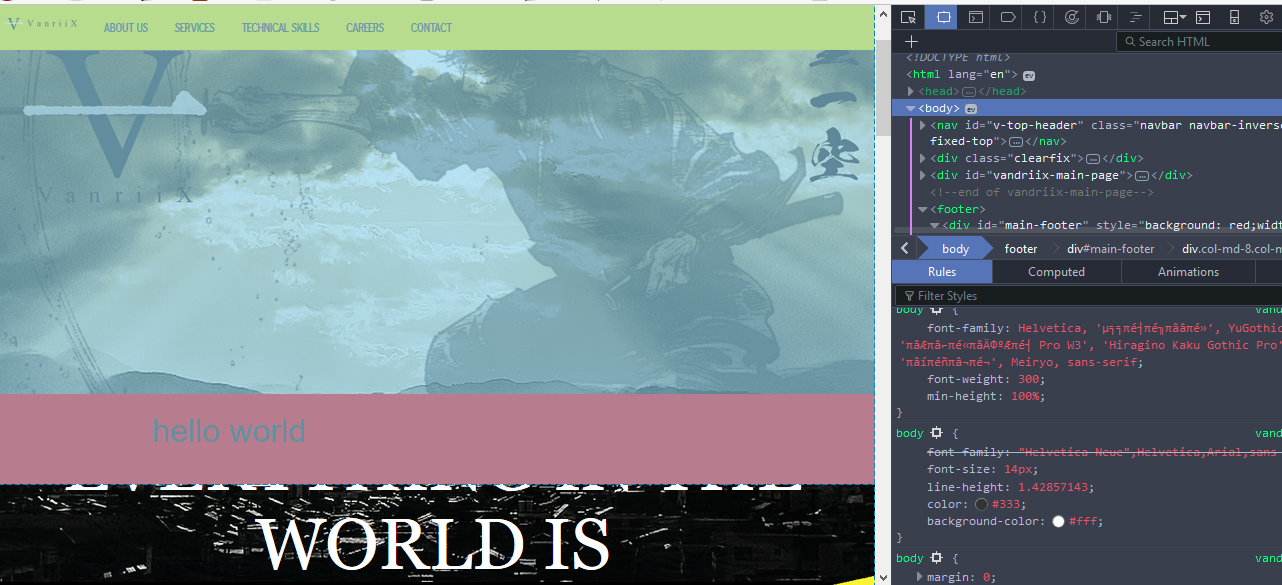
如你所见,它并没有占据我的整个页面。
回答 2
Stack Overflow用户
发布于 2017-05-04 06:15:00
请使用下面的css为您的代码,可能会对您工作。
html {
    min-height:100%;
    position:relative;
    height:auto;
}

body {
    padding-bottom:500px;
}

footer {
    position: absolute;
    bottom: 0; /** no effect **/
    min-height:500px;
    background: #000;
    width: 100%;
    z-index: 4;
}Stack Overflow用户
发布于 2017-05-04 06:18:19
正确关闭css本体大括号。也参考其他网站,并学习如何编写/编码CSS。现在,请考虑以下几点。
不要使用绝对。相反,使用相对位置。相对位置用于放置相对于其正常位置的内容的相对位置。绝对位置,用于将内容放置到最近的位置祖先。有三种立场:固定的,相对的,绝对的和静态的。
body {
    font-family: Helvetica, '游ゴシック', YuGothic, 'ヒラギノ角ゴ Pro W3', 'Hiragino Kaku Gothic Pro', 'メイリオ', Meiryo, sans-serif;
    font-weight: 300;
    position: relative;
}
footer {
    position: relative;
    bottom: 0; /** no effect **/
    min-height: 500px;
    background: #000;
    width: 100%;
    z-index: 4;
    /** top: 0; -- if enabled my footer goes on the top **/
}页面原文内容由Stack Overflow提供。腾讯云小微IT领域专用引擎提供翻译支持
原文链接:
https://stackoverflow.com/questions/43774952
复制相关文章
相似问题
腾讯云开发者

Copyright © 2013 - 2026 Tencent Cloud. All Rights Reserved. 腾讯云 版权所有
深圳市腾讯计算机系统有限公司 ICP备案/许可证号:粤B2-20090059  粤公网安备44030502008569号
腾讯云计算(北京)有限责任公司 京ICP证150476号 | 京ICP备11018762号