
(C)不兼容指针类型[LPCWSTR]
当我试图使用unicode LPCWSTR types时,不兼容的指针类型无处不在--。
无论我做什么,我都被完全困住了,我一直在寻找答案,但仍然没有希望!
我的代码:
#include <tchar.h>
#include <stdio.h>
#include <stdlib.h>
#include <windows.h>
#include "Mouse.h"
#include "Keyboard.h"
//#define APP_WindowClassName "MOUSE_CLICKER"
//#define APP_WindowTitle "Mouse Clicker"

LRESULT CALLBACK app_WindowProcedure (HWND hwnd, UINT uMsg, WPARAM wParam, LPARAM lParam) {
    switch (uMsg) {
        case WM_DESTROY:
            PostQuitMessage(0);
            break;
        default:
            return DefWindowProcW(hwnd, uMsg, wParam, lParam);
    }
    return 0;
}

int WINAPI WinMain(HINSTANCE hInstance, HINSTANCE hPrevInstance, LPSTR lpCmdLine, int nCmdShow) { // Arg1 - A handle to the current instance of the application, Arg 2 - ???, Arg 3 - Arguments, Arg 4 - Controls how the window is to be shown.

    WNDCLASSEXW main_WindowClass = { };
    main_WindowClass.cbSize = sizeof(WNDCLASSEXA);
    main_WindowClass.cbClsExtra = 0;
    main_WindowClass.cbWndExtra = 0;
    main_WindowClass.hInstance = hInstance;
    main_WindowClass.lpfnWndProc = app_WindowProcedure;
    main_WindowClass.lpszClassName = TEXT("MOUSE_CLICKER");
    main_WindowClass.lpszMenuName = NULL;
    main_WindowClass.hbrBackground  = (HBRUSH) (TEXT(COLOR_BACKGROUND));
    main_WindowClass.hCursor = LoadCursorW (NULL, TEXT(IDC_ARROW));
    main_WindowClass.hIcon = LoadIconW(NULL, TEXT(IDI_APPLICATION));
    main_WindowClass.hIconSm = LoadIconW(NULL, TEXT(IDI_APPLICATION));
    main_WindowClass.style = CS_DBLCLKS;

    //CS_HREDRAW | CS_VREDRAW a


    if (RegisterClassExW(&main_WindowClass) == 0) {
        printf ("[CRITICAL] main_WindowClass cannot be registered!");
        return -1;
    }

    HWND main_WindowHandle = CreateWindowExW (0, TEXT("MOUSE_CLICKER"), TEXT("MouseClicker"), WS_OVERLAPPEDWINDOW, 0, 0, 800, 600, NULL, NULL, hInstance, NULL);

    if (main_WindowHandle == NULL) {
        return -1;
    }

    ShowWindow(main_WindowHandle, nCmdShow);

    printf("Unicode: %d", IsWindowUnicode(main_WindowHandle));

    MSG ProcessingMessage;
    while (GetMessage(&ProcessingMessage, NULL, 0, 0)) {
        TranslateMessage(&ProcessingMessage);
        DispatchMessage(&ProcessingMessage);
    }
    return ProcessingMessage.wParam;

}
我的构建日志图片链接:
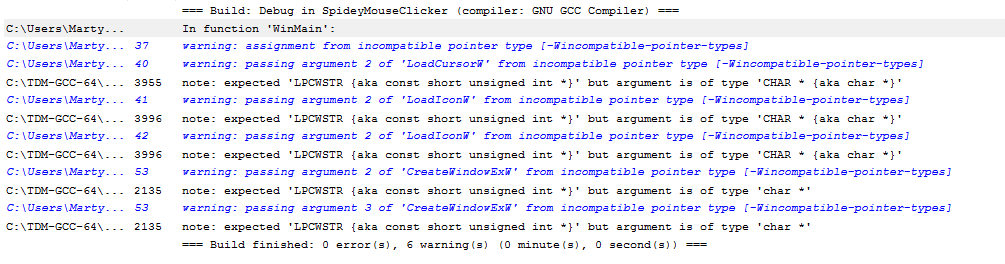
PS:我是C的初学者(还在学习),关于我做错了什么的可以理解的描述性信息会很好。
PS2:为了避免混淆,这是纯C,而不是C++。
解决方案代码:
#if defined(UNICODE) && !defined(_UNICODE)
    #define _UNICODE
#elif defined(_UNICODE) && !defined(UNICODE)
    #define UNICODE
#endif

#include <tchar.h>
#include <stdio.h>
#include <stdlib.h>
#include <tchar.h>
#include "Mouse.h"
#include "Keyboard.h"

LRESULT CALLBACK app_WindowProcedure (HWND hwnd, UINT uMsg, WPARAM wParam, LPARAM lParam) {
    switch (uMsg) {
        case WM_DESTROY:
            PostQuitMessage(0);
            break;
        default:
            return DefWindowProcW(hwnd, uMsg, wParam, lParam);

    }
    return 0;
}

int WINAPI WinMain(HINSTANCE hInstance, HINSTANCE hPrevInstance, LPSTR lpCmdLine, int nCmdShow) { // Arg1 - A handle to the current instance of the application, Arg 2 - ???, Arg 3 - Arguments, Arg 4 - Controls how the window is to be shown.

    WNDCLASSEXW main_WindowClass = { };
    main_WindowClass.cbSize = sizeof(WNDCLASSEXA);
    main_WindowClass.cbClsExtra = 0;
    main_WindowClass.cbWndExtra = 0;
    main_WindowClass.hInstance = hInstance;
    main_WindowClass.lpfnWndProc = app_WindowProcedure;
    main_WindowClass.lpszClassName = L"MOUSE_CLICKER";
    main_WindowClass.lpszMenuName = NULL;
    main_WindowClass.hbrBackground  = (HBRUSH) (COLOR_BACKGROUND);
    main_WindowClass.hCursor = LoadCursorW (NULL, (LPCWSTR) IDC_ARROW);
    main_WindowClass.hIcon = LoadIconW(NULL, (LPCWSTR) IDI_APPLICATION);
    main_WindowClass.hIconSm = LoadIconW(NULL, (LPCWSTR) IDI_APPLICATION);
    main_WindowClass.style = CS_DBLCLKS;

    //CS_HREDRAW | CS_VREDRAW a


    if (RegisterClassExW(&main_WindowClass) == 0) {
        printf ("[CRITICAL] main_WindowClass cannot be registered!");
        return -1;
    }

    HWND main_WindowHandle = CreateWindowExW (0, L"MOUSE_CLICKER", L"MouseClicker", WS_OVERLAPPEDWINDOW, 0, 0, 800, 600, NULL, NULL, hInstance, NULL);

    if (main_WindowHandle == NULL) {
        return -1;
    }

    ShowWindow(main_WindowHandle, nCmdShow);

    printf("Unicode: %d", IsWindowUnicode(main_WindowHandle));

    MSG ProcessingMessage;
    while (GetMessage(&ProcessingMessage, NULL, 0, 0)) {
        TranslateMessage(&ProcessingMessage);
        DispatchMessage(&ProcessingMessage);
    }
    return ProcessingMessage.wParam;

}回答 3
Stack Overflow用户
发布于 2017-05-02 20:36:27
在项目中定义UNICODE。
根据是否定义了UNICODE,TEXT扩展为LPSTR或LPWSTR。您正在显式调用*W版本的WinAPI函数,但是传递LPSTR而不是LPWSTR。用L作为字符串的前缀应该有效。也许你用它作为L("foo") -它不会这样工作。您需要使用L"foo"。
总的来说,如果您使用TEXT,您应该使用没有后缀的WinAPI函数,这样代码就可以编译并同时定义UNICODE。如果显式使用*W函数,则使用L""字符串。
Stack Overflow用户
发布于 2017-05-02 21:13:04
有几种方法可以让它正常工作;既然您已经走上了使用Tchar.h的道路,那么让我们继续这条路线。
以下是您的程序的主体,当您的项目设置为构建Unicode时,将其修改为以Unicode的形式运行。
(如果您这样说的话,另一个“好处”是,您也可以通过更改项目的字符集来作为ASCII应用程序运行应用程序。)
LRESULT CALLBACK app_WindowProcedure(HWND hwnd, UINT uMsg, WPARAM wParam, LPARAM lParam) {
    switch (uMsg) {
    case WM_DESTROY:
        PostQuitMessage(0);
        break;
    default:
        return DefWindowProc(hwnd, uMsg, wParam, lParam);
    }
    return 0;
}

int WINAPI _tWinMain(HINSTANCE hInstance, HINSTANCE hPrevInstance, LPTSTR lpCmdLine, int nCmdShow) { // Arg1 - A handle to the current instance of the application, Arg 2 - ???, Arg 3 - Arguments, Arg 4 - Controls how the window is to be shown.

    WNDCLASSEX main_WindowClass = {};
    main_WindowClass.cbSize = sizeof(WNDCLASSEX);
    main_WindowClass.cbClsExtra = 0;
    main_WindowClass.cbWndExtra = 0;
    main_WindowClass.hInstance = hInstance;
    main_WindowClass.lpfnWndProc = app_WindowProcedure;
    main_WindowClass.lpszClassName = TEXT("MOUSE_CLICKER");
    main_WindowClass.lpszMenuName = NULL;
    main_WindowClass.hbrBackground = (HBRUSH)(COLOR_BACKGROUND);
    main_WindowClass.hCursor = LoadCursor(NULL, IDC_ARROW);
    main_WindowClass.hIcon = LoadIcon(NULL, IDI_APPLICATION);
    main_WindowClass.hIconSm = LoadIcon(NULL, IDI_APPLICATION);
    main_WindowClass.style = CS_DBLCLKS;

    //CS_HREDRAW | CS_VREDRAW a


    if (RegisterClassEx(&main_WindowClass) == 0) {
        _tprintf(TEXT("[CRITICAL] main_WindowClass cannot be registered!"));
        return -1;
    }

    HWND main_WindowHandle = CreateWindowEx(0, TEXT("MOUSE_CLICKER"), TEXT("MouseClicker"), WS_OVERLAPPEDWINDOW, 0, 0, 800, 600, NULL, NULL, hInstance, NULL);

    if (main_WindowHandle == NULL) {
        return -1;
    }

    ShowWindow(main_WindowHandle, nCmdShow);

    _tprintf(TEXT("Unicode: %d"), IsWindowUnicode(main_WindowHandle));

    MSG ProcessingMessage;
    while (GetMessage(&ProcessingMessage, NULL, 0, 0)) {
        TranslateMessage(&ProcessingMessage);
        DispatchMessage(&ProcessingMessage);
    }
    return ProcessingMessage.wParam;

}注意,特定于Unicode的函数调用被替换为它们的泛型对应函数(例如,DefWindowProcW()现在是DefWindowProc();RegisterClassExW()现在是RegisterClassEx();printf()现在是_tprintf(),等等)。所有文本都包装在TEXT()宏中。
另一种方法,正如您在一定程度上所做的那样,是让所有API调用...W版本的Unicode函数,并使用L前缀对硬代码文本使用Unicode文本。
一个好的经验法则是尝试选择一种或另一种技术,并始终如一地全面应用它。
Stack Overflow用户
发布于 2017-05-02 21:01:22
这应该能行
#include <tchar.h>
#include <stdio.h>
#include <stdlib.h>
#include <windows.h>
#include "Mouse.h"
#include "Keyboard.h"
//#define APP_WindowClassName "MOUSE_CLICKER"
//#define APP_WindowTitle "Mouse Clicker"

LRESULT CALLBACK app_WindowProcedure(HWND hwnd, UINT uMsg, WPARAM wParam, LPARAM lParam) {
    switch (uMsg) {
    case WM_DESTROY:
        PostQuitMessage(0);
        break;
    default:
        return DefWindowProcW(hwnd, uMsg, wParam, lParam);
    }
    return 0;
}

int WINAPI WinMain(HINSTANCE hInstance, HINSTANCE hPrevInstance, LPSTR lpCmdLine, int nCmdShow) { // Arg1 - A handle to the current instance of the application, Arg 2 - ???, Arg 3 - Arguments, Arg 4 - Controls how the window is to be shown.

    WNDCLASSEXW main_WindowClass = *((WNDCLASSEXW*)malloc(sizeof(WNDCLASSEXW)));
    main_WindowClass.cbSize = sizeof(WNDCLASSEXA);
    main_WindowClass.cbClsExtra = 0;
    main_WindowClass.cbWndExtra = 0;
    main_WindowClass.hInstance = hInstance;
    main_WindowClass.lpfnWndProc = app_WindowProcedure;
    main_WindowClass.lpszClassName = L"MOUSE_CLICKER";
    main_WindowClass.lpszMenuName = NULL;
    main_WindowClass.hbrBackground = (HBRUSH)(COLOR_BACKGROUND);
    main_WindowClass.hCursor = LoadCursorW(NULL, (LPWSTR)IDC_ARROW);
    main_WindowClass.hIcon = LoadIconW(NULL, (LPWSTR)IDI_APPLICATION);
    main_WindowClass.hIconSm = LoadIconW(NULL, (LPWSTR)IDI_APPLICATION);
    main_WindowClass.style = CS_DBLCLKS;

    //CS_HREDRAW | CS_VREDRAW a


    if (RegisterClassExW(&main_WindowClass) == 0) {
        printf("[CRITICAL] main_WindowClass cannot be registered!");
        return -1;
    }

    HWND main_WindowHandle = CreateWindowExW(0, L"MOUSE_CLICKER", L"MouseClicker", WS_OVERLAPPEDWINDOW, 0, 0, 800, 600, NULL, NULL, hInstance, NULL);

    if (main_WindowHandle == NULL) {
        return -1;
    }

    ShowWindow(main_WindowHandle, nCmdShow);

    printf("Unicode: %d", IsWindowUnicode(main_WindowHandle));

    MSG ProcessingMessage;
    while (GetMessage(&ProcessingMessage, NULL, 0, 0)) {
        TranslateMessage(&ProcessingMessage);
        DispatchMessage(&ProcessingMessage);
    }
    return ProcessingMessage.wParam;

}https://stackoverflow.com/questions/43746218
复制相似问题
腾讯云开发者

Copyright © 2013 - 2026 Tencent Cloud. All Rights Reserved. 腾讯云 版权所有
深圳市腾讯计算机系统有限公司 ICP备案/许可证号:粤B2-20090059  粤公网安备44030502008569号
腾讯云计算(北京)有限责任公司 京ICP证150476号 | 京ICP备11018762号