
正确对中文本(PIL/枕头)
正确对中文本(PIL/枕头)
提问于 2017-05-02 05:01:25
我在一条黑带上画一些文本,然后使用PIL将结果粘贴在基本图像的上面。一个关键问题是文本位置完美地位于黑带的中心。
我通过以下代码来满足这一要求:
from PIL import Image, ImageFont, ImageDraw

background = Image.new('RGB', (strip_width, strip_height)) #creating the black strip
draw = ImageDraw.Draw(background)
font = ImageFont.truetype("/usr/share/fonts/truetype/freefont/FreeSansBold.ttf", 16)
text_width, text_height = draw.textsize("Foooo Barrrr!")
position = ((strip_width-text_width)/2,(strip_height-text_height)/2)
draw.text(position,"Foooo Barrrr!",(255,255,255),font=font)
offset = (0,base_image_height/2)
base_image.paste(background,offset)注意我是如何设置position的。
现在,所有这些都已经完成,结果看起来是这样:
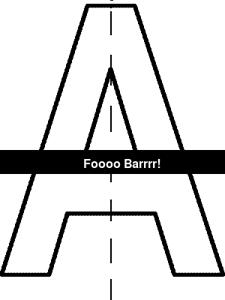
这篇文章并不完全是中间的。稍微向右和往下。如何改进我的算法?
回答 1
Stack Overflow用户
回答已采纳
发布于 2017-05-02 07:02:08
记住将您的font作为第二个参数传递给draw.textsize (并确保您确实使用了与draw.textsize和draw.text相同的text和font参数)。
以下是对我起作用的东西:
from PIL import Image, ImageFont, ImageDraw

def center_text(img, font, text, color=(255, 255, 255)):
    draw = ImageDraw.Draw(img)
    text_width, text_height = draw.textsize(text, font)
    position = ((strip_width-text_width)/2,(strip_height-text_height)/2)
    draw.text(position, text, color, font=font)
    return img
用法:
strip_width, strip_height = 300, 50
text = "Foooo Barrrr!!"

background = Image.new('RGB', (strip_width, strip_height)) #creating the black strip
font = ImageFont.truetype("times", 24)
center_text(background, font, "Foooo Barrrr!")
结果:

页面原文内容由Stack Overflow提供。腾讯云小微IT领域专用引擎提供翻译支持
原文链接:
https://stackoverflow.com/questions/43730389
复制相关文章
相似问题
腾讯云开发者

Copyright © 2013 - 2026 Tencent Cloud. All Rights Reserved. 腾讯云 版权所有
深圳市腾讯计算机系统有限公司 ICP备案/许可证号:粤B2-20090059  粤公网安备44030502008569号
腾讯云计算(北京)有限责任公司 京ICP证150476号 | 京ICP备11018762号