
SoftHSM2 java不工作
我试着在SoftHSM 2上做POC,但是有些我是如何得到下面的问题。
        Exception in thread "main" java.security.ProviderException: Initialization failed
            at sun.security.pkcs11.SunPKCS11.<init>(SunPKCS11.java:376)
            at sun.security.pkcs11.SunPKCS11.<init>(SunPKCS11.java:103)
            at SoftHSM.main(SoftHSM.java:50)
        Caused by: sun.security.pkcs11.wrapper.PKCS11Exception: CKR_SLOT_ID_INVALID
            at sun.security.pkcs11.wrapper.PKCS11.C_GetSlotInfo(Native Method)
            at sun.security.pkcs11.SunPKCS11.<init>(SunPKCS11.java:365)
            ... 2 more
HSM Config文件:
    # SoftHSM v2 configuration file
    name= SoftHSM2
    library = C:\SoftHSM2\lib\softhsm2-x64.dll
    slot=1
如果我评论slot=1,那么我就得到了
        Exception in thread "main" java.security.ProviderException: Initialization failed
            at sun.security.pkcs11.SunPKCS11.<init>(SunPKCS11.java:376)
            at sun.security.pkcs11.SunPKCS11.<init>(SunPKCS11.java:103)
            at SoftHSM.main(SoftHSM.java:50)
        Caused by: sun.security.pkcs11.wrapper.PKCS11Exception: CKR_TOKEN_NOT_RECOGNIZED
            at sun.security.pkcs11.wrapper.PKCS11.C_OpenSession(Native Method)
            at sun.security.pkcs11.SessionManager.openSession(SessionManager.java:215)
            at sun.security.pkcs11.SessionManager.getOpSession(SessionManager.java:150)
            at sun.security.pkcs11.Token.<init>(Token.java:151)
            at sun.security.pkcs11.SunPKCS11.initToken(SunPKCS11.java:858)
            at sun.security.pkcs11.SunPKCS11.<init>(SunPKCS11.java:367)
            ... 2 more
由于某些原因,它没有被灌输。有人能帮我让它用Java运行吗。
我的个人电脑详细信息: Winn 10: 64位,我增加了VC++可根据softHSM的要求发行。
我正在附加我的java源文件
    import java.security.Key;
    import java.security.KeyStore;
    import java.security.Provider;
    import java.security.Security;

    import javax.crypto.spec.SecretKeySpec;

    import sun.security.pkcs11.SunPKCS11;

    public class TestClass {


         public static void main(String[] args) throws Exception {
                // Set up the Sun PKCS 11 provider
               // String configName = "Z:\\SOFTHSM_INSTALL\\etc\\softhsm2.conf";

             String configName = "softhsm2.cfg";

                Provider p = new SunPKCS11(configName);

                if (-1 == Security.addProvider(p)) {
                    throw new RuntimeException("could not add security provider");
                }

                // Load the key store
                char[] pin = "mypin".toCharArray();
                KeyStore keyStore = KeyStore.getInstance("PKCS11", p);
                keyStore.load(null, pin);

                // AES key
                SecretKeySpec secretKeySpec = new SecretKeySpec("0123456789ABCDEF".getBytes(), "AES");
                Key key = new SecretKeySpec(secretKeySpec.getEncoded(), "AES");

                keyStore.setKeyEntry("AA", key, "1234".toCharArray(), null);
                keyStore.store(null); //this gives me the exception.

         }

    }
请帮帮我伙计们。
似乎我没有任何标记初始化的插槽。所以尝试初始化令牌。但是越来越少的错误。有人能帮我找出我犯的错误吗。
    C:\SoftHSM2\bin>softhsm2-util.exe --show-slots
    Available slots:
    Slot 0
        Slot info:
            Description:      SoftHSM slot ID 0x0
            Manufacturer ID:  SoftHSM project
            Hardware version: 2.2
            Firmware version: 2.2
            Token present:    yes
        Token info:
            Manufacturer ID:  SoftHSM project
            Model:            SoftHSM v2
            Hardware version: 2.2
            Firmware version: 2.2
            Serial number:
            Initialized:      no
            User PIN init.:   no
            Label:

    C:\SoftHSM2\bin>softhsm2-util.exe --init-token --slot 0 --label Kumar
    === SO PIN (4-255 characters) ===
    Please enter SO PIN: ****
    Please reenter SO PIN: ****
    === User PIN (4-255 characters) ===
    Please enter user PIN: ****
    Please reenter user PIN: ****
    ERROR 30: Could not initialize the token.
解决方案:
我按照Jariq验证了Windows事件日志,它说应用程序损坏了。我重新安装了windows应用程序"softhsm2.msi“。
下面是执行脚本,供像我这样的人参考。
    Microsoft Windows [Version 10.0.14393]
    (c) 2016 Microsoft Corporation. All rights reserved.

    C:\WINDOWS\system32>cd\

    C:\>cd SoftHSM2

    C:\SoftHSM2>cd bin

    C:\SoftHSM2\bin>softhsm2-util.exe --init-token --slot 0 --label "My token 1"
    === SO PIN (4-255 characters) ===
    Please enter SO PIN:
    ERROR: The length of the PIN is out of range.
    === SO PIN (4-255 characters) ===
    ^C
    C:\SoftHSM2\bin>softhsm2-util.exe --init-token --slot 0 --label "My token 1"
    === SO PIN (4-255 characters) ===
    Please enter SO PIN: ****
    Please reenter SO PIN: ****
    === User PIN (4-255 characters) ===
    Please enter user PIN: ****
    Please reenter user PIN: ****
    CKR_SLOT_ID_INVALID: Slot 0 does not exist.

    C:\SoftHSM2\bin>softhsm2-util.exe --show-slots
    Available slots:
    Slot 1526831955
        Slot info:
            Description:      SoftHSM slot ID 0x5b019b53
            Manufacturer ID:  SoftHSM project
            Hardware version: 2.2
            Firmware version: 2.2
            Token present:    yes
        Token info:
            Manufacturer ID:  SoftHSM project
            Model:            SoftHSM v2
            Hardware version: 2.2
            Firmware version: 2.2
            Serial number:    cafa9efc5b019b53
            Initialized:      yes
            User PIN init.:   yes
            Label:            0 token
    Slot 1
        Slot info:
            Description:      SoftHSM slot ID 0x1
            Manufacturer ID:  SoftHSM project
            Hardware version: 2.2
            Firmware version: 2.2
            Token present:    yes
        Token info:
            Manufacturer ID:  SoftHSM project
            Model:            SoftHSM v2
            Hardware version: 2.2
            Firmware version: 2.2
            Serial number:
            Initialized:      no
            User PIN init.:   no
            Label:

    C:\SoftHSM2\bin>softhsm2-util.exe --init-token --slot 1 --label "My token 1"
    === SO PIN (4-255 characters) ===
    Please enter SO PIN: ****
    Please reenter SO PIN: ****
    === User PIN (4-255 characters) ===
    Please enter user PIN: ****
    Please reenter user PIN: ****
    The token has been initialized.

    C:\SoftHSM2\bin>softhsm2-util.exe --show-slots
    Available slots:
    Slot 1242738572
        Slot info:
            Description:      SoftHSM slot ID 0x4a12af8c
            Manufacturer ID:  SoftHSM project
            Hardware version: 2.2
            Firmware version: 2.2
            Token present:    yes
        Token info:
            Manufacturer ID:  SoftHSM project
            Model:            SoftHSM v2
            Hardware version: 2.2
            Firmware version: 2.2
            Serial number:    00fbfb20ca12af8c
            Initialized:      yes
            User PIN init.:   yes
            Label:            My token 1
    Slot 1526831955
        Slot info:
            Description:      SoftHSM slot ID 0x5b019b53
            Manufacturer ID:  SoftHSM project
            Hardware version: 2.2
            Firmware version: 2.2
            Token present:    yes
        Token info:
            Manufacturer ID:  SoftHSM project
            Model:            SoftHSM v2
            Hardware version: 2.2
            Firmware version: 2.2
            Serial number:    cafa9efc5b019b53
            Initialized:      yes
            User PIN init.:   yes
            Label:            0 token
    Slot 2
        Slot info:
            Description:      SoftHSM slot ID 0x2
            Manufacturer ID:  SoftHSM project
            Hardware version: 2.2
            Firmware version: 2.2
            Token present:    yes
        Token info:
            Manufacturer ID:  SoftHSM project
            Model:            SoftHSM v2
            Hardware version: 2.2
            Firmware version: 2.2
            Serial number:
            Initialized:      no
            User PIN init.:   no
            Label:

    C:\SoftHSM2\bin>softhsm2-util.exe --init-token --slot 2 --label "My token 2"
    === SO PIN (4-255 characters) ===
    Please enter SO PIN: ****
    Please reenter SO PIN: ****
    === User PIN (4-255 characters) ===
    Please enter user PIN: ****
    Please reenter user PIN: ****
    The token has been initialized.

C:\SoftHSM2\bin>在此之后,我有多个令牌初始化。非常感谢Jariq。
回答 2
Stack Overflow用户
发布于 2017-05-03 21:06:02
正如JDK 8 PKCS#11参考指南中记录的那样,您需要在Sun PKCS#11提供程序配置文件中使用slotListIndex属性而不是slot属性。
在您提供的测试应用程序中,下面的配置文件对我很好:
# Sun PKCS#11 provider configuration file for SoftHSMv2
name = SoftHSM2
library = d:\SoftHSM2\lib\softhsm2-x64.dll
slotListIndex = 0
SoftHSMv2总是返回所有初始化的插槽/令牌..。
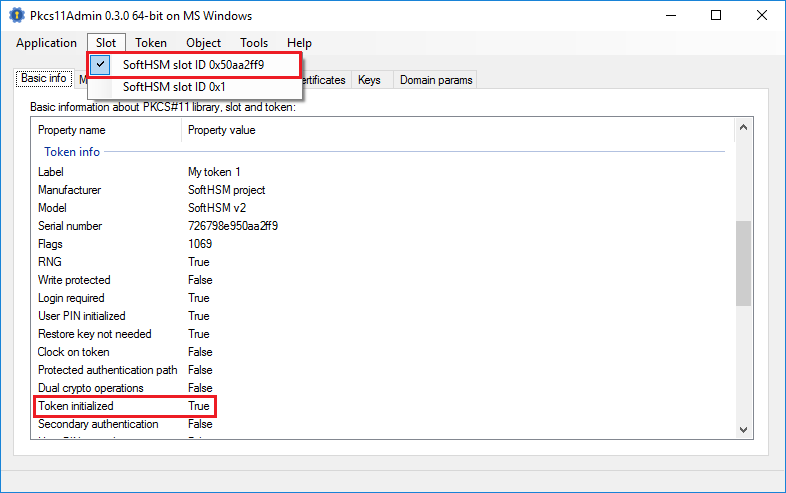
...plus一个附加的,它没有初始化,并且对几乎每个PKCS#11调用都返回CKR_TOKEN_NOT_RECOGNIZED错误.
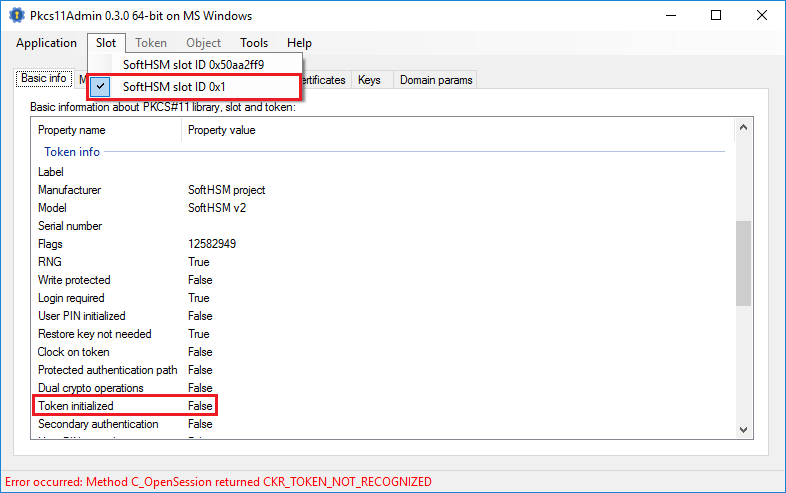
...and通过使用slotListIndex = 0,您将指示Sun PKCS#11提供程序只使用第一个返回的时隙/令牌。
Stack Overflow用户
发布于 2021-08-18 03:19:02
默认的Softhsm2配置文件应该如下所示
# SoftHSM v2 configuration file
directories.tokendir = C:\SoftHSM2\var\softhsm2\tokens\
objectstore.backend = file
log.level = INFO
slots.removable = falsehttps://stackoverflow.com/questions/43673782
复制相似问题
腾讯云开发者

Copyright © 2013 - 2026 Tencent Cloud. All Rights Reserved. 腾讯云 版权所有
深圳市腾讯计算机系统有限公司 ICP备案/许可证号:粤B2-20090059  粤公网安备44030502008569号
腾讯云计算(北京)有限责任公司 京ICP证150476号 | 京ICP备11018762号