
角2下载文件(下载弹出不来)
角2下载文件(下载弹出不来)
提问于 2017-04-27 20:34:47
我有一个视图按钮,点击我调用Web下载word文档文件。
WebAPI运行良好,当我在浏览器中粘贴下载URL (例如http://localhost:50963/api/Download/1022)时,浏览器会显示一个弹出以保存/取消。
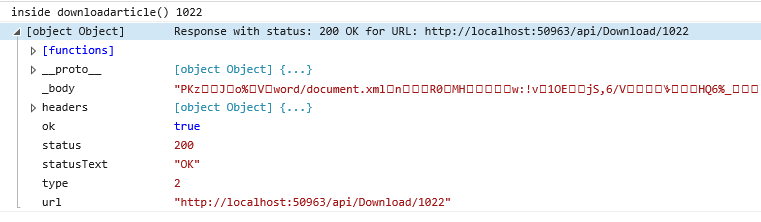
我希望有同样的行为,即当用户单击“视图”按钮时,我需要显示上面的下载弹出。 API正在被成功调用,见下面的屏幕截图
download.service.ts
export class DownloadService {

  constructor(private http: Http) {}

  private downloadUrl = 'http://localhost:50963/api/Download/';

  //Fetch all existing Templates
  DownloadDocument(Doc_Id: number){
      return this.http.get(this.downloadUrl + Doc_Id.toString())
  }
}
document-list.component.ts
DownloadArticle(Doc: ArticleModel){
        console.log("inside downloadarticle()",Doc.Doc_Id);
         this.downloadservice.DownloadDocument(Doc.Doc_Id)
                           .subscribe(
                                err => {
                                    console.log(err);
                                });
}回答 1
Stack Overflow用户
发布于 2017-04-27 20:50:21
你需要在这里做些解决办法。角'http‘服务不能提供您想要的东西。我把我所有可行的代码都粘在这里了。你需要选择你需要的那部分。
retrieveJquery(fileId: number, fileName: string): void {
    let that = this;
    let useBase64 = false;

    let iOS = false;
    if (navigator.platform)
        iOS = /iPad|iPhone|iPod/.test(navigator.platform);
    else if (navigator.userAgent)
        iOS = /iPad|iPhone|iPod/.test(navigator.userAgent);

    let android = false;
    if (navigator.platform)
        android = /android/.test(navigator.platform);
    else if (navigator.userAgent)
        android = /android/.test(navigator.userAgent);

    //useBase64 = iOS;
    if (iOS || android) {
        window.open('cloud/api/file/retrieve?fileId=' + fileId + '&base64=-1&_access_token=' + this.utilsSvc.getToken(), '_blank');
    }
    else {
        $.ajax({
            type: "GET",
            headers: { 'Authorization': this.utilsSvc.getToken() },
            url: 'cloud/api/file/retrieve',
            data: {
                'fileId': fileId,
                'base64': useBase64 ? '1' : '0'
            }
            ,
            xhrFields: {
                responseType: 'blob'
            }
        }).fail(function (jqXHR, textStatus) {
            if (jqXHR.status === 501)
                alert('Please configure service url first.');
            else if (jqXHR.status === 404)
                alert('File not found');
            else
                alert('Retrieving file failed: ' + textStatus + " : " + jqXHR.responseText);
        }).done(function (data) {
            if (useBase64)
                window.open('data:' + that.utilsSvc.getMimeType(fileName) + ';base64, ' + data, '_blank');
            else {
                let blob = new Blob([data]);
                if (window.navigator && window.navigator.msSaveOrOpenBlob)
                    window.navigator.msSaveOrOpenBlob(blob, fileName);
                else {
                    let link = document.createElement('a');
                    link.target = '_blank';
                    link.href = window.URL.createObjectURL(blob);
                    link.setAttribute("download", fileName);
                    link.click();
                }
            }
        });
    }
}页面原文内容由Stack Overflow提供。腾讯云小微IT领域专用引擎提供翻译支持
原文链接:
https://stackoverflow.com/questions/43667455
复制相关文章
相似问题
腾讯云开发者

Copyright © 2013 - 2026 Tencent Cloud. All Rights Reserved. 腾讯云 版权所有
深圳市腾讯计算机系统有限公司 ICP备案/许可证号:粤B2-20090059  粤公网安备44030502008569号
腾讯云计算(北京)有限责任公司 京ICP证150476号 | 京ICP备11018762号