
关于自动布局
因为我已经给出了集合视图的自动布局,但是在肖像中它是好的:
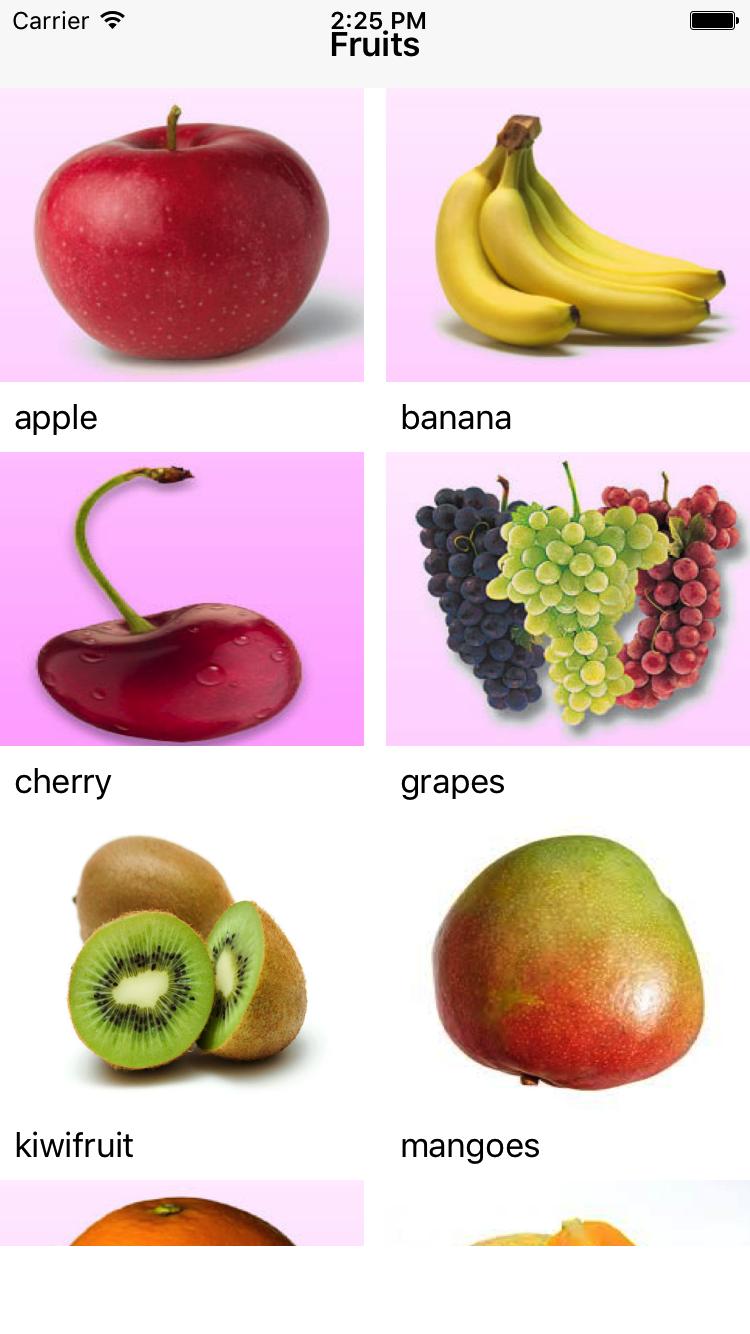
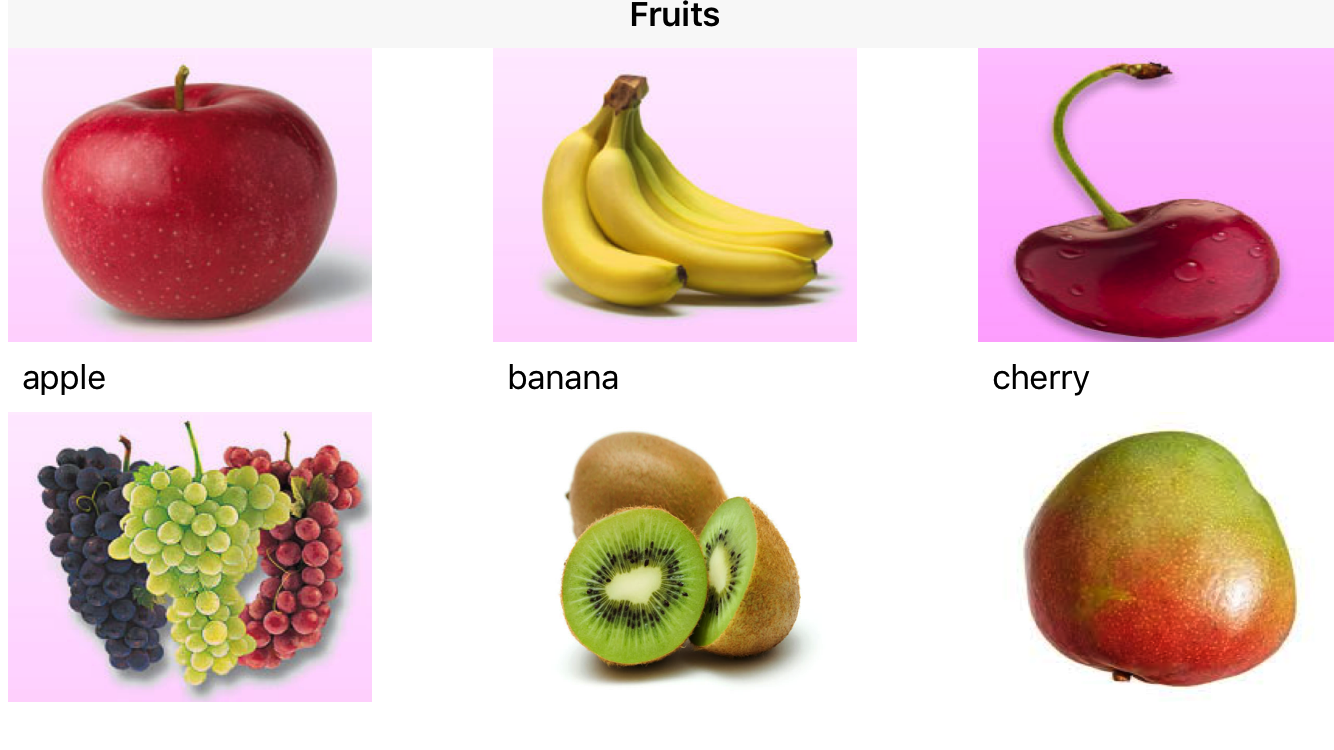
问题是,随着景观的出现,细胞间的差距正在增大。如何避免这种情况?
import UIKit

class ViewController: UIViewController,UICollectionViewDataSource,UICollectionViewDelegate,UICollectionViewDelegateFlowLayout{
    @IBOutlet weak var collectionView: UICollectionView!
    var images = ["apple","banana","cherry","grapes","kiwifruit","mangoes","orange","papaya","passionfruit","peaches","pineapple","strawberry","sugarapple","watermelon"]

    override func viewDidLoad() {
        super.viewDidLoad()
        NotificationCenter.default.addObserver(self, selector: #selector(orientationChanged(notification:)), name: Notification.Name.UIDeviceOrientationDidChange, object: nil)
        collectionView.dataSource = self
        collectionView.delegate = self

    }
    func orientationChanged(notification: Notification) {
        collectionView.collectionViewLayout.invalidateLayout()
    }
        func numberOfSections(in collectionView: UICollectionView) -> Int {
            return 1
        }

        func collectionView(_ collectionView: UICollectionView, numberOfItemsInSection section: Int) -> Int {
            return images.count
        }

        func collectionView(_ collectionView: UICollectionView, cellForItemAt indexPath: IndexPath) -> UICollectionViewCell {
            let cell = collectionView.dequeueReusableCell(withReuseIdentifier: "stridentifier",for:indexPath) as! FruitsCollectionViewCell


            cell.image.image = UIImage(named: images[indexPath.row])
            cell.nameLabel.text = images[indexPath.row]

            return cell
        }
    class SampleCollectionViewFlowLayout: UICollectionViewFlowLayout {
        override init() {
            super.init()
            setUpLayout()
        }

        required init?(coder aDecoder: NSCoder) {
            super.init(coder: aDecoder)
            setUpLayout()
        }

        override var itemSize: CGSize {
            set {}
            get {
                let itemWidth = ((self.collectionView?.bounds.width)! / 3.0) - self.minimumLineSpacing - minimumInteritemSpacing
                return CGSize(width: itemWidth, height: itemWidth)
            }
        }

        func setUpLayout() {
            minimumInteritemSpacing = 0
            minimumLineSpacing = 1.0
            scrollDirection = .vertical
        }

        override func shouldInvalidateLayout(forBoundsChange newBounds: CGRect) -> Bool {
            return true
        }
    }
}回答 3
Stack Overflow用户
发布于 2017-04-27 04:39:46
虽然我在这个thread.But中有点晚了,但根据您的规范,我的解决方案将在每个设备上工作。2细胞在纵向和3个细胞在landscape.But你可以根据你的选择增加细胞数目只要修改NUMBER_OF_CELLS_IN_PORTRAIT和NUMBER_OF_CELLS_IN_LANDSCAPE
我在每一个function.So上都发表了评论,这是可以理解的。
一开始我做了一些默认值。
let SCREEN_WIDTH = UIScreen.main.bounds.size.width
let SCREEN_HEIGHT = UIScreen.main.bounds.size.height

let BASE_SCREEN_HEIGHT:CGFloat = 736.0
let SCREEN_MAX_LENGTH = max(SCREEN_WIDTH, SCREEN_HEIGHT)
let ASPECT_RATIO_RESPECT_OF_7P = SCREEN_MAX_LENGTH / BASE_SCREEN_HEIGHT

let MINIMUM_INTERITEM_SPACING:CGFloat = 14.0 //My Default Inter Cell Spacing for iphone 7plus as i have designed in it.
var ITEM_WIDTH:CGFloat  = 200 //for iPhone 7 plus.initial value
var ITEM_HEIGHT:CGFloat = 200 //for iphone 7 plus.initial value
let NUMBER_OF_CELLS_IN_PORTRAIT:CGFloat = 2
let NUMBER_OF_CELLS_IN_LANDSCAPE:CGFloat = 3
然后在viewDidLoad中,我使用以下函数初始化集合视图
func initialCollectionData() {
    let orientation = UIApplication.shared.statusBarOrientation
    if orientation == .portrait {
        self.calculateCellSize(screenWidth:SCREEN_WIDTH ,cellItem: NUMBER_OF_CELLS_IN_PORTRAIT)
    }
    else {
        self.calculateCellSize(screenWidth:SCREEN_WIDTH ,cellItem: NUMBER_OF_CELLS_IN_LANDSCAPE)
    }
}
还有一些辅助函数。就像这样。
//This method calculate cellsize according to cell number.
func  calculateCellSize(screenWidth:CGFloat , cellItem:CGFloat) {
    ITEM_WIDTH = (screenWidth - MINIMUM_INTERITEM_SPACING * ASPECT_RATIO_RESPECT_OF_7P  * (cellItem-1)) / cellItem  - 1// This 1 has been subtracted from ITEM_WIDTH to remove mantissa
    ITEM_HEIGHT = ITEM_WIDTH
}

//This method calculate cell number according to orientation.
func findCellItem(screenWidth:CGFloat)  {
    let orientation = UIDevice.current.orientation
    if orientation == .portrait {
        self.calculateCellSize(screenWidth:screenWidth ,cellItem: NUMBER_OF_CELLS_IN_PORTRAIT) //You have chosen 2 cells to show in portrait
    }
    else {
        self.calculateCellSize(screenWidth:screenWidth ,cellItem: NUMBER_OF_CELLS_IN_LANDSCAPE) ////You have chosen 3 cells to show in portrait
    }
}

//During orientation change this method is called everytime.
override func viewWillTransition(to size: CGSize, with coordinator: UIViewControllerTransitionCoordinator) {

    super.viewWillTransition(to: size, with: coordinator)
    coordinator.animate(alongsideTransition: { context in

        context.viewController(forKey: UITransitionContextViewControllerKey.from)
        //Below two methods do the trick
        self.findCellItem(screenWidth: size.width)
        self.collectionView.collectionViewLayout.invalidateLayout()
    }, completion: {
        _ in
    })

}
//Collection View委托方法
public func collectionView(_ collectionView: UICollectionView, cellForItemAt indexPath: IndexPath) -> UICollectionViewCell {

    let collectionCell = collectionView.dequeueReusableCell(withReuseIdentifier: "cell", for: indexPath) as! CollectionViewCell

    collectionCell.fruitImage.image = UIImage.init(named: imageArray[indexPath.row])
    return collectionCell


}


 public func numberOfSections(in collectionView: UICollectionView) -> Int {
    return 1
}


public func collectionView(_ collectionView: UICollectionView, layout collectionViewLayout: UICollectionViewLayout, sizeForItemAt indexPath: IndexPath) -> CGSize {
    return CGSize.init(width: ITEM_WIDTH , height: ITEM_HEIGHT )
}

public func collectionView(_ collectionView: UICollectionView, layout collectionViewLayout: UICollectionViewLayout, minimumLineSpacingForSectionAt section: Int) -> CGFloat {
   return MINIMUM_INTERITEM_SPACING * ASPECT_RATIO_RESPECT_OF_7P
}

public func collectionView(_ collectionView: UICollectionView, layout collectionViewLayout: UICollectionViewLayout, minimumInteritemSpacingForSectionAt section: Int) -> CGFloat {
    return MINIMUM_INTERITEM_SPACING * ASPECT_RATIO_RESPECT_OF_7P
}Stack Overflow用户
发布于 2017-04-26 09:25:06
如果您已经子类UICollectionViewFlowLayout,则需要覆盖itemSize和setup minimumInteritemSpacing,当方向发生变化时,需要告诉集合视图使用collectionView.collectionViewLayout.invalidateLayout()重置布局,如果没有对其进行子类处理,则需要重写它。
collectionView(_ collectionView: UICollectionView, layout collectionViewLayout: UICollectionViewLayout, sizeForItemAt indexPath: IndexPath) -> CGSize
每当设备旋转调用collectionView.collectionViewLayout.invalidateLayout()时,就必须添加设备旋转的通知。
下面是3列的示例UICollectionViewFlowLayout
class SampleCollectionViewFlowLayout: UICollectionViewFlowLayout {
    override init() {
        super.init()
        setUpLayout()
    }

    required init?(coder aDecoder: NSCoder) {
        super.init(coder: aDecoder)
        setUpLayout()
    }

    override var itemSize: CGSize {
        set {}
        get {
             // 2 columns in portrait and 3 in landscape
          if UIApplication.shared.statusBarOrientation.isPortrait {
           let itemWidth = ((self.collectionView?.bounds.width)! / 2.0) - self.minimumLineSpacing - minimumInteritemSpacing
           return CGSize(width: itemWidth, height: itemWidth)
         }
          let itemWidth = ((self.collectionView?.bounds.width)! / 3.0) - self.minimumLineSpacing - minimumInteritemSpacing
            return CGSize(width: itemWidth, height: itemWidth)
        }
    }

    func setUpLayout() {
        minimumInteritemSpacing = 0
        minimumLineSpacing = 1.0
        scrollDirection = .vertical
    }

    override func shouldInvalidateLayout(forBoundsChange newBounds: CGRect) -> Bool {
        return true
    }
}在viewDidLoad中添加这一行
NotificationCenter.default.addObserver(self, selector: #selector(orientationChanged(notification:)), name: Notification.Name.UIDeviceOrientationDidChange, object: nil)并添加该函数
func orientationChanged(notification: Notification) {
  collectionView.collectionViewLayout.invalidateLayout()
}
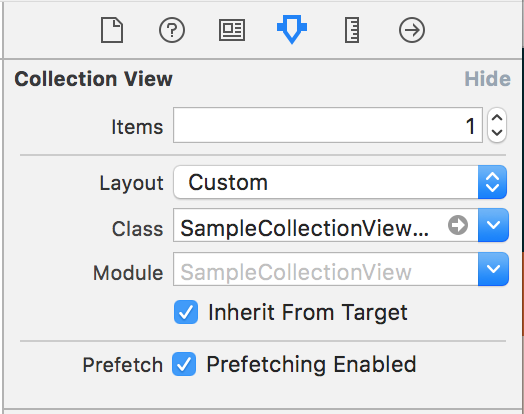
另外,如果您正在使用customLayout,您需要转到xib->选择收藏品视图->属性检查器(第四个选项)、-> Tap布局,然后选择自定义,并将子类UICollectionViewLayout类(SampleCollectionViewFlowLayout)的名称放在我们的示例中。
在选择Storyboard/xib文件中的UICollectionViewFlowLayout后,需要在这里设置UICollectionView类
Stack Overflow用户
发布于 2017-04-26 11:20:30
只需在ViewController中添加以下行:
override func willRotateToInterfaceOrientation(toInterfaceOrientation: UIInterfaceOrientation, duration: NSTimeInterval) {
    self.yourCollectionView.collectionViewLayout.invalidateLayout()
}
并在此委托方法中设置适当的大小:
func collectionView(_ collectionView: UICollectionView, layout collectionViewLayout: UICollectionViewLayout, sizeForItemAt indexPath: IndexPath) -> CGSize {https://stackoverflow.com/questions/43629636
复制相似问题
腾讯云开发者

Copyright © 2013 - 2026 Tencent Cloud. All Rights Reserved. 腾讯云 版权所有
深圳市腾讯计算机系统有限公司 ICP备案/许可证号:粤B2-20090059  粤公网安备44030502008569号
腾讯云计算(北京)有限责任公司 京ICP证150476号 | 京ICP备11018762号