
ModelVisual3D未在DockPanel中正确呈现
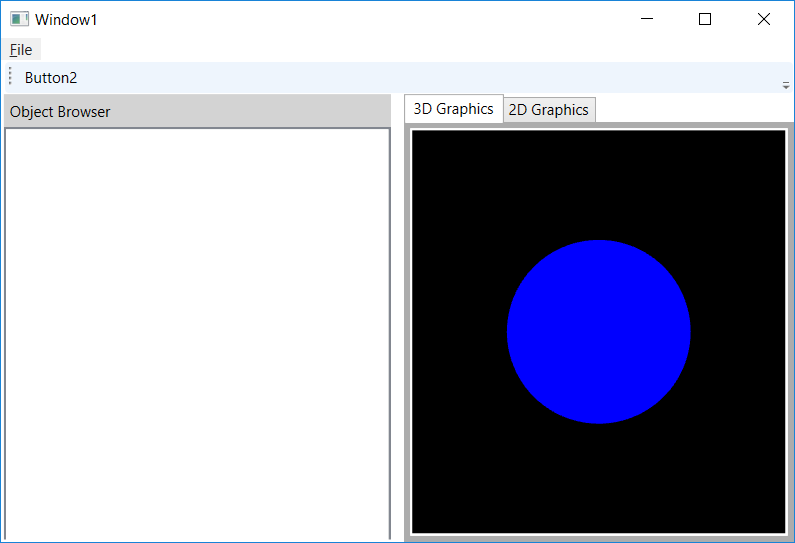
我对WPF非常陌生,我正在尝试创建一个应用程序,在这个应用程序中,我将在一个选项卡中绘制一个地球仪,在第二个选项卡中绘制一个平面地图。我能够在测试应用程序中绘制地球仪,下面的代码如下所示:
    <Window x:Class="SphereTutorial.MainWindow"
        xmlns="http://schemas.microsoft.com/winfx/2006/xaml/presentation"
        xmlns:x="http://schemas.microsoft.com/winfx/2006/xaml"
        xmlns:d="http://schemas.microsoft.com/expression/blend/2008"
        xmlns:mc="http://schemas.openxmlformats.org/markup-compatibility/2006"
        xmlns:local="clr-namespace:SphereTutorial"
        xmlns:earth="clr-namespace:SphereTutorial.Globe"
        mc:Ignorable="d"
        Title="MainWindow" Height="350" Width="525">
    <Grid>

        <Grid.Resources>
            <earth:SphereMeshGenerator x:Key="SphereGeometrySource1"/>
            <MeshGeometry3D x:Key="SphereGeometry1"

                            Positions="{Binding Source={StaticResource
                                  SphereGeometrySource1}, Path=Geometry.Positions}"

                            TriangleIndices="{Binding Source={StaticResource
                                  SphereGeometrySource1}, Path=Geometry.TriangleIndices}"

                            TextureCoordinates="{Binding Source={StaticResource SphereGeometrySource1}, Path=Geometry.TextureCoordinates}"/>

        </Grid.Resources>
        <Grid.Background>
            Black
        </Grid.Background>
        <Viewport3D x:Name="mainScene3D">
            <Viewport3D.Camera>
                <PerspectiveCamera x:Name="mainCam" LookDirection="-1,0,0" Position="5,0,0" UpDirection="0,1,0"/>
            </Viewport3D.Camera>
            <ModelVisual3D>
                <ModelVisual3D.Content>
                    <Model3DGroup>
                        <AmbientLight Color="White"/>
                        <GeometryModel3D Geometry="{StaticResource SphereGeometry1}">
                            <GeometryModel3D.Material>
                                <MaterialGroup>
                                    <DiffuseMaterial>
                                        <DiffuseMaterial.Brush>
                                            <ImageBrush ImageSource="H:\C#\SphereTutorial\SphereTutorial\Images\Earth.jpg"/>
                                        </DiffuseMaterial.Brush>
                                    </DiffuseMaterial>
                                </MaterialGroup>
                            </GeometryModel3D.Material>
                        </GeometryModel3D>
                    </Model3DGroup>
                </ModelVisual3D.Content>
            </ModelVisual3D>
        </Viewport3D>
    </Grid>
</Window>我从this link中提取的球面代码,并给出了如下代码:
    namespace VenProp.Sphere3D
{
    class SphereMeshGenerator
    {
        private int _slices = 100;
        private int _stacks = 50;
        private Point3D _center = new Point3D();
        private double _radius = 1;

        public int Slices
        {
            get { return _slices; }
            set { _slices = value; }
        }

        public int Stacks
        {
            get { return _stacks; }
            set { _stacks = value; }
        }

        public Point3D Center
        {
            get { return _center; }
            set { _center = value; }
        }

        public double Radius
        {
            get { return _radius; }
            set { _radius = value; }
        }

        public MeshGeometry3D Geometry
        {
            get
            {
                return CalculateMesh();
            }
        }


        private MeshGeometry3D CalculateMesh()
        {
            MeshGeometry3D mesh = new MeshGeometry3D();

            for (int stack = 0; stack <= Stacks; stack++)
            {
                double phi = Math.PI / 2 - stack * Math.PI / Stacks;
                double y = _radius * Math.Sin(phi);
                double scale = -_radius * Math.Cos(phi);

                for (int slice = 0; slice <= Slices; slice++)
                {
                    double theta = slice * 2 * Math.PI / Slices;
                    double x = scale * Math.Sin(theta);
                    double z = scale * Math.Cos(theta);

                    Vector3D normal = new Vector3D(x, y, z);
                    mesh.Normals.Add(normal);
                    mesh.Positions.Add(normal + Center);
                    mesh.TextureCoordinates.Add(new Point((double)slice / Slices, (double)stack / Stacks));
                }
            }

            for (int stack = 0; stack <= Stacks; stack++)
            {
                int top = (stack + 0) * (Slices + 1);
                int bot = (stack + 1) * (Slices + 1);

                for (int slice = 0; slice < Slices; slice++)
                {
                    if (stack != 0)
                    {
                        mesh.TriangleIndices.Add(top + slice);
                        mesh.TriangleIndices.Add(bot + slice);
                        mesh.TriangleIndices.Add(top + slice + 1);
                    }

                    if (stack != Stacks - 1)
                    {
                        mesh.TriangleIndices.Add(top + slice + 1);
                        mesh.TriangleIndices.Add(bot + slice);
                        mesh.TriangleIndices.Add(bot + slice + 1);
                    }
                }
            }

            return mesh;
        }
    }
}
我能够验证它是否适用于这个方法;但是,当我在应用程序中实现相同的逻辑时,事情就崩溃了。由于某种原因,它开始只在边缘渲染图像。我有一种感觉,这可能与身处DockPanel有关?然而,2D图像在其DockPanel中工作得很好。下面是不起作用的代码:
<Window x:Class="VenProp.MainWindow"
        xmlns="http://schemas.microsoft.com/winfx/2006/xaml/presentation"
        xmlns:x="http://schemas.microsoft.com/winfx/2006/xaml"
        xmlns:d="http://schemas.microsoft.com/expression/blend/2008"
        xmlns:mc="http://schemas.openxmlformats.org/markup-compatibility/2006"
        xmlns:local="clr-namespace:VenProp"
        xmlns:sphere="clr-namespace:VenProp.Sphere3D"
        mc:Ignorable="d"
        Title="VenProp"
        Height="{Binding Source={x:Static SystemParameters.PrimaryScreenHeight}, Converter={local:RatioConverter}, ConverterParameter='0.9' }"
        Width="{Binding Source={x:Static SystemParameters.PrimaryScreenWidth}, Converter={local:RatioConverter}, ConverterParameter='0.9' }"
        WindowStartupLocation="CenterScreen"
        Background="#FFE4E4E4">

    <!-- Window Resources -->
    <Window.Resources>
        <sphere:SphereMeshGenerator x:Key="SphereGeometrySource"/>
        <MeshGeometry3D x:Key="SphereGeometry"
                        Positions="{Binding Source={StaticResource SphereGeometrySource}, Path=Geometry.Positions}"
                        TriangleIndices="{Binding Source={StaticResource SphereGeometrySource}, Path=Geometry.TriangleIndicies}"
                        TextureCoordinates="{Binding Source={StaticResource SphereGeometrySource}, Path=Geometry.TextureCoordinates}"/>

    </Window.Resources>


    <!-- Overall Container is VERTICAL-->
    <DockPanel>

        <!-- Top Menu -->
        <Menu DockPanel.Dock="Top" HorizontalAlignment="Left" BorderBrush="Black">
            <MenuItem Header="_File"></MenuItem>
        </Menu>

        <!-- Main toolbar -->
        <ToolBar DockPanel.Dock="Top">
            <Button>
                <!-- Put image here-->
            </Button>
            <Button Content="Button2"/>
        </ToolBar>

        <!-- StatusBar -->
        <StatusBar x:Name="statusBar" DockPanel.Dock="Bottom"  />

        <!-- Inner container is horizontal -->
        <DockPanel>

            <Separator Width="2" Foreground="{x:Null}" Background="{x:Null}"/>
            <!-- Throw Tree into a dock panel with its label-->
            <StackPanel Width="310" DockPanel.Dock="Left" HorizontalAlignment="Left" Margin="0,0,0,2" Background="#FFE4E4E4">
                <Label Content="Object Browser" FontSize="12" Background="LightGray"/>
                <TreeView x:Name="ObjectBrowser" BorderThickness="2" Height="620" DockPanel.Dock="Top">
                    <TreeView.BitmapEffect>
                        <BevelBitmapEffect BevelWidth="5" Relief="0.4" LightAngle="320"/>
                    </TreeView.BitmapEffect>
                </TreeView>
            </StackPanel>
        </DockPanel>

        <Separator Width="10" Background="{x:Null}" Foreground="{x:Null}" RenderTransformOrigin="-0.45,0.541" />
        <!-- Tabs for graphics windows -->
        <TabControl x:Name="tabGraphics" BorderThickness="5">
            <TabControl.BitmapEffect>
                <BevelBitmapEffect BevelWidth="15" Relief="0.4"/>
            </TabControl.BitmapEffect>

            <!-- 3D Earth Model -->
            <TabItem x:Name="graphics3D" Header="3D Graphics">
                <DockPanel Background="Black">
                    <Viewport3D x:Name="mainScene3D">
                        <!--Camera-->
                        <Viewport3D.Camera>
                            <PerspectiveCamera x:Name="mainCam" LookDirection="-1,0,0" Position="5,0,0" UpDirection="0,1,0"/>
                        </Viewport3D.Camera>

                        <!--Earth Model-->
                        <ModelVisual3D>
                            <ModelVisual3D.Content>
                                <Model3DGroup>
                                    <AmbientLight Color="White"/>
                                    <GeometryModel3D Geometry="{StaticResource SphereGeometry}">
                                        <GeometryModel3D.Material>
                                            <MaterialGroup>
                                                <DiffuseMaterial>
                                                    <DiffuseMaterial.Brush>
                                                        <ImageBrush ImageSource="H:\C#\VenProp\VenProp\Images\Earth.jpg"/>
                                                    </DiffuseMaterial.Brush>
                                                </DiffuseMaterial>
                                            </MaterialGroup>
                                        </GeometryModel3D.Material>
                                    </GeometryModel3D>
                                </Model3DGroup>
                            </ModelVisual3D.Content>
                        </ModelVisual3D>
                    </Viewport3D>
                </DockPanel>
            </TabItem>


            <TabItem x:Name="graphics2D" Header="2D Graphics">
                <DockPanel Background="Gray">
                    <Image Source="H:\C#\VenProp\VenProp\Images/Earth.jpg"/>
                </DockPanel>
            </TabItem>
        </TabControl>
    </DockPanel>
</Window>
出于测试的目的,如果您将ImageBrush替换为SolidColorBrush,则会发生相同的效果。
有人知道这是怎么回事吗?此外,我是新的堆栈溢出,所以如果有什么我可以做,使我的问题更清楚,请让我知道。谢谢您的帮助,提前!
回答 1
Stack Overflow用户
发布于 2017-04-25 23:00:23
请始终检查Output窗口中的绑定错误,如下所示:
'TriangleIndicies'错误: 40 : BindingExpression路径错误:在“object”‘MeshGetimey3D’(HashCode=33785274)‘上找不到BindingExpression属性。BindingExpression:Path=Geometry.TriangleIndicies;DataItem='SphereMeshGenerator‘(HashCode=18281552);目标元素为'MeshGeometry3D’(HashCode=34085817);目标属性为'TriangleIndices‘(键入'Int32Collection')
在从TriangleIndicies转换为TriangleIndices,之后,它运行得很好:
https://stackoverflow.com/questions/43616581
复制相似问题
腾讯云开发者

Copyright © 2013 - 2026 Tencent Cloud. All Rights Reserved. 腾讯云 版权所有
深圳市腾讯计算机系统有限公司 ICP备案/许可证号:粤B2-20090059  粤公网安备44030502008569号
腾讯云计算(北京)有限责任公司 京ICP证150476号 | 京ICP备11018762号