
如何从主机UIView的右侧动画一个滑动UIView?
如何从主机UIView的右侧动画一个滑动UIView?
提问于 2017-04-25 09:45:54
场景:
我创建了一个'attributeView‘(UITableView),它是一个子视图(即成员UIViewController的容器UIViewController视图的视图),将显示在父视图的右侧。
它由上下文(UITableView)菜单的用户选择(未见)激活。
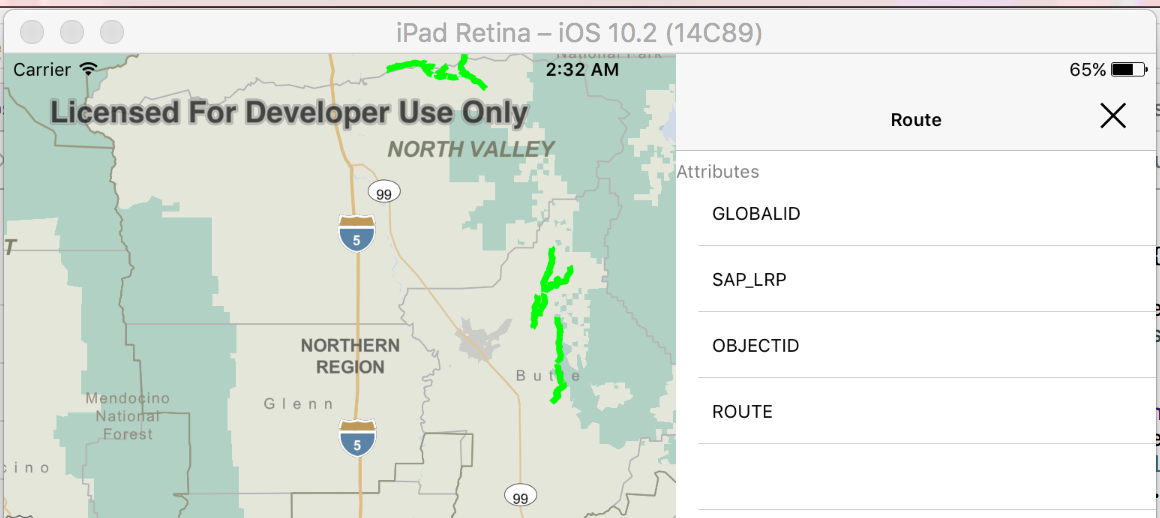
目标:将此UIView从屏幕的右侧作为滑动视图进行动画化。
基本上,就像一个滑动的抽屉。
下面的管理工具包代码定位attributeView。我正在考虑从零宽度视图开始,然后动画到全宽度:
public func tableView(_ tableView: UITableView, didSelectRowAt indexPath: IndexPath) {
...
let attributeView = viewControllerToPresent.view
let containerView = presentingViewController?.view

presentingViewController?.addChildViewController(viewControllerToPresent)
containerView?.addSubview(attributeView!)

attributeView?.snp.makeConstraints { (make) in
    make.width.equalTo(0.0)
    make.top.equalTo(containerView!).offset(00.0)
    make.right.equalTo(containerView!).offset(0.0)
    make.bottom.equalTo(containerView!).offset(0.0)
}

UIView.animate(withDuration: 0.3,
               animations: {
                attributeView?.snp.updateConstraints { (update) in
                    update.width.equalTo(320.0)
                }
                self.layoutIfNeeded()
})

viewControllerToPresent.didMove(toParentViewController: presentingViewController)
但这不管用。我尝试过各种方法使用管理工具包动画宽度。但我不能让它从右边的边缘滑入视野。
做这件事的正确方法是什么?
或者我必须在没有管理工具包的情况下手动定位视图并从那里出发?
回答 1
Stack Overflow用户
发布于 2017-04-25 17:13:21
您需要设置左侧约束,以便从屏幕开始。
attributeView?.snp.makeConstraints { (make) in
    make.width.equalTo(0.0)
    make.top.equalTo(containerView!).offset(00.0)
    make.right.equalTo(containerView!).offset(0.0)
    make.left.equalTo(containerView!.snp.right)
    make.bottom.equalTo(containerView!).offset(0.0)
}

UIView.animate(withDuration: 0.3,
           animations: {
            attributeView?.snp.updateConstraints { (update) in
                update.left.equalTo(containerView!.snp.right).offset(-320.0)
            }
            self.layoutIfNeeded()
})页面原文内容由Stack Overflow提供。腾讯云小微IT领域专用引擎提供翻译支持
原文链接:
https://stackoverflow.com/questions/43607118
复制相关文章
相似问题
腾讯云开发者

Copyright © 2013 - 2026 Tencent Cloud. All Rights Reserved. 腾讯云 版权所有
深圳市腾讯计算机系统有限公司 ICP备案/许可证号:粤B2-20090059  粤公网安备44030502008569号
腾讯云计算(北京)有限责任公司 京ICP证150476号 | 京ICP备11018762号